Note:
❏ After loading paper, set paper size for each paper source. Paper will be fed from appropriate paper source based on
setting. To set paper size, press Setup. Then select Printer Setup and Paper Size Loaded.
& “Paper Size Loaded” on page 115
❏ You can also use the panel utility to set the paper size.
& “Paper Size Loaded Setting” on page 142
❏ For fax capable models, you can select which paper source(s) to feed paper from in Paper Source to Print.
& “Selecting paper source to print fax” on page 104
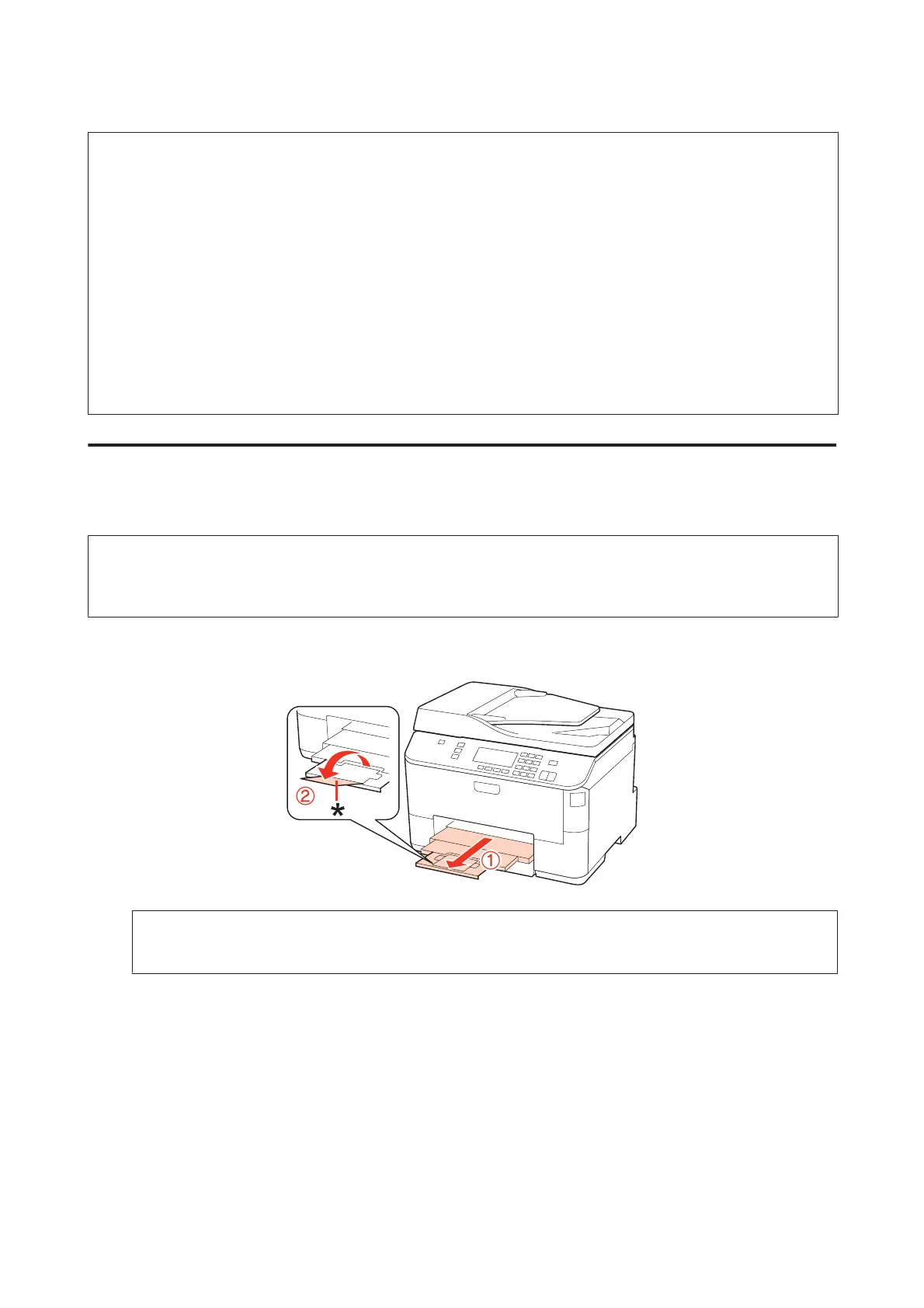
❏ When using Legal-size paper, lower the stopper (*).
❏ Leave enough space in front of the product for the paper to be fully ejected.
❏ Do not remove or insert the paper cassette while the product is operating.
Into the rear MP tray
Follow these steps to load paper:
Note:
The illustrations in this section are from a similar product model. Although they may differ from your actual product, the
method of operation is the same.
A
Slide out the output tray, and raise the stopper.
Note:
When using Legal-size paper, lower the stopper (*).
WP-4511/4515/4521/4525/4530/4531/4535/4540/4545 User’s Guide
Paper Handling
29



 To Next Page