6 PS6500 Rack Mount Instructions
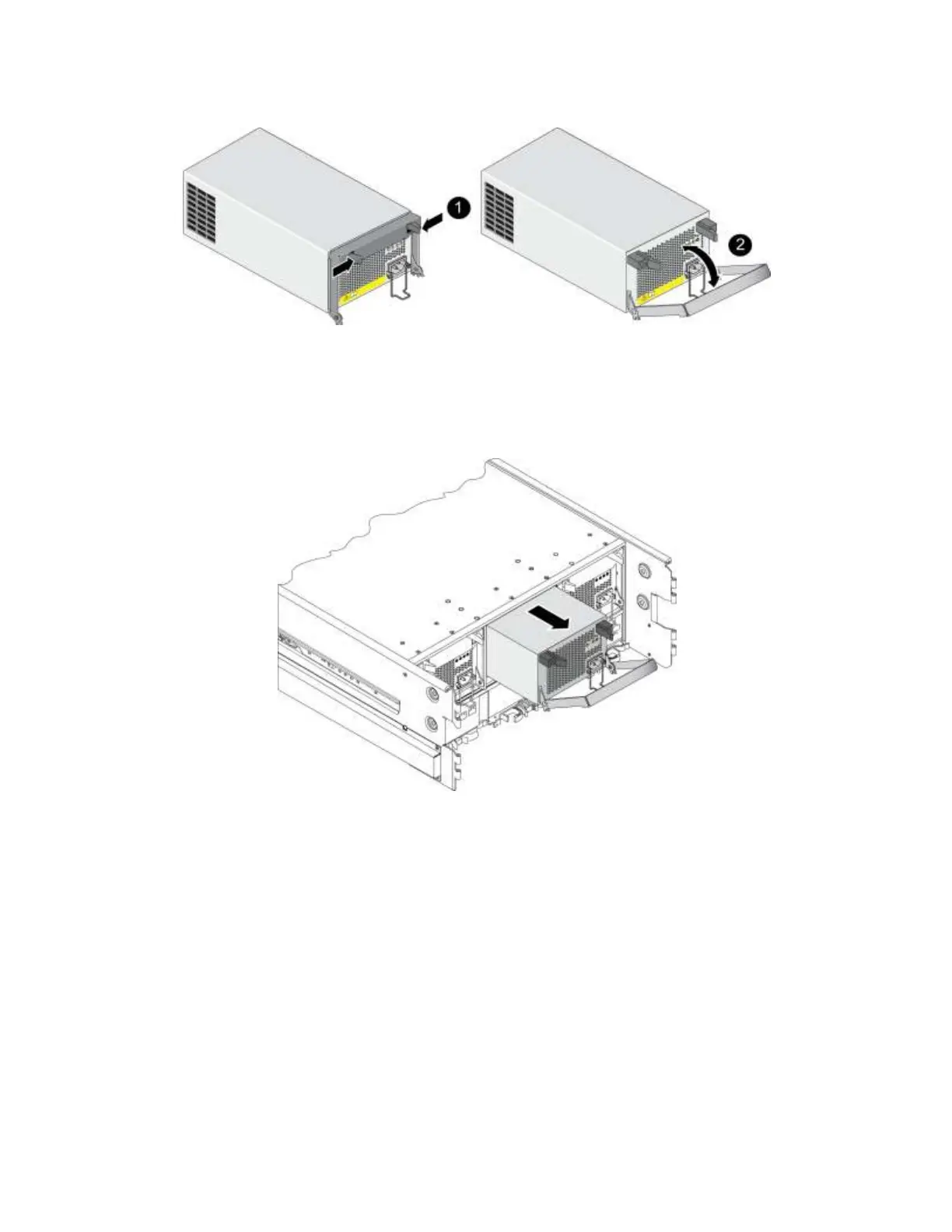
Figure 4 Removing a Power Supply and Cooling Module
2. Carefully slide the module from the slot and place the module on a sturdy surface that is protected
from electrostatic discharge. See Figure 5.
Note: Remove one module at a time. Do not stack the modules.
Figure 5 Removing a Power Supply and Cooling Module
Step 4: Attach the Mounting Rails to the Rack Posts
The rail kit includes two mounting rails, one for the left rack post and one for the right rack post when
viewed from the front of the rack. Each mounting rail includes a telescopic rail assembly.
Note: If your rack has side panels, it might be helpful to remove them for ease of access.
Guidelines for Attaching the Mounting Rails
Follow these guidelines when attaching the mounting rails to the rack posts:
Attach the mounting rail flanges to the outside of the rack post flanges.
For tapped hole racks, insert the screws from the outside of the rack.
Use the markings on the rack posts to make sure the rails are level.


 To Next Page