16 PS6500 Rack Mount Instructions
After you install the last disk drive, close the chassis and lock the cover by using a flathead screwdriver to
turn both cam screws on the front panel counter-clockwise.
Step 8: Install the Bezel
To install the bezel:
1. Facing the front of the rack, fit the right side of the bezel into the right side of the chassis.
2. Push the bezel toward the chassis until the left side of the bezel engages with the chassis.
3. Insert the bezel key and turn it counter-clockwise to lock the bezel to the chassis. Make sure you store
the key in a safe location.
Step 9: Install the Power Supply and Cooling Modules
Once the array chassis is rack mounted, you can install the three power supply and cooling modules.
1. Orient each module so that the power socket is toward the bottom.
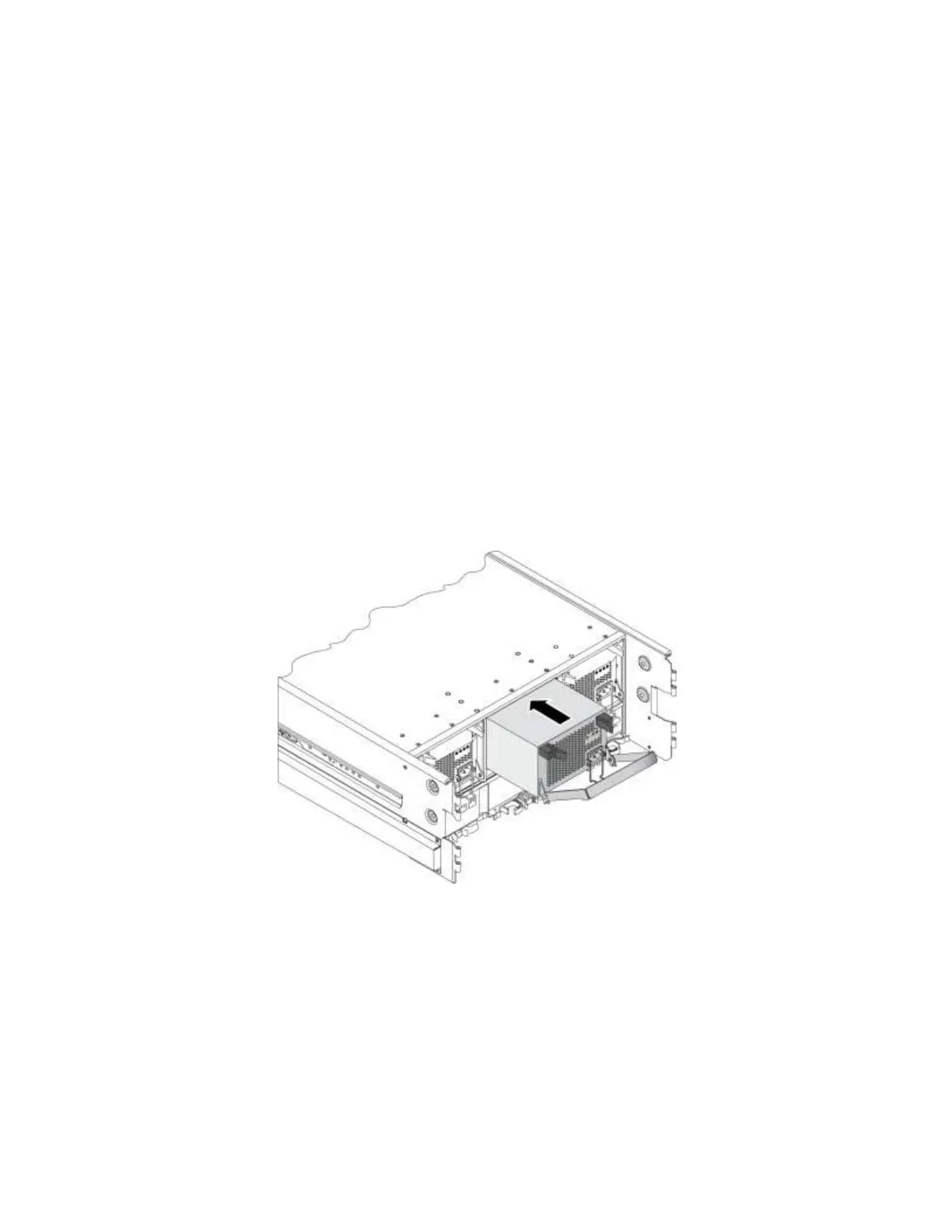
2. Carefully slide each module partially into the slot. See Figure 12.
Figure 12 Installing a Power Supply and Cooling Module
3. Push the module completely into the slot, simultaneously rotating the handle upwards to close it and
seat the module. Make sure you hear the handle “click” into the latches.
Step 10: Install the Cable Management System
The cable management system attaches to the rear of the chassis and the rack rails. It enables you to
organize your power and network cables. It also enables you to open the chassis cover without dislodging
the cables.
1. Obtain the cable management system from the array shipping box. The cable management system
consists of two wire assemblies. See Figure 13.


 To Next Page