variobike 500 Operation Manual E - 2 Version: 03/02
Art-No: 475.403
Operation Manual
variobike 500
Control Panel : Display and Control Buttons
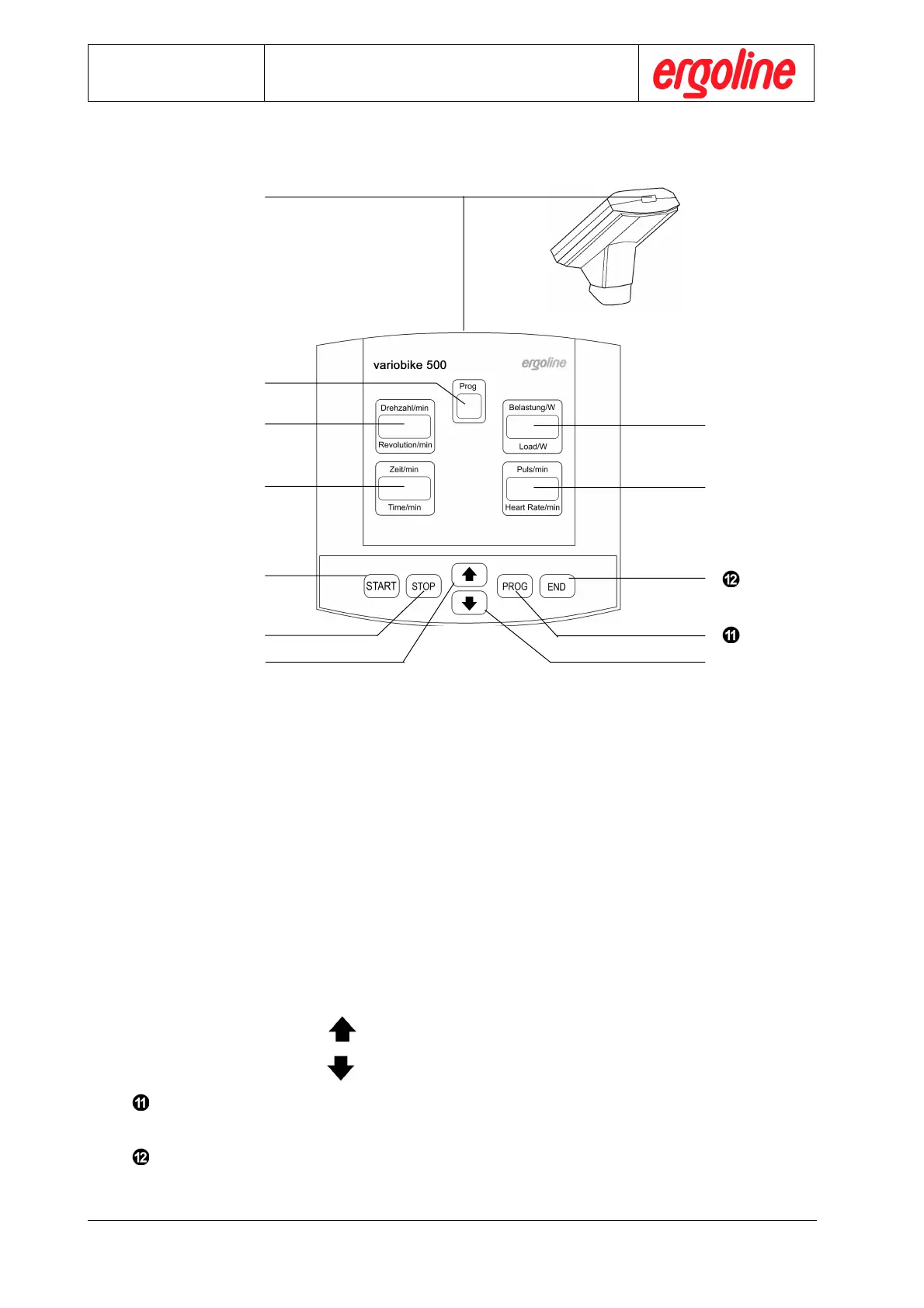
Overview: Control Panel
Display „Prog“: shows current program number
Display „Load/W“: shows current load in Watt
Display „Revolution/min“: shows current pedal speed during the ergometry as rpm
LED Speed Display : additional pedal speed display for the patient
Display „Heart Rate/min“: shows current heart rate value of patient
Display „Time/min“: shows ergometry time in minutes
Control button „ START“: starts the ergometry program selected
Control button „STOP“: stops the automatic program course;
subsequently, the actual load can be controlled in 5 Watts
steps with the cursor control buttons
Cursor control button „ “: increases settings via cursor control
Cursor control button „ “: decreases settings via cursor control
Control button „ PROG“: the number of the ergometry program can then be selected via
the cursor control button
Control button „ END“: ends ergometry



 To Next Page