Version: 03/02 E - 11 Operation Manual variobike 500
Art-No: 475.403
Operation Manual
variobike 500
3. Operation
3.1 Defining an ergometry program
Please proceed as follows in order to define an ergometry program:
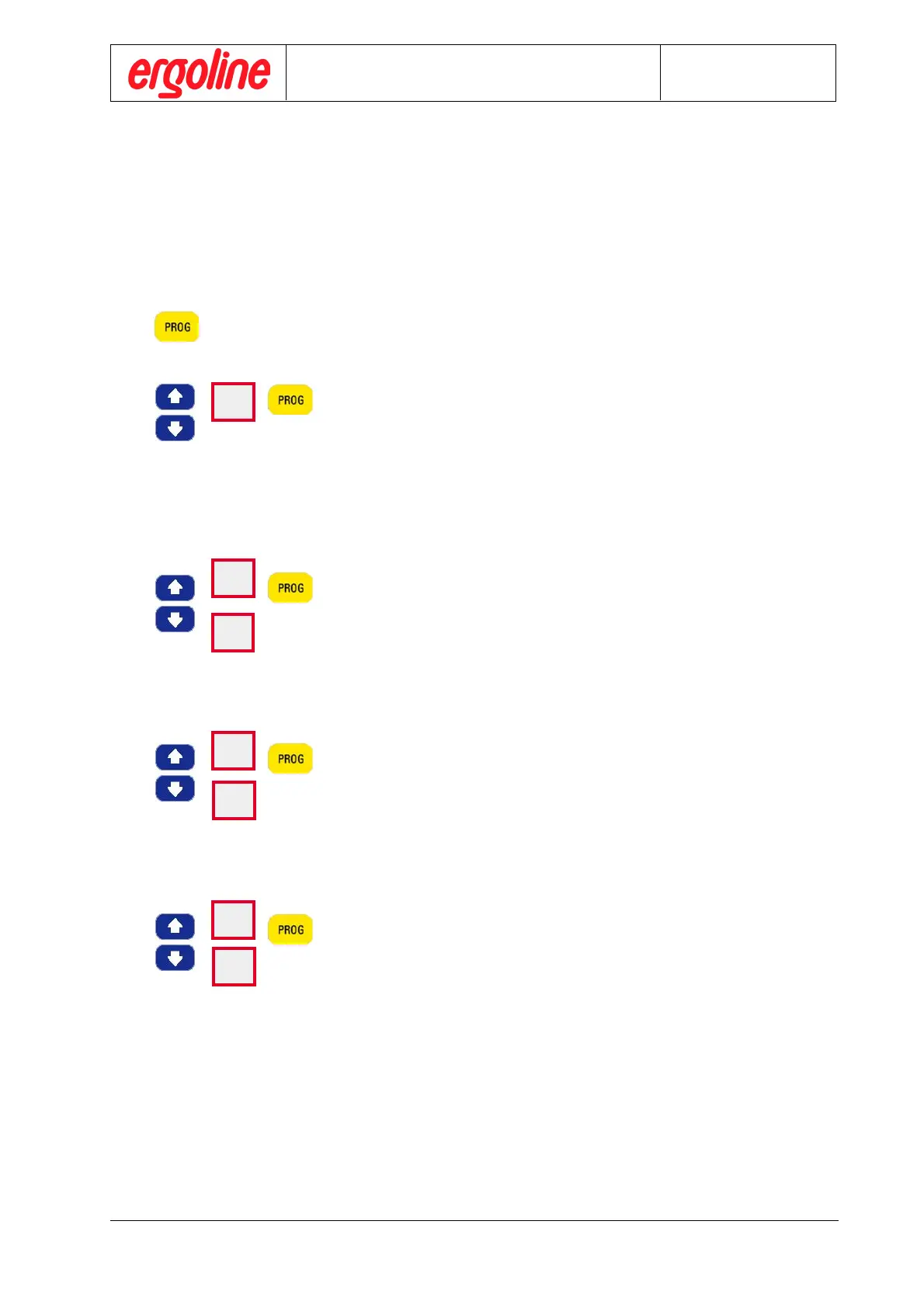
3 seconds Keep the control button „PROG“ depressed for at least 3 seconds, in order to
enter the programming mode.
The program number flashes. Select the desired program number, e.g. „1“
by using the cursor keys and press control button „PROG“ to confirm.
Then, the program number no longer flashes.
Subsequently, define the three parameters „Initial load“, „Load Step“ and
„Load Step Interval“ as described below for this program number.
LED-display „Revolution/min“ indicates “Po” for initial load setting.
The current initial load value is flashing in LED-display “Load/W”. Select
the desired initial load value by using the UP and DOWN cursor keys and
then press the control button “PROG” to confirm.
The ergometer automatically moves to the next stage.
The initial load value “Po“can be set in a range of 20 - 150 watts in steps of
5 watts.
LED-display „Revolution/min“ indicates „LS“ for load step setting,
In LED display „Load/W“, the current load step value is flashing.
Select the desired load step value by using the UP and DOWN cursor keys
and then press the control button “PROG” to confirm.
The ergometer automatically moves to the next stage.
The load step value “LS” can be set in a range of 5 - 50 watts in steps of
5 watts.
LED-display „Revolution/min“ indicates „[“ for load interval setting.
In LED display „Load/W“, the current load interval value is flashing.
Select the desired load interval value by using the UP and DOWN cursor
keys and then press the control button “PROG” to confirm.
The load interval value „[“ can be set in a range of 1 - 5 minutes in steps of
1 minute.
The definition of the three program parameters is now complete and the variobike 500 returns to normal
operating condition, the ergometry mode.
Operation
1
Po
50
LS
50
[
50



 To Next Page