-- 7 --
bh26d1e
6.2 Control panel
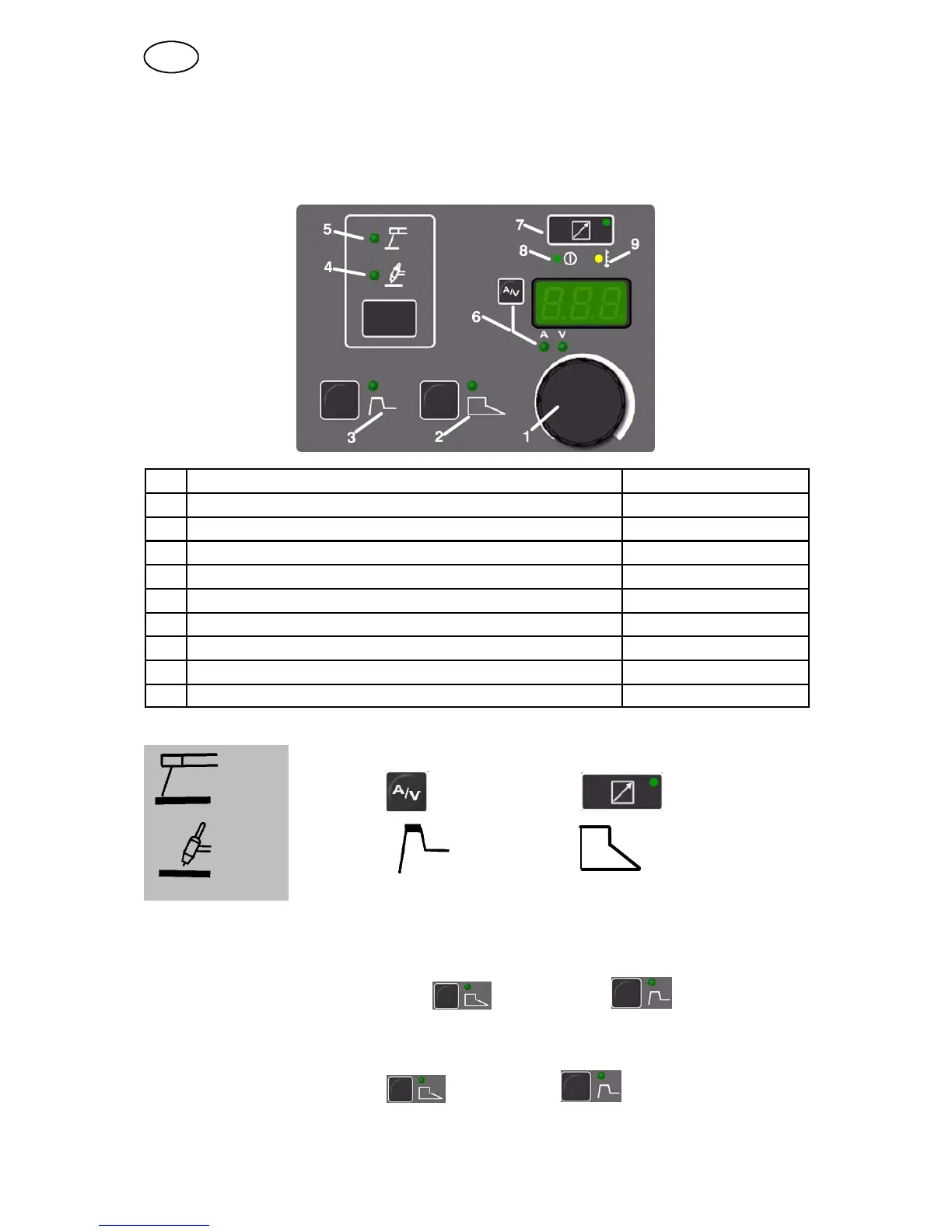
Welding process parameters are controlled via the control panel.
6.2.1 Functional d escription
Pos Symbol/Function Set values
1 Knob for setting data --
2 Arc Force 0 -- 99%
3 Hot Start 0 -- 99%
4 TIG welding “Live TIG--start” --
5 MMA welding with coated electrodes --
6 Pushbutton indicating welding current (A) and/or arc voltage (V) --
7 Connection of remote control unit --
8 Indicating lamp (green), mains power supply --
9 Indicating lamp (yellow) for overheating --
6.2.2 Panel fu n ctio n symbols
MMA Amp/Volt Fjärrdon
TIG Hot Start Arc Force
6.2.3 Hidden functions
A number of setting options for welding data, such as drop welding and ArcPlust,
are obtained by pressing Arc Force and Hot Start simultaneously
for at least 1 second. The function is selected using the setting knob, and the
welding method is selected by pressing the ArcForce or HotStart button.
Return by pressing ArcForce and HotStart simultaneously for 1
second.
GB




 To Next Page