-- 2 3 --
doce
4 OPERATIONAL DESCRIPTION
4.1 General
Switch on welding power source
The process controller can be used in manual or automatic mode.
In manual mode the wire feed speed and travel speed are controlled manually and
you can preset all other essential welding parameters for the current weld.
In automatic mode you can choose a preset group of welding parameters and
fine--tune the actual welding parameters. Other settings made previously in manual
mode cannot be adjusted in automatic mode.
The process controller is ready for manual operation as soon as the mains power is
switched on. When welding begins the controller switches to automatic mode. When
welding stops, or if there is a fault, the controller switches back to manual mode.
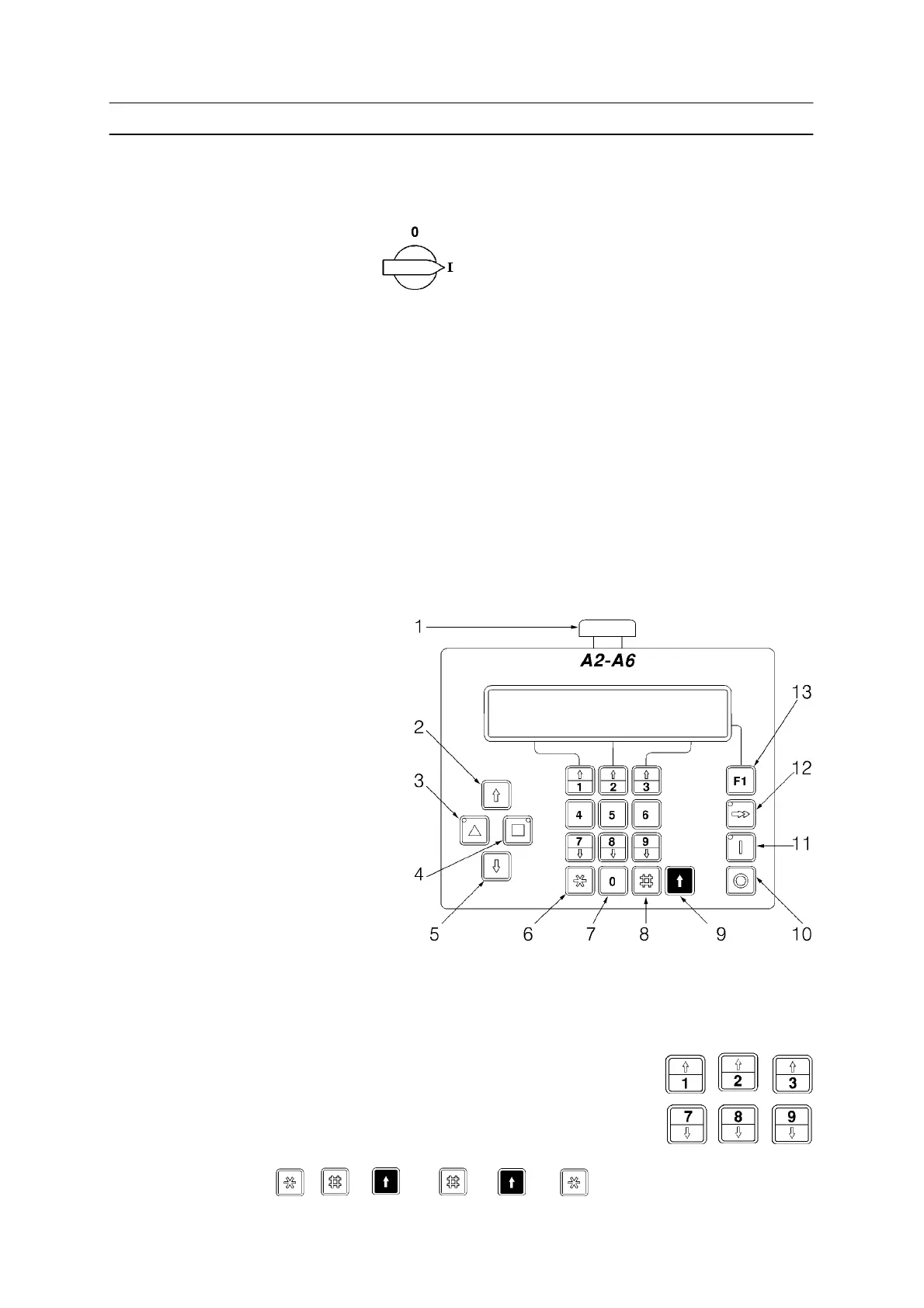
4.2 Control panel
1 Emergency stop
2 Retract wire
3 Travel
4 Travel, opposite direction
5 Advance wire
6 Change menu
7 Numerical key, number entry
8 ENTER key,
Change row
9 SHIFT key
10 Stop welding.
Return to manual mode
11 Start welding. Switch to automatic mode
12 Fast, wire feed or travel
13 Scroll page (welding setup menu) or close valve (main menu)
The arrowed keys are used during welding to increase or
decrease the current, voltage and speed.
By pressing either , ,
+
or
+
it is possible to browse.



 To Next Page