-- 2 7 --
doce
7.1 Entering welding parameters
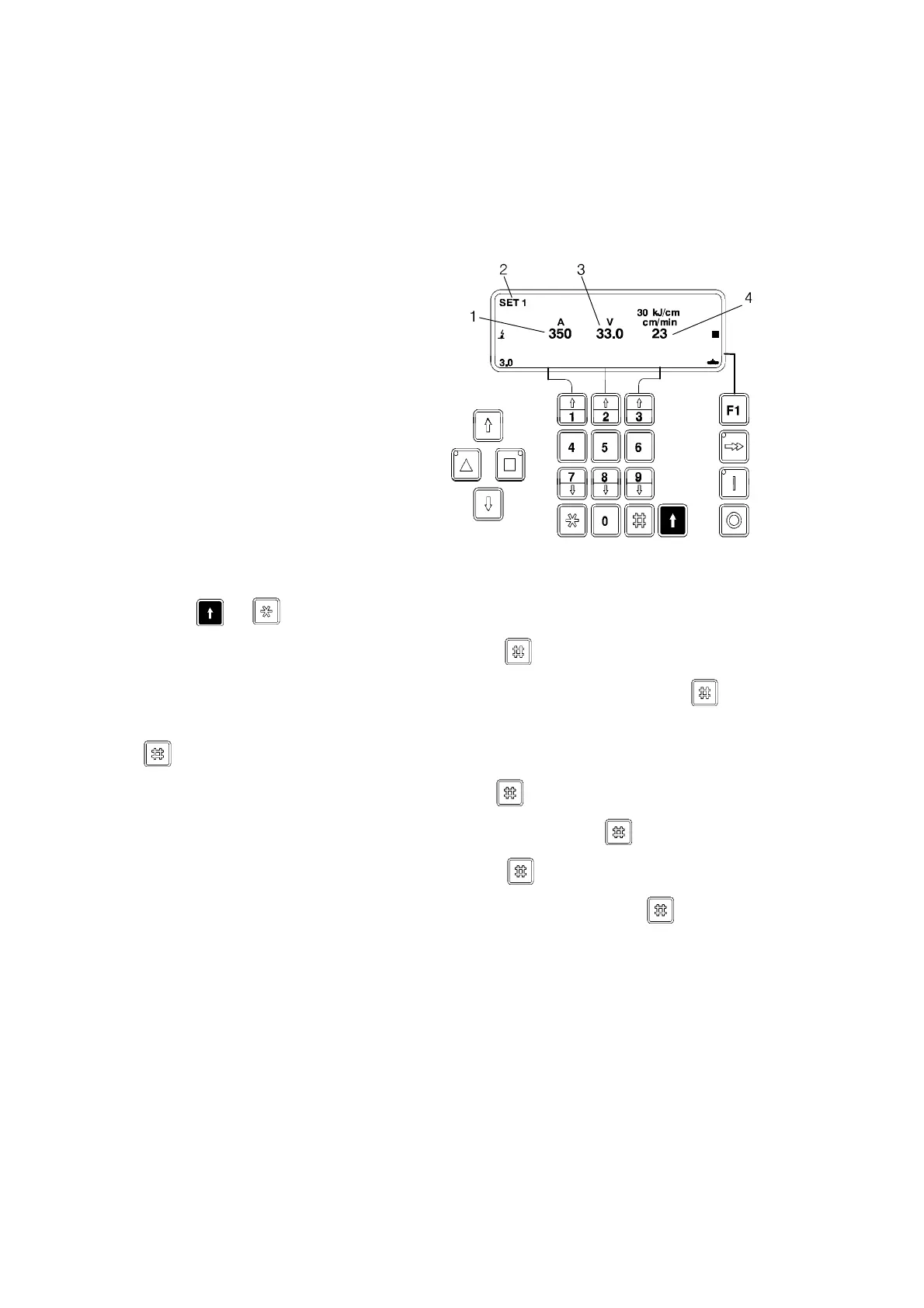
When the power source is switched on, the main menu appears on the display.
In the “Display menu” you can choose how many sets of parameters you want to
work with. If more than one set of parameters is used then the SET number appears
in the top left corner.
1 Welding current or wire
feed speed
2 SET no.
3 Arc voltage
4 Travel speed
If you choose to work with just one set of parameters then start at step 3.
S Press + to mark the “parameter set field “.
S Type in the desired SET number and press .
S Select the field for welding current or wire feed speed by pressing .
S Type in the desired welding current or wire feed speed. Max. 4 numbers, press
.
S Select the field for arc voltage by pressing .
S Type in the desired arc voltage, max. 3 numbers, press
.
S Select the field for travel speed by pressing
.
S Type in the desired travel speed, max. 3 numbers and press .
Now the whole set has been marked and is ready to use. A further 9 additional sets
can be stored. (Total 10 SETs).



 To Next Page