14
User guide
Bluetooth® pairing
2. Turn on unit B.
All keypad LEDs must be white. If the Bluetooth® LED is blue, unit B is connected to another
audio device than unit A. Disconnect the Bluetooth® link on this other device (see Disconnecting
an Apple® (iOS®) device and Disconnecting an Android™ device) or reset the Bluetooth®
memory on unit B (see Clearing the Bluetooth® memory). Make sure that unit A and unit B are
in close proximity.
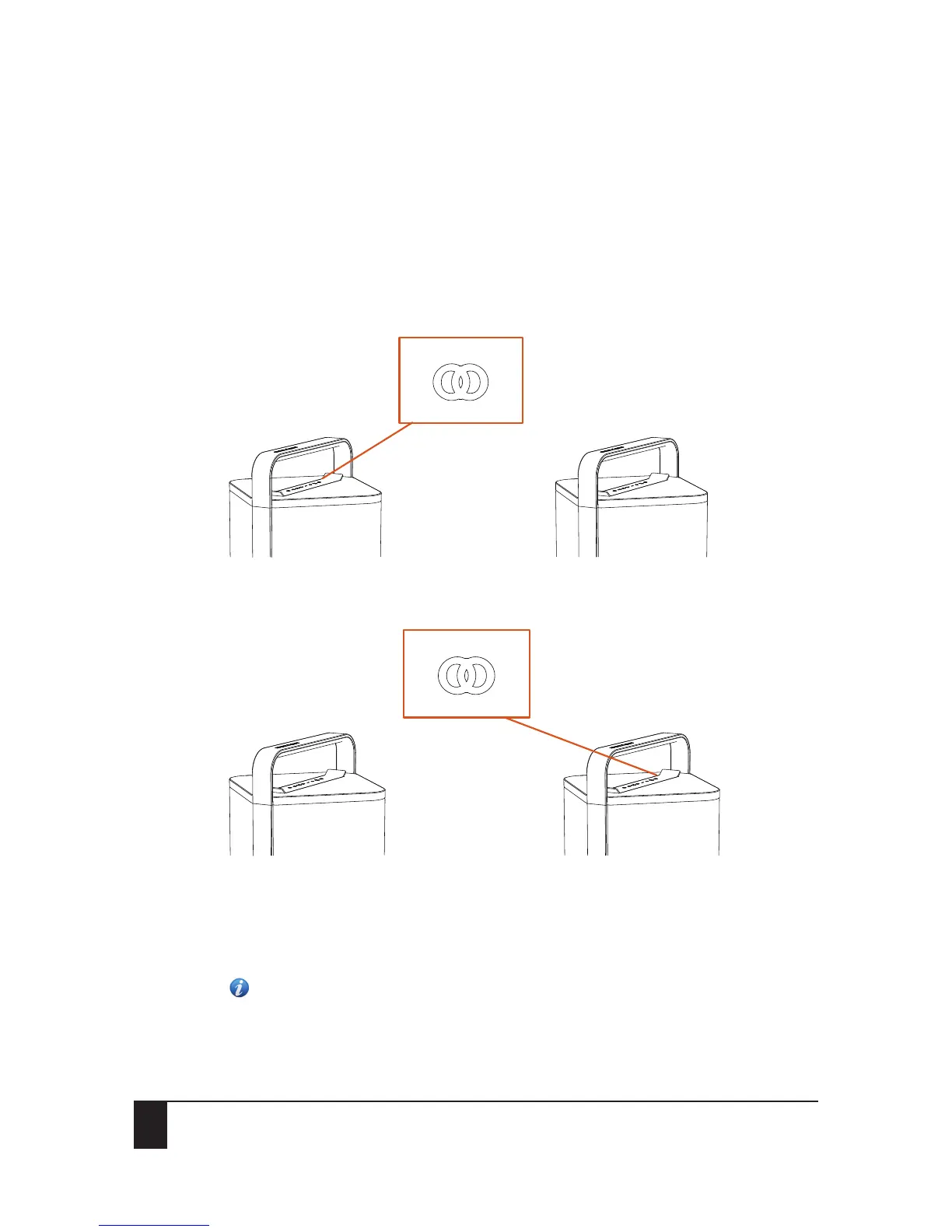
3. Press the Twin button on unit A twice within a very short time. The Twin button on unit A will
be flashing blue and white every 2 seconds.
Unit A will act as the master device.
4. Press and hold the Twin button on unit B until you hear a confirmation tone.
The pairing sequence between unit A and B will start. Both Twin buttons will start flashing blue
and white every 2 seconds. Unit B will act as the Twin device.
The pairing sequence between unit A and B is successful when the Twin button LEDs on unit A and
B are solid blue. Both units will now play the same stereo signal.
Note: If you accidentally activate the Twin mode, you must switch the P9 off and on again
to end the activation or wait until the Twin mode search function automatically ends after
2 minutes.
Unit A Unit B
Unit A Unit B


 To Next Page