630298_3 EF5000 Installation Guide - US
17.0 Operating Instructions:
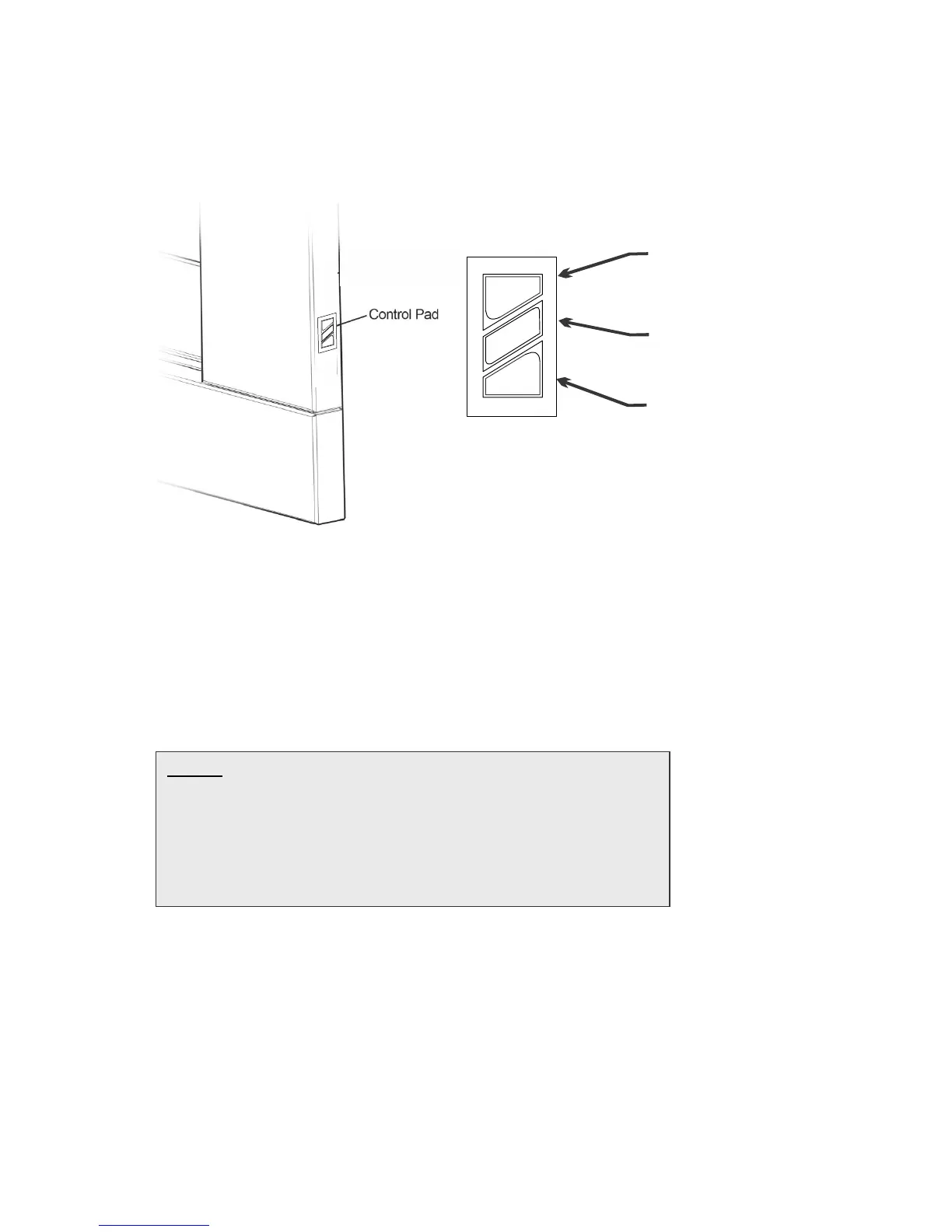
The EF5000 is operated by the touch control panel located on the Right hand side outer
edge of the fascia. The basic operations possible from the touch control are ON/OFF and
manual adjustment of the flame height.
17.1 Igniting the pilot flame:
17.2 To turn the fireplace on push the ON-OFF button on the touch control. The pilot will start
sparking and gas will start flowing to the pilot which should light and be visible in a few
seconds.
17.3 The pilot ignition process takes a duration of 12 seconds. No other button should be pressed
during those 12 seconds. Once the pilot is lit, the main burner will automatically go to HIGH
flame after 15 seconds.
In the event of the pilot not igniting after 12 seconds press the ON/OFF button this will turn
the valve and gas off. Now repeat the process from 17.2 until the pilot ignites.
NOTE: The first time you attempt to ignite the EF5000 after
connecting it to a gas supply, will take between 1 and 4 lighting
attempts in order to let gas flow through the pipe system and
purge all air. To do this, push ‘ON-OFF’ to switch the fire on
and wait for 12 seconds. If there is a spark but no flame, push
‘ON-OFF’ again to switch off (you will hear 2 short beeps) and
then repeat until you get a pilot flame.





 To Next Page