ES441.1 - User’s Guide46
Functional Description ETAS
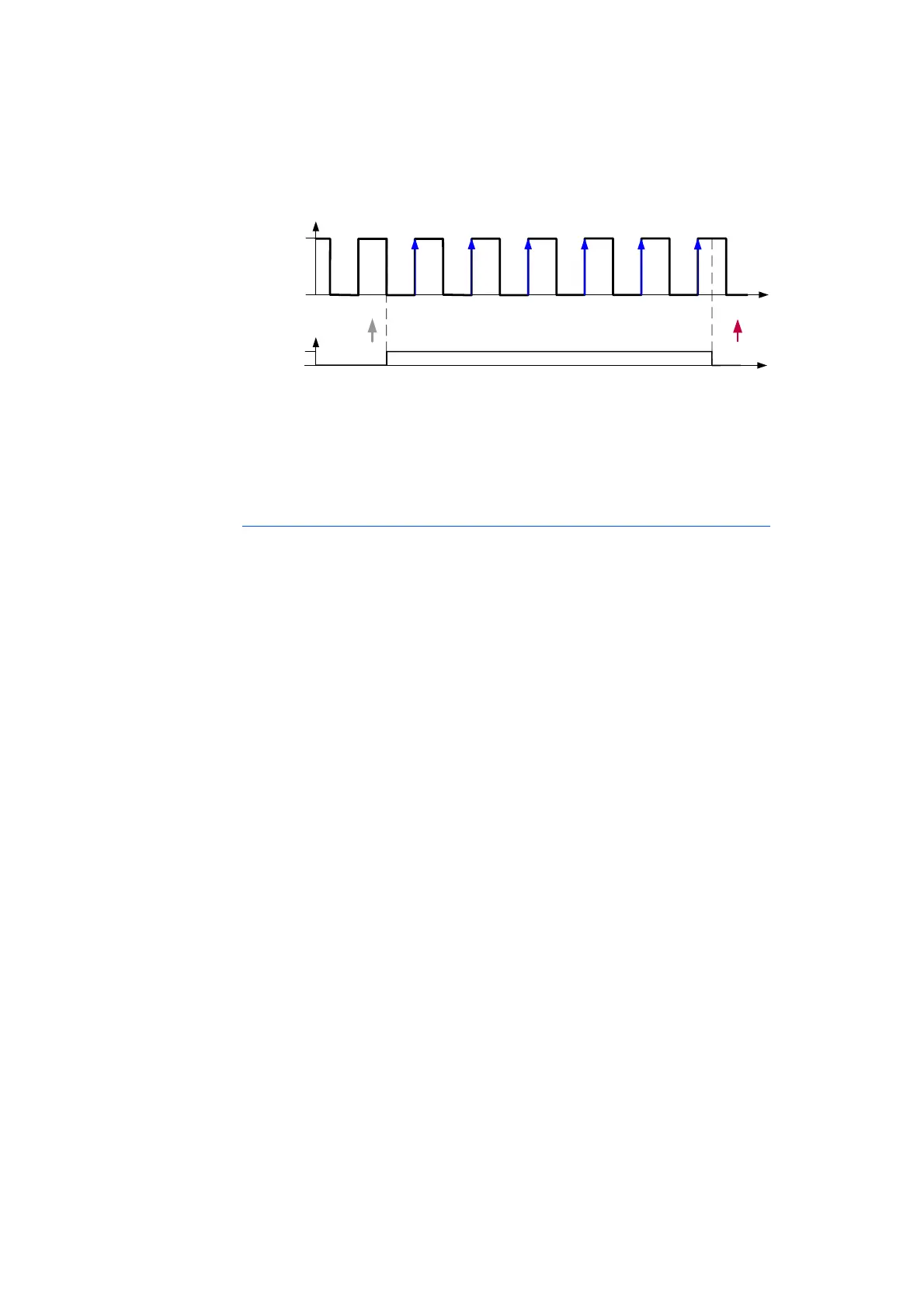
Fig. 5-14 Counting the Inactive-Active Edges when the Qualifying Signal is
Active
In the example shown in Fig. 5-14, the active-inactive edge of the assigned qual-
ifying signal resets the counter. The signal at the measurement channel is
counted when the qualifying signal is active.
Count Direction Control in acc. with the State of the Qualifying Signal
In this counter mode, the ES441.1 is configured as an up-/down-counter with
the count direction being controlled in acc. with the state at the assigned quali-
fying channel (trigger channel). The counter can be positive or negative.
In the counter modes “Up/Down1” and “Up/Down2”, the counter is incre-
mented or decremented by comparing the state of the signal at the measure-
ment channel and at the qualifying channel:
• “Up/Down1”: The counter is incremented when the states differ and dec-
remented when the states of the measurement channel and qualifying
channel are identical
• “Up/Down2”: The counter is incremented when the states are identical
and decremented when the states of the measurement channel and qual-
ifying channel differ
In the counter modes “Up/Down3” and “Up/Down4”, the counter is incre-
mented or decremented depending on the evaluation of the state of the signal
at the qualifying channel:
• “Up/Down3”: The counter is incremented when the qualifying channel is
active and decremented when it is inactive
• “Up/Down4”: The counter is incremented when the qualifying channel is
inactive and decremented when it is active
In the calibration software, the type of counter resetting can be selected for this
counter mode:
• Resetting the counter after every sampling point or
• Resetting the counter with the edge of the qualifying channel selected in
the calibration software or
• Counter in Free Running Mode (no resetting of the counter).
Time
Input
Si g n a l
Active
Inact ive
1 2 3
4 5
Time
Active
Inact ive
Qualifying
Signal
6



 To Next Page