EasyManua.ls Logo

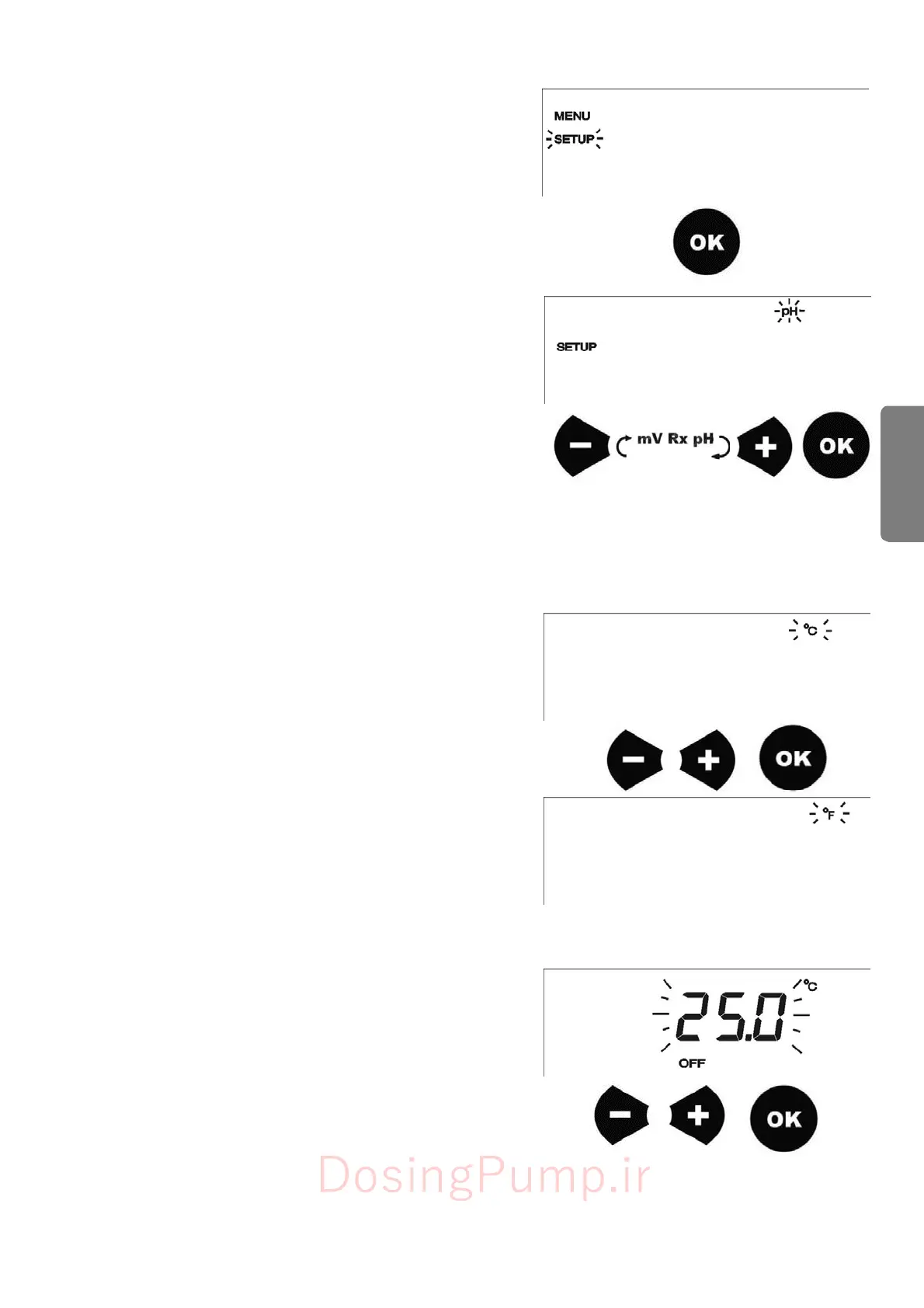
Etatron DLX - Measure Type Selection (pH;Redox); Temperature Unit Selection (°C;°F); Setting Temperature Compensation

Default Icon
23 pages
Print Icon
To Next Page IconTo Next Page
To Previous Page IconTo Previous Page
Loading...
37
ENGLISH
To
enter
in
SETUP
menu
scroll
all
menus
with
+
and
-
buttons
up
to
reach
the
desired
menu
(on
display
will
show
SETUP),
press
OK
to
confirm.
7.1.1
-
Measure
ty
p
e
selection
Once
pressed
OK
the
pump
goes
in
SETUP
mode.
In
this
mode
is
possible
to
select
the
type
of
control
(measure)
that
it
want
to
effect.
This
mode
is
a
loop
among
pH,
Redox;
as
default
pH
will
flash.
Acting
on
+
and
-
buttons,
user
can
select
among
2
possibili-
ties,
(pH,
RX
mV
).
Pressing
the
button
OK
is
confirmed
the
selected
choice.
7.1.2
-
Temperature
selection
b
etween
Celsius
and
Fahrenhe
it
degrees
Continuing
in
the
SETUP
menu,
pressing
OK,
it
is
possible
to
select
temperature
reading
reading
between
Celsius
and
Fahrenheit
degrees
(°C
or
°F).
To
shift
use
+
or
-
buttons.
Pressing
OK
to
confirm
and
to
save
the
choice.
7.1.3
-
Temperature
compensation
Once
in
the
temperature
compesation
,
on
the
display
will
flash
the
default
temperature
value
i.e.
25°C.
Using
+
and
buttons
it
is
possible
to
ch’ange
this
value
.
When
the
desired
value
is
reached
press
OK
again
and
the
values
will
be
memorized.
DosingPump.ir

Related product manuals