EasyManua.ls Logo

Etatron DLX - Setpoint Setting and Control Modes

Default Icon
23 pages
Print Icon
To Next Page IconTo Next Page
To Previous Page IconTo Previous Page
Loading...
•
40
•
7.3
-
SETPOINT
SETTING
To
have
the
pump
operative
it's
mandatory
set
the
following
data:
Setpoint
values,
type
of
dosing,
hysteresis,
manual
or
proportional
dosing.
7.3.1
-
Setpoint
value
From
measuring
status,
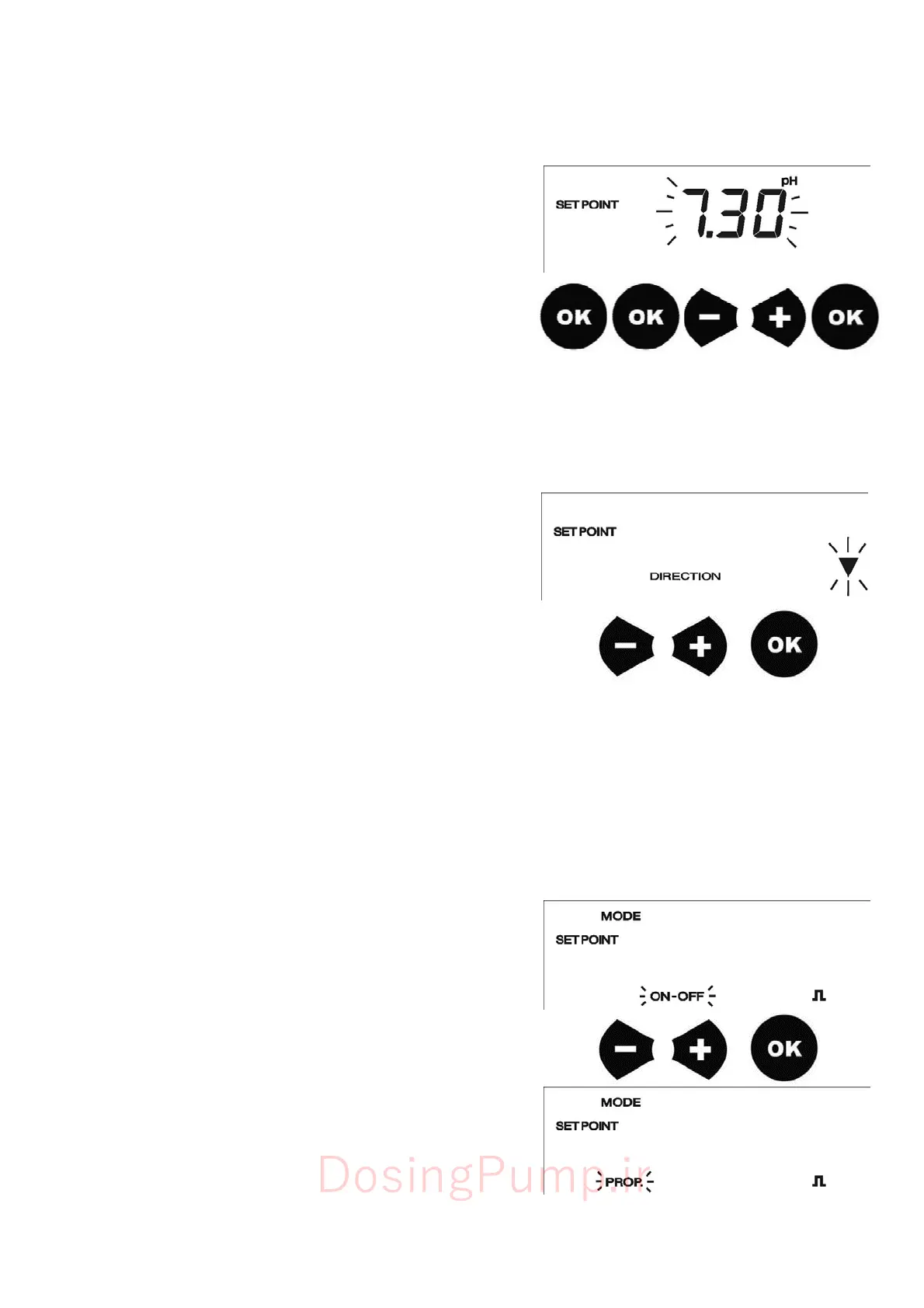
pressing
OK
,
the
pump
will
go
in
SETPOINT
programming
phase.
Setpoint
icon
will
flash.
Pressing
OK
again,
the
setpoint
value
saved
will
flash
and
can
be
adjusted
using
+
and
-
buttons.
Pressing
OK
,
the
setpoint
value
will
be
memorized.
The
pump
automatically
will
go
in
DIRECTION
menu
7.3.2
-
D
irec
tion
me
nu
In
this
menu,
has
to
set
if
the
pump
has
to
dose
above
the
setpoint
or
below
this
value.
For
instance
to
reduce
pH
value,
dosing
an
acid
chemical,
the
direction
arrow
has
to
point
down.
In
this
way
the
pump
will
be
active,
dosing,
when
the
pH
value
is
higher
than
the
setpoint
previously
set.
For
Redox
if
the
pump
has
to
dose
up
to
reach
a
certain
quantity
of
oxidant
,
the
direction
arrow
has
to
point
in
aloft.
To
select
the
direction
of
the
arrow,
use
the
+
and
-
buttons.
Pressing
OK
the
direction
will
be
memorized.
7.3.3
-
Manual
or
P
roportional
mode
After
selected
direction
of
the
dosing,
the
pump
will
show
ON-OFF
or
PROP.
flashing.
With
+
or
-
buttons
it's
possible
to
shift
among
them.
ON-OFF
-
When
the
pump
has
to
dose
it
will
run
at
flow
rate
selected
by
the
user
in
Flow
rate
setting,
and
it
stops
at
the
Setpoint.
PROP.
-
In
this
mode
the
pump
will
dose
proportionally
to
the
setpoint
value.
The
pump
starts
dosing
over
setpoint
(determined
by
hysteresis),
increasing
its
speed
up
to
the
MAX
FREQUENCY
ADJUSTMENT
use
will
set
after
pressing
OK
from
this
menu.
Use
+
and
-
to
select
the
operative
mode.
Press
OK
to
confirm
the
selection.
Following
will
be
described
these
two
modes:
DosingPump.ir

Related product manuals