EasyManua.ls Logo

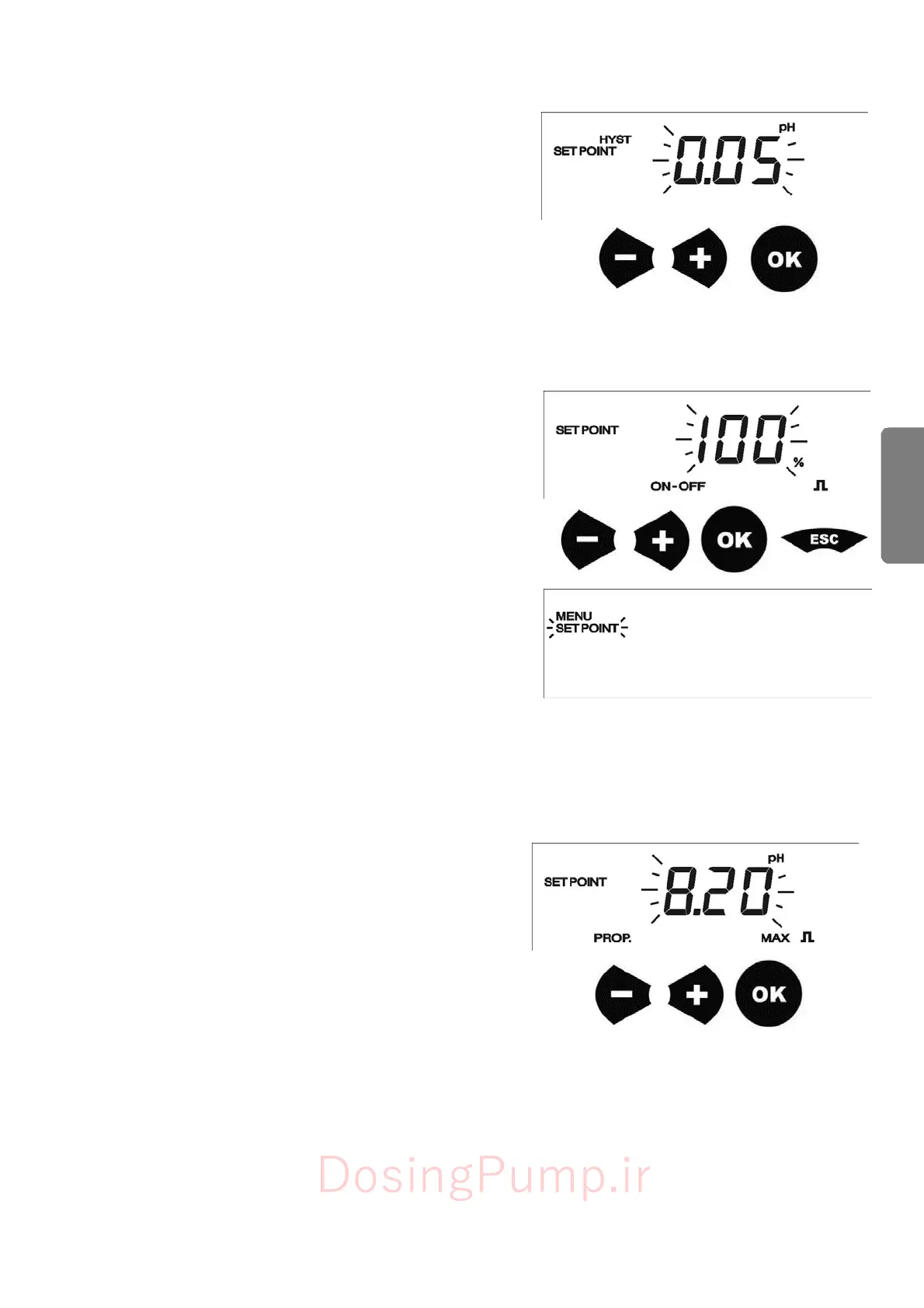
Etatron DLX - Hysteresis Value Setting; Frequency Adjustment (Manual Mode); Max Frequency Adjustment (Proportional Mode)

Default Icon
23 pages
Print Icon
To Next Page IconTo Next Page
To Previous Page IconTo Previous Page
Loading...
41
EN
G
L
I
SH
7.3.4
-
Hysteresis
me
nu
After
selected
direction
of
dosing,
user
has
to
adjust
the
hysteresis
value:
distance
from
the
setpoint
value,
over
this
value
the
pump
starts
or
stops
its
dosing.
After
pressing
the
OK
button
the
instrument
goes
to
Hysteresis
menu
setting.
Press
+
and
-
to
set
the
desired
hysteresis
value.
Press
OK
button
to
confirm
and
to
save
value.
7.3.5
-
F
requenc
y
adjustment
If
the
user
has
select
Manual
mode
(
ON-OFF
),
after
pressing
OK
button,
the
pump
will
pass
in
Frequency
adjustment
menu.
User
has
to
set
the
flow
rate
of
the
pump,
from
0
to
100%
of
maximum
frequency.
Use
+
e
-
buttons
to
select
the
desired
flow
rate
percentage.
Pressing
OK
the
pump
will
save
data
and
go
out
from
Setpoint
mode.
It
will
be
enough
to
press
ESC
button
to
go
in
metering
mode.
7.3.6
-
Max
frequenc
y
adjustment
If
the
user
has
select
Proportional
mode
(
PROP.
),
after
pressing
OK
button,
the
pump
will
pass
in
Max
Setpoint
value
based
to
de
Maximum
frequency.
User
has
to
set
at
which
pH,
Redox
value
the
pump
has
to
dose
at
the
maximum
speed.
The
pump
self
controls
its
flow
rate
from
this
point,
up
to
the
setpoint
where
it
stops
dosing.
Use
+
and
-
buttons
to
select
the
maximum
measure
value
to
which
the
pump
has
to
dose
at
the
maximum
frequency
.
Pressing
OK
the
pump
will
save
data
and
go
out
from
Setpoint
mode.
It
will
be
enough
to
press
ESC
button
to
go
in
metering
mode
.
DosingPump.ir

Related product manuals