EasyManua.ls Logo

Etatron DLX - Alarm Setting Configuration

Default Icon
23 pages
Print Icon
To Next Page IconTo Next Page
To Previous Page IconTo Previous Page
Loading...
•
42
•
7.4
-
ALARMS
SETTING
It
is
possibleto
to
plan
three
different
types
of
alarm
pump:
1
-
MAX
:
User
can
set
at
which
maximum
value
the
pump
has
to
go
in
alarm
mode.
When
the
pump
will
go
over
this
value,
on
the
display,
Alarm
message
will
flash,
Alarm
Led
will
flash.
2
-
min
:
User
can
set
at
which
minimum
value
the
pump
has
to
go
in
alarm
mode.
When
the
pump
will
go
over
this
value,
on
the
display,
Alarm
message
will
flash,
Alarm
Led
will
flash.
3
-
OVER
:
Overdosing
alarm.
For
any
kind
of
problems
may
occur
in
the
plant
(wrong
calibration,
dirty
or
broken
probe,
etc.)
if
the
pump
doesn't
reach
the
Setpoint
in
OVER
ALARM
TIME,
the
pump
stops
the
dosing.
On
the
display
Alarm
message
will
flash,
Alarm
Led
will
flash.
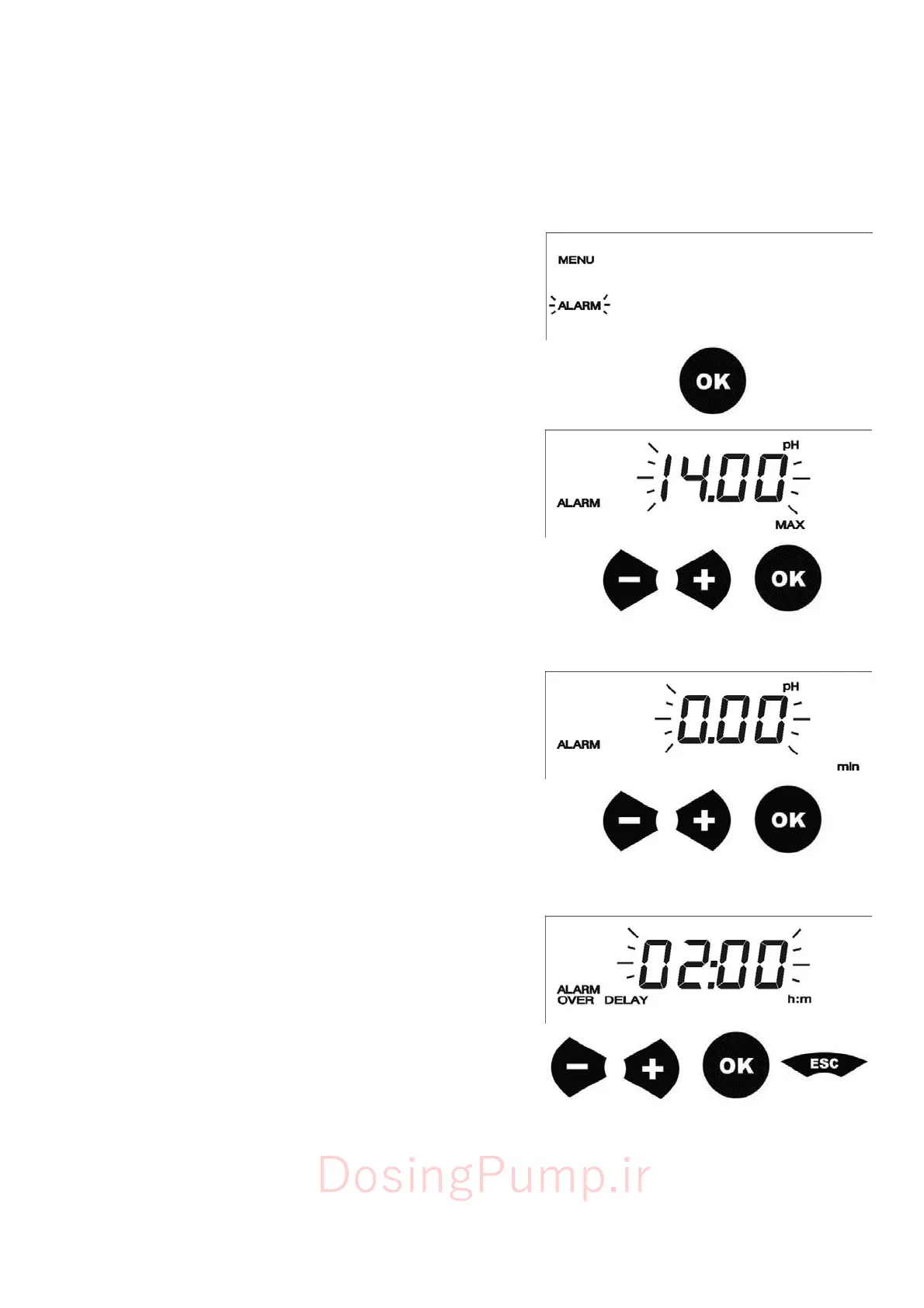
To
enter
in
ALARM
menu
follow
the
procedure
described
in
paragraph
7.1
-
PUMP
SETUP.
When
ALARM
menu
is
reached,
press
OK
to
enter
in
submenus
7.4.1
-
Maximum
Alarm
s
etti
ng
On
the
display
will
appear
MAX
and
the
value
of
measure
will
flash.
Press
+
and
-
to
adjust
the
maximum
value
of
the
measure
Press
OK
to
confirm
and
to
save
data.
7.4.2
-
Minimum
Alarm
s
etti
ng
On
the
display
will
appear
"min"
and
the
value
of
measure
will
flash.
Press
+
and
-
to
adjust
the
minimum
value
of
the
measure
Press
OK
to
confirm
and
to
save
data.
7.4.3
-
Overdosing
Alarm
s
etti
ng
On
the
display
will
appear
OVER
and
time
counter
(h:min)
will
flash.
Press
+
and
-
to
adjust
the
time,
over
which
the
pump
will
go
in
alarm.
Press
OK
to
confirm
and
to
save
data.
This
will
end
the
alarm
seeting.
Press
ESC
to
return
in
measure
mode.
DosingPump.ir

Related product manuals