EasyManua.ls Logo

Etatron DLX - Measuring Calibration Procedure

Default Icon
23 pages
Print Icon
To Next Page IconTo Next Page
To Previous Page IconTo Previous Page
Loading...
39
ENGLISH
7.2
-
MEASURING
CALIBRATION
To
calibrate
the
pump
integrated
controller,
user
has
to
adjust
two
calibration
points
for
any
kind
of
parameter,
i.e.
pH,
Redox
.
To
enter
in
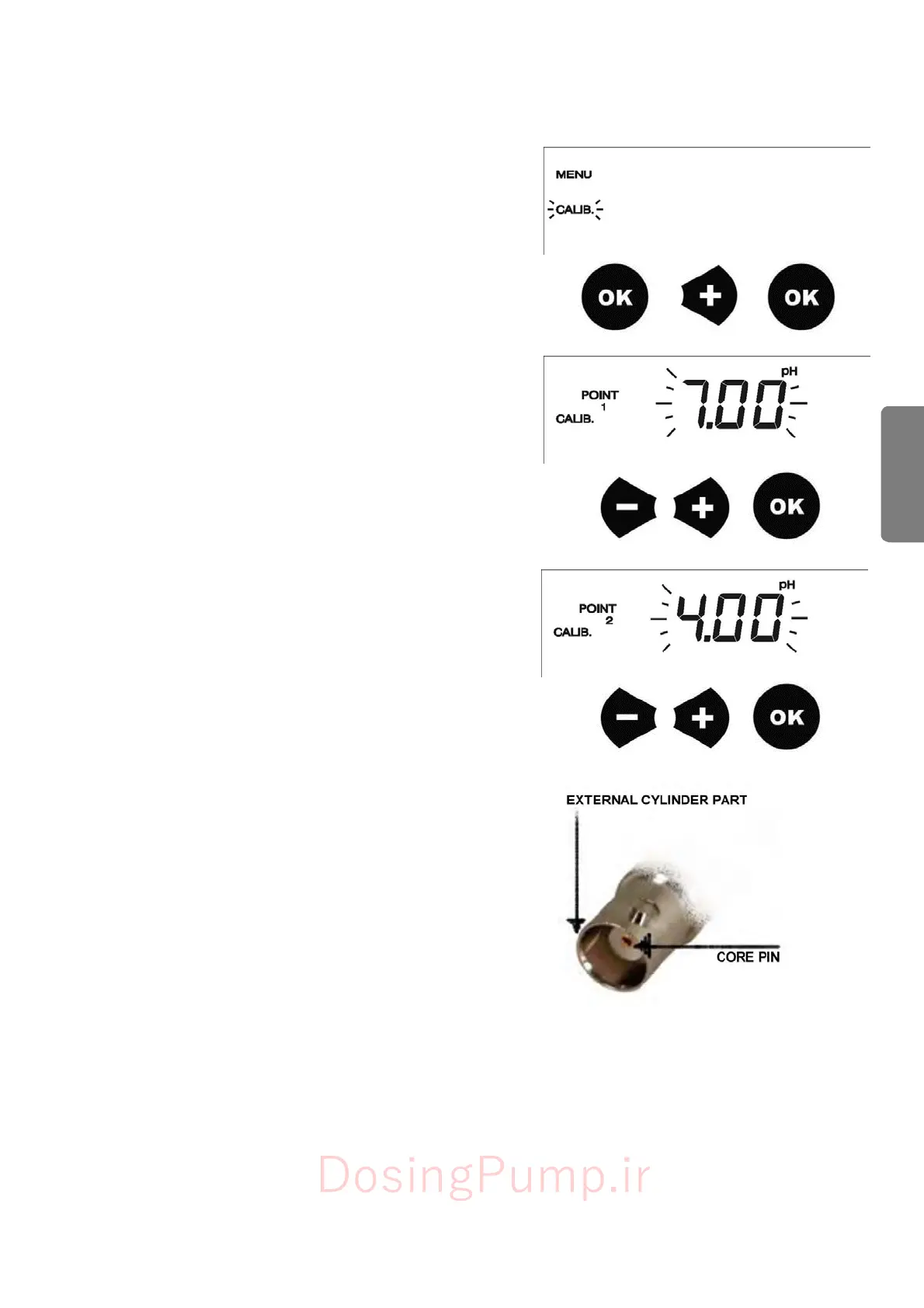
CALIB.
menu,
from
measuring
mode,
press
OK
button
then
the
+
button,
on
display
CALIB.
will
flash,
press
OK
button
again
to
confirm.
On
display
will
appear
POINT
1
pH
PROCEDURE:
Dip
the
electrode
in
buffer
solution
7.00.
Adjust
the
value
on
the
display
up
to
reach
7.00
with
+
and
-
buttons.
Press
OK
to
save
the
data.
On
display
will
appear
POINT
2.
Dip
the
electrode
after
washing
with
tap
water
in
the
second
buffer
solution;
we
suggest
4.00
or
9.00
pH.
Adjust
the
value
on
the
display
up
to
reach
the
second
buffer
solution
value
with
+
and
-
buttons.
Press
OK
to
save
the
data.
REDOX
(mV)
PROCEDURE:
Put
in
short
circuit
the
BNC
connector.
Using
a
metal
wire,
connect
the
core
pin
with
the
external
cyl
i
nder
part.
Adjust
the
value
on
the
display
up
to
reach
0
using
+
and
-
buttons.
Press
OK
to
save
the
data.
On
the
display
will
appear
POINT
2
Dip
the
electrode
in
a
buffer
solution.
We
suggest
250,
475
or
650mV.
Adjust
the
value
on
the
display
up
to
reach
the
buffer
solution
value
using
+
and
-
buttons.
Press
OK
to
save
the
data.
DosingPump.ir

Related product manuals