Handheld Touchscreen and Wireless Accessories User Manual 5
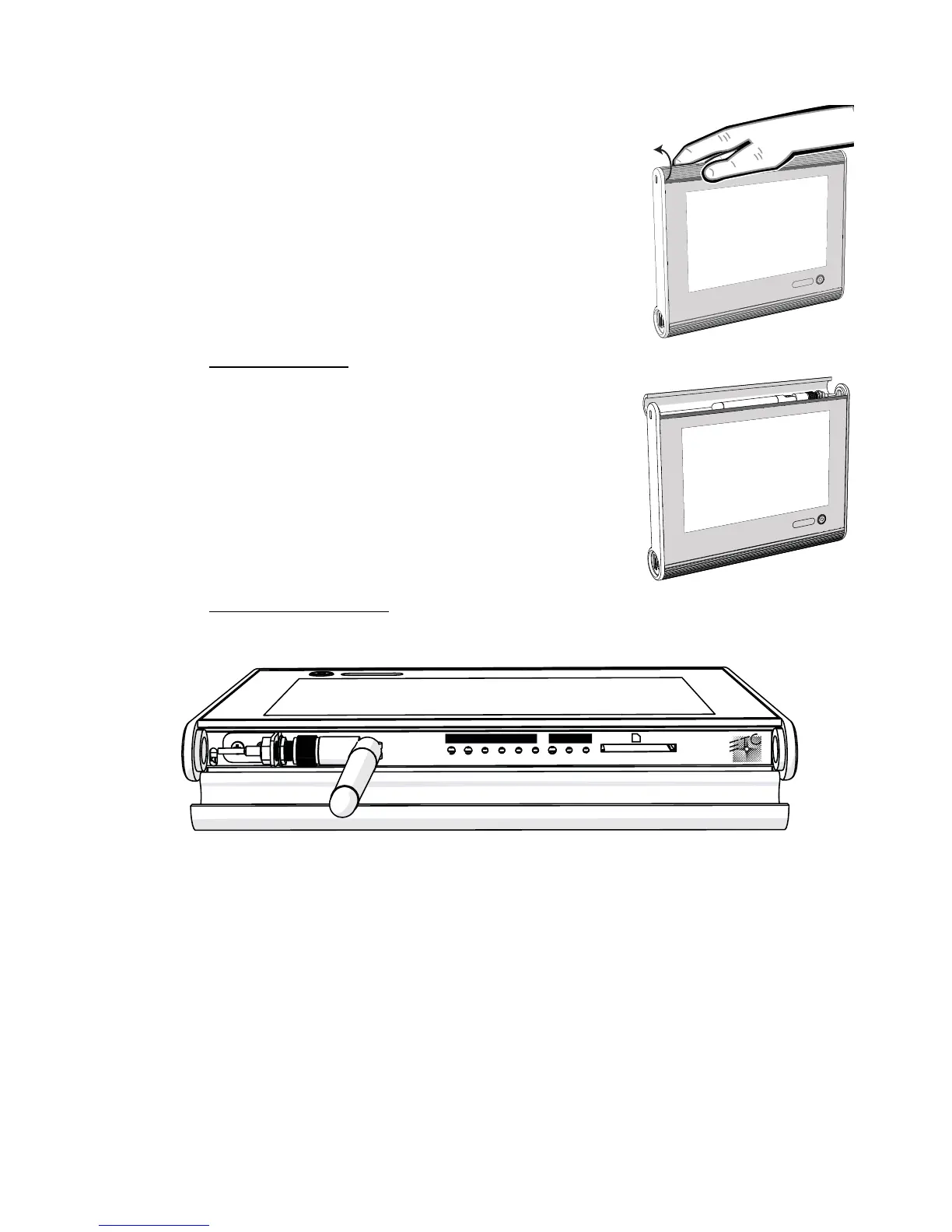
Access Panel
Wireless Antenna
Buttons and Indicators
Each of the buttons and indicators on the Touchscreen I/O panel are labeled and grouped
according to their relationship and function.
STATUS
This section includes all buttons and indicators that relate specifically to the Touchscreen
function and features.
• Reset button - when pressed, resets the Handheld Touchscreen software causing a
reboot
• Mode button - press once to access the Setup Menu (see page 18). Press and hold for
four seconds to access the Calibrate Touchscreen feature.
• USB indicator - flashes when the battery charging source is USB
• Aux indicator - illuminates solid when powered by the Docking Station or portable
LinkConnect cable. Alternatively, this LED flashes when the Handheld battery is
charging from these sources.
• Bat indicator - flashes when the battery is charging
The access panel is located on the top edge of the
Handheld Touchscreen. To open the access panel, place
your thumb on the front of the access panel and wrap your
fingers to the back side. While holding your thumb in
place, apply pressure with your fingers and rotate the
access panel open.
The wireless antenna for the Handheld is located behind
the access panel. The wireless antenna is designed to
operate behind the closed access panel. It is not
necessary to extend the wireless antenna on the
Handheld during operation.



 To Next Page