19
2510145-02-07/18 (translation of the original operating instructions)
Operating Instructions
Non-Contact Safety Switch CES-I-BR-.-C07-…
EN
9. Commissioning
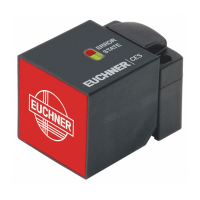
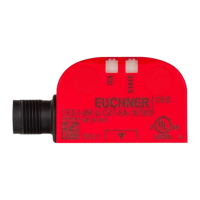
9.1. LED displays
You will nd a detailed description of the signal functions in chapter 10. System status table CES‑I‑BR‑… on page 21.
LED Color
STATE green
DIA red
9.2. Teach-in function for actuator (only for unicode evaluation)
The actuator must be allocated to the safety switch using a teach-in function before the system forms a functional unit.
During a teach-in operation, the safety outputs and the monitoring output OD/C are switched off, i.e. the system is in the
safe state.
Tip!
It is recommended to perform the teach-in operation prior to mounting. Mark switches and actuators
that belong together in order to avoid confusion. For devices to be connected in series, we recommend
performing the teach-in operation separately for each device prior to series connection.
Important!
Ì The teach-in operation may be performed only if the device functions awlessly. The red DIA LED
must not be illuminated.
Ì The safety switch disables the code of the previous actuator if teach-in is carried out for a new
actuator. Teach-in is not possible again immediately for this actuator if a new teach-in operation is
carried out. The disabled code is released again in the safety switch only after a third code has
been taught in.
Ì The safety switch can be operated only with the last actuator taught in.
Ì The number of teach-in operations is unlimited.
Ì If the switch detects the actuator that was most recently taught in when in the teach-in standby
state, this state is ended immediately and the switch changes to normal operation.
Ì If the actuator to be taught in is within the operating distance for less than 30s, it will not be acti-
vated and the most recently taught in actuator will remain saved.
9.2.1. Preparing device for the teach-in operation and teaching in actuator
1. Apply operating voltage to the safety switch.
¨ The green LED ashes quickly (approx. 5Hz)
A self-test is performed during this time (approx. 5s). After this, the LED ashes cyclically three times and signals that
it is in standby state for teach-in.
Standby state for teach-in remains active for approx. 3 minutes. On switches that have not been taught in, teach-in
standby is unlimited.
2. Move new actuator to the read head (observe distance < S
ao
).
¨ Teach-in operation starts, green LED ashes (approx. 1 Hz). During the teach-in operation, the safety switch checks
whether the actuator is a disabled actuator. After successful teach-in, the STATE and DIA LEDs ash alternately. The new
code has now been stored, and the old code is disabled. The teach-in operation takes approx. 30s.
3. Disconnect safety switch from the operating voltage for 3 seconds.
¨ The switch is in normal operation after the self-test.
LEDs


 To Next Page
 Loading...