3. Using Your Robot with the eufy Clean App
To enjoy all the available features, it is recommended to control your robot via the eufy Clean app.
Before you start, make sure:
• Your smartphone is running iOS 11.0 (or above) or Android 8.0 (or above).
• The 2.4GHz band wireless signal is enabled on your wireless router.
3.1 Download the App
1. Download the eufy Clean app from the App Store (iOS devices) or Google Play (Android devices), or by clicking
this link: https://dl-eufy.eufylife.com/qcdl/index.html?flow=eufy.
2. Open the app and create a user account.
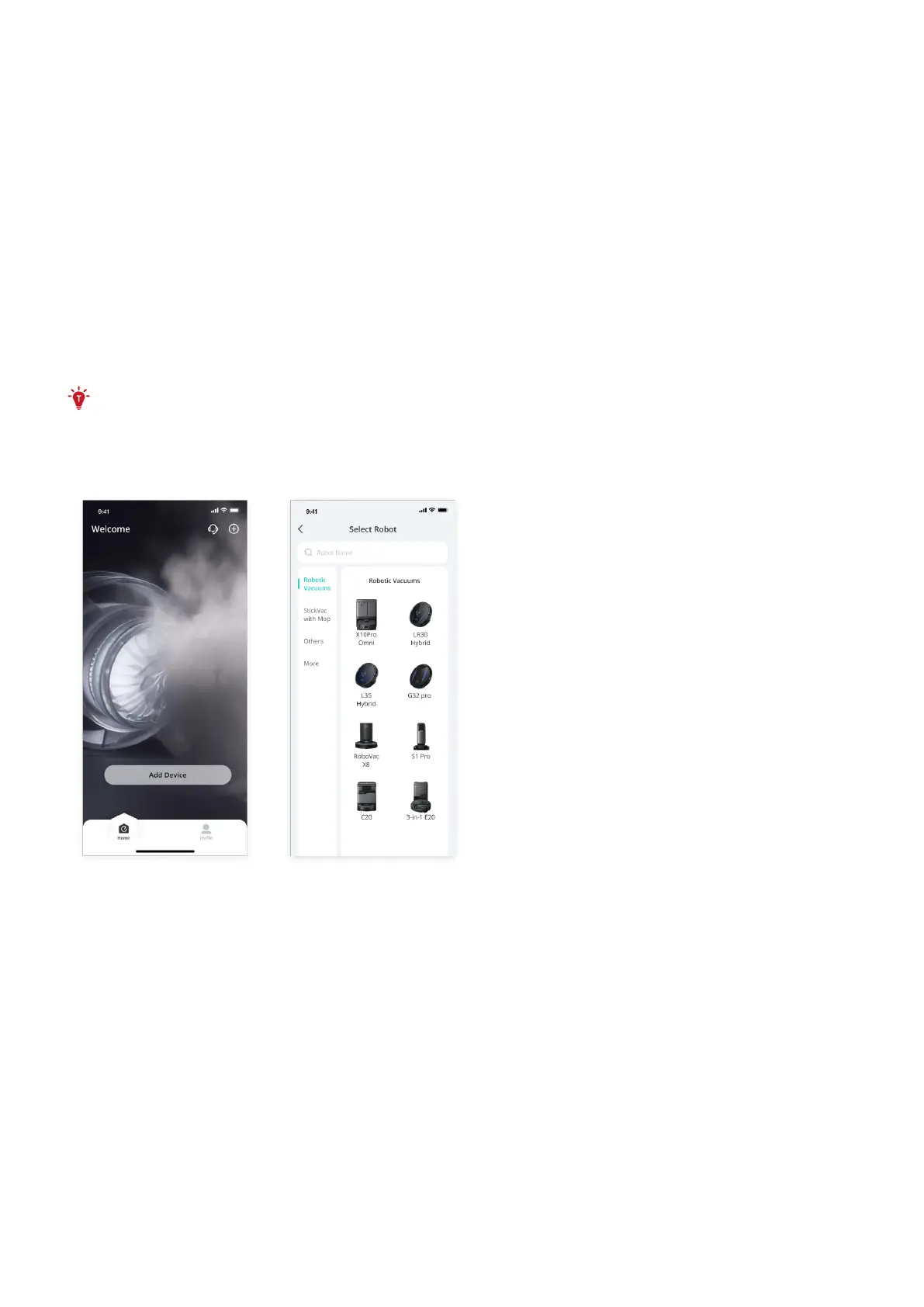
3. Tap Add Device on the main screen of the app, and select 3-in-1 E20 to connect the robot.
4. Follow the instructions in the app to set up the Wi-Fi connection.
• After connecting successfully, you can control the robot via the app.
• With the app, you can select dierent cleaning modes, schedule cleaning, adjust the suction level, view the
operation status, receive notifications, set up “No-Go” zones, and access additional features.
• The Robot does not support 5GHz Wi-Fi.
• If the robot gets stuck in any space, tap Find My Robot in the app to find the device.
• Due to ongoing development and upgrades of the eufy Clean App, there may be minor adjustments to
features. Please refer to the latest version for the most accurate information.












 To Next Page