EVAstream Electrical connections - PCB Settings EVAstream Electrical connections - PCB Settingswww.evaoptic.com14 15
6 Controlling with EVA Experience web app
6.1 Technical tablet requirements
The EVA Experience Controller can only be operated with a touchscreen tablet,
not with a smartphone.
We recommend a screen size of 9.7 inch to 11 inch for optimal functioning of the web environment.
The following tablet operating systems are generally suitable:
l Android tablets with Android version 12 or higher.
l Apple tablets with iOS 15.3 or higher.
6.2 Network connection
An internet connection is not required to operate the EVA Experience Controller with a tablet. However,
the tablet must be connected to the same WiFi network as the controller. There are 2 options for this:
1. New network (Access Point Mode)
Create a new WiFi network with the EVA Experience Controller, and connect the tablet to this network.
This option is suitable if the home network does not provide sufficient coverage around the pool:
l Due to the EVA Experience Controller’s own network, it is not necessary to further expand the
cover age of the home network.
l Your device is not connected to the internet.
2. Home network
Connect the tablet and the EVA Experience Controller to the home network. This option is preferred if
the home network provides sufficient coverage around the pool:
l The tablet remains connected to the home network while operating the
EVA Experience Controller.
l Switching networks on the tablet is not necessary to operate the controller.
WiFi networks of 2.4 GHz are supported.
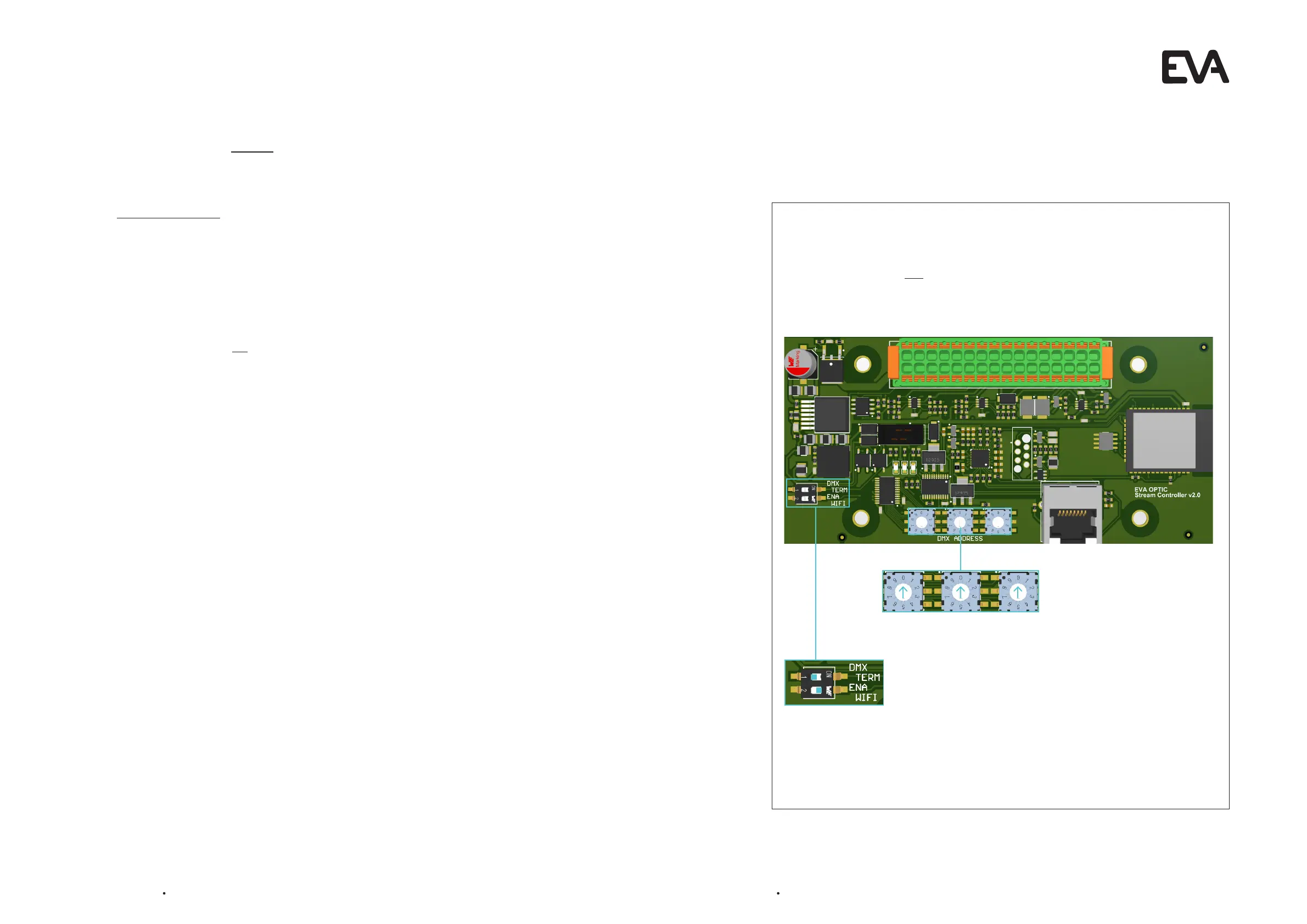
1. Setting the Printed Circuit Board (PCB):
Go to the green Printed Circuit Board (EVA SP-ECA-PRO). This is located in the Motor Control Unit
of the EVAstream or in a separate power supply box.
Set the Rotary switches at 000
2. Turn WIFI on for installation
On the green Printed Circuit Board, set the ENA WIFI button to ON by sliding switch 2 to the right.
The green Printed Circuit Board (EVA SP-ECA-PRO) is the master in all cases for control. The EVA
LED underwater lighting and EVA Piezo can be linked to this if desired.
Rotary
switch 1
0
WIFI
turn On
Rotary
switch 2
0
Rotary
switch 3
0
6.3 Setting the PCB and WIFI
Before you want to connect to the home network or create a new network, the rotary switches must
first be set correctly and the WIFI must be switched on.


 To Next Page