EVCO S.p.A. EVDRIVE03 | User manual ver. 3.7 | Code 144EPDE374
Page 27 of 76
page 3 page 2a
or or
page 4 page 2b
or or
page 5 page 3b
or
page 6
or
page 7 to the installer menu
or and
page 8 page 9/11
or
page 10/12
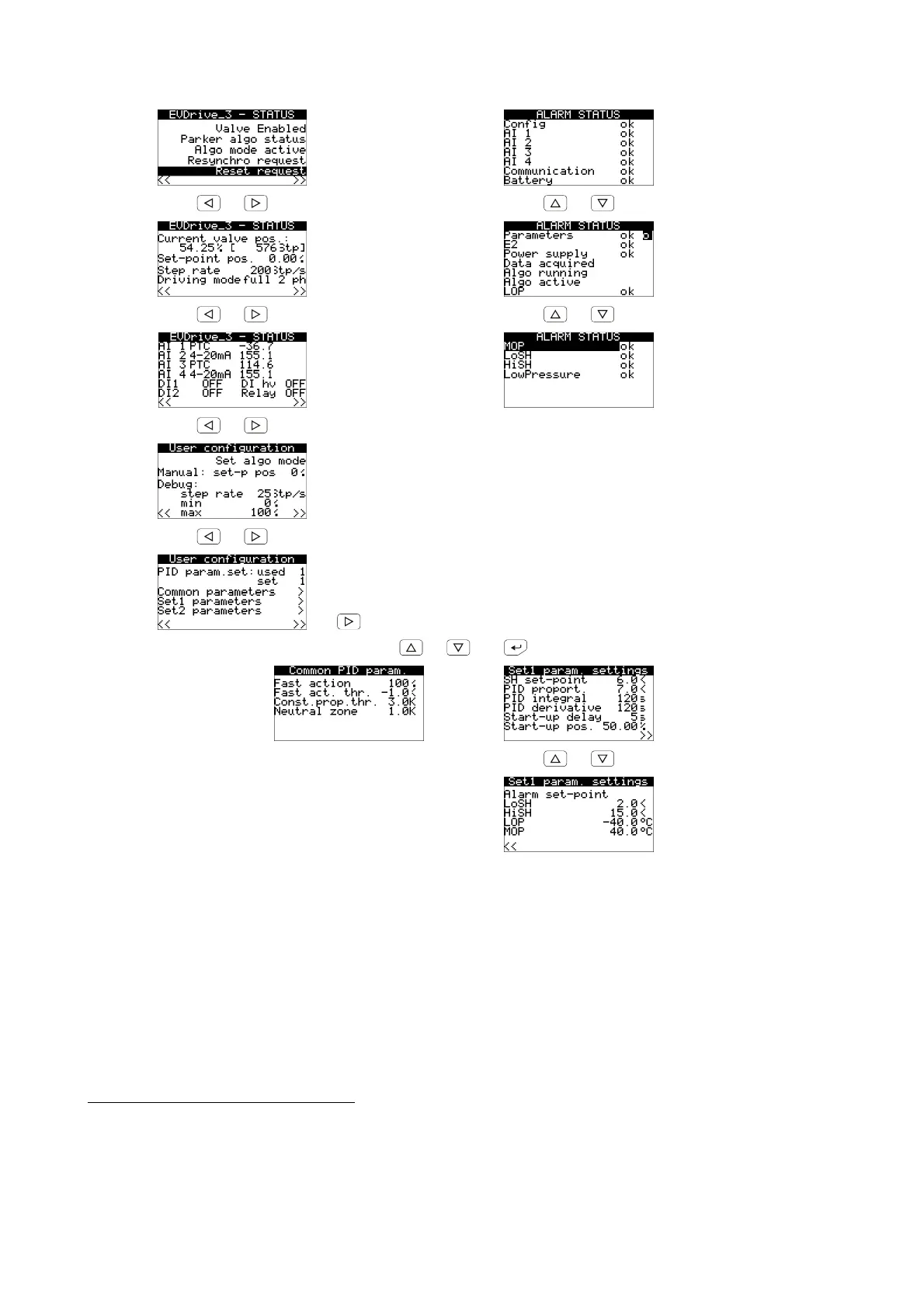
The first five pages are dedicated to the end user and permit display of major features of the EVDRIVE03, any
alarm messages, or whether it is necessary to resynchronise or reset the machine after changing parameters.
In the third page, the fourth line is visible and blinking only if there is a request for resynchronization; the last
line signalizes a request to disable (blinking "disable request”) or a request to reset the board (negative
blinking “reset request”).
In the “User configuration” pages, some manual and debug mode functions are also available, including the
direct setting of SH set-point to pass to the algorithm.
In the “Alarm Status” page all the warnings and alarms are displayed.
To modify a parameter operate as follows:
3. Make sure to have selected an “User configuration” page.
4. Press and release button UP or button DOWN to select a submenu.
5. Press and release button ENTER.
6. Press and release button UP or button DOWN to select the parameter.



 To Next Page