EVCO S.p.A. EVDRIVE03 | User manual ver. 3.7 | Code 144EPDE374
Page 28 of 76
7. Press and release button ENTER.
8. Press and release button UP or button DOWN to modify the value.
9. Press and release button ENTER to confirm the value.
10. Press and release button ESC over and over again to go back to the previous pages.
To gain access to the installer menu:
11. With reference to step 2, from page 1 press button LEFT (or from page 7 press button RIGHT).
12. Press and release button ENTER.
13. Press and release button UP or button DOWN over and over again to set level 1 password (according to the
factory settings “10”; to change this value look at paragraph 7.6 “Main menu”.
14. Press and release button ENTER again.
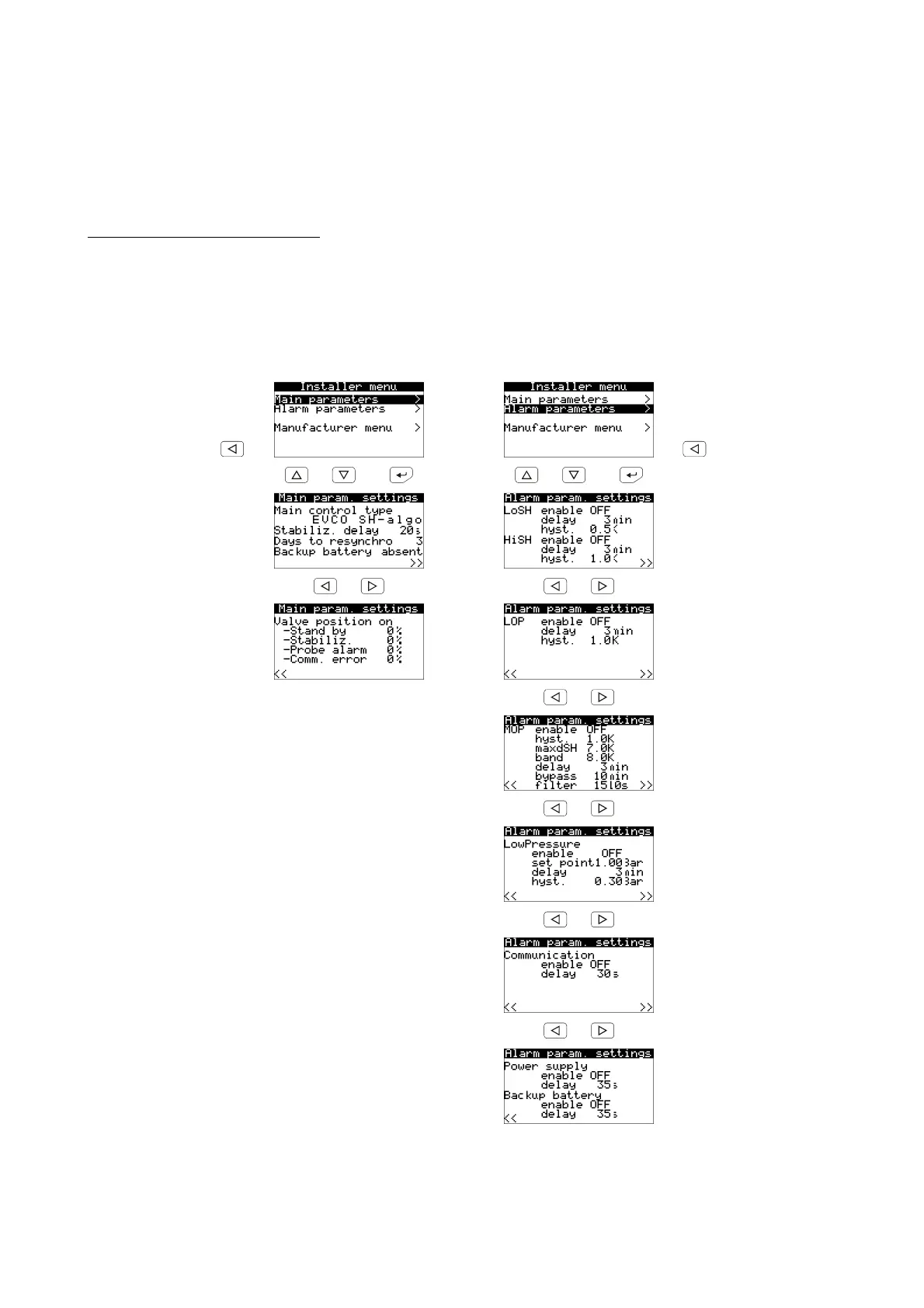
15. Move among the pages using the buttons as shown in the example here below:
to page 1 page 13 to page 1
or and or and
page 14 page 16
or or
page 15 page 17
or
page 18
or
page 19
or
page 20
or
page 21
These menus permit modification of most driver parameters.



 To Next Page