EVCO S.p.A. EVJ800 | Installer manual ver. 2.0 | Code 144J800E204
page 10 of 50
4 DISPLAY
4.1 Keys
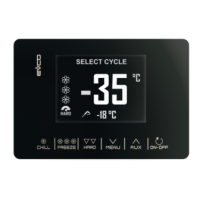
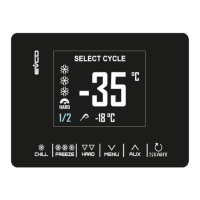
Each of the 6 keys activates different functions depending on the navigation level or the function currently running.
KEYS FUNCTION
- Enables the quick selection of a blast chilling cycle.
- Once a blast chilling cycle has been selected, it makes it possible to switch from temperature
controlled blast chilling to time controlled blast chilling and vice versa.
- During the quick selection of blast chilling/freezing cycle: by touching the key three times in
succession, the controller moves to the stand-by page.
- Within a menu or when setting a parameter: acts as the "ESC" key and returns the controller to the
page above.
- N.B. When a cycle is in progress the key is not active; to stop the cycle press the "START" key for 2
seconds.
- Enables the quick selection of a blast freezing cycle.
- Once a blast freezing cycle has been selected, it makes it possible to switch from temperature
controlled blast freezing to time controlled blast freezing and vice versa.
- Once the blast chilling/blast freezing cycle has been selected, it makes it possible to switch from
hard to soft mode and vice versa.
- From the Home page: gives access to the setting menu.
- Within a menu: enables navigation down a level.
- During parameter setting: decreases the value of the element to be modified.
- From the Home page: gives access to the menu for selecting special cycles
- Within a menu: enables navigation up a level.
- During parameter setting: increases the value of the element to be modified.
- Short press: starts the selected function or gives access to the selected menu page.
- Long press for 2 seconds: interrupts the cycle in progress
- During parameter setting: enables the value to be modified, while pressing a second time confirms
the set value.


 To Next Page