EVCO S.p.A. EVJ800 | Installer manual ver. 2.0 | Code 144J800E204
page 26 of 50
QUICK NEEDLE PROBE BLAST FREEZING
Phase 1
Cabinet setpoint 0°C
Needle probe setpoint 3°C
Phase 2
Cabinet setpoint -12°C
Needle probe setpoint -3°C
Phase 3
Cabinet setpoint -30°C
Needle probe setpoint -18°C
Conservation
Cabinet setpoint -20°C
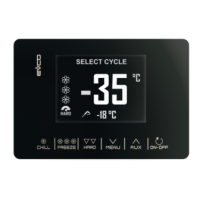
To see the list of predefined blast chilling/blast freezing programs available, access the SPECIAL CYCLES menu from
the key and select RECIPES. Using the keys select the desired recipe, change the setpoint if
necessary and start the cycle by pressing the key.
Besides the 7 standard (not-modifiable) recipes, model EVJS825 provides 20 further programs (from P1 to P20) which
the user can use for saving the settings of his/her own recipes.
These 20 programs are listed below the 7 preset recipes and are identified by the label “- - -“ which shows the position
is empty. Once the user memorizes the settings of a recipe, label “Px” will be automatically displayed in the position
where it has been saved.
To save or overwrite one of the 20 recipes, proceed as follows:
- Move the cursor in the position you want to save the recipe and press the key
- With the key, the mode can be shifted from NEEDLE PROBE to TIME and vice versa (for blast
chilling)
- With the key, the mode can be shifted from NEEDLE PROBE to TIME and vice versa (for blast
freezing)
- With the key, the mode can be shifted from SOFT to HARD and vice versa
- With the key, cycle values can be edited and scrolled
- With the key, the selected value can be accessed, edited using the and keys
and confirmed pressing again or exited without editing with the key
- Once back to the home page for starting the cycle, the icon is displayed as a reminder for
memorizing the recipe; press the key to save it
Press the key to start the cycle


 To Next Page