14
15
Using the Embrace Handle
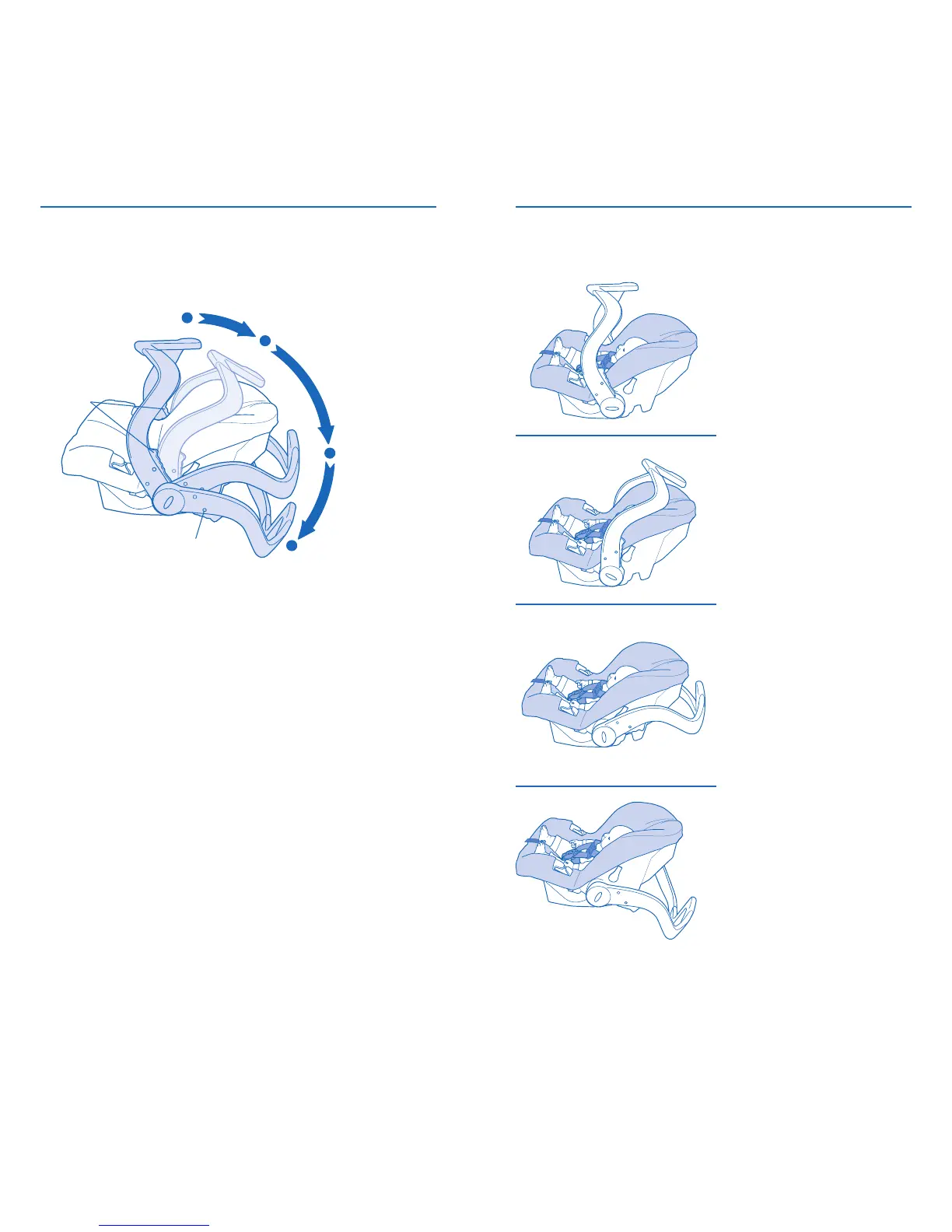
To change handle positions, squeeze both red
handle releases and rotate the handle to the desired
position. When the handle is locked into position,
the lock indicator will be green.
Convenience Position*
Car Position
Stand Position
Handle
Releases
Lock Indicator
Carry Position*
*Do not use the “Carry” and “Convenience” positions
while traveling in a vehicle.
IMPORTANT: Always secure the child in the carrier.
Refer to “Securing your Child in the Carrier” on page 30.
Stand Position
Place the handle in this
position when you set
the carrier on the floor.
Can also be used in a car
for additional clearance.
Car Position
Place the handle in
this position after
the carrier has been
securely fastened to
the vehicle seat.
Carry Position
Place the handle in this
position when you want
to carry your child in the
carrier.
Using the Embrace Handle
Convenience Position
NEVER use this position
to carry your child in the
carrier. NEVER use this
position in the vehicle.





 To Next Page