Rampmaster Operating Manual
Heat Treat ver. RM3 – Feb 2017
Page 2 of 25
Use your Smart-phone to scan this QR code to watch Rampmaster how-to Programming Videos!
Thank you for purchasing a Rampmaster equipped heat treating oven from Evenheat. The Rampmaster is preferred by many for heat treating as it allows
up to 12 custom user programs, numerical keypad and alarm features not found on our Set-Pro control. To dive right into programming see our Quick Start
Programming on page 2. For an in-depth discussion of programming check out Custom Mode Programming on page 6. Don’t forget to read the rest of the
manual! There are some very cool features that allow you to take full advantage of the Rampmaster and you don’t want to miss them.
CAUTION: The Rampmaster is used to control temperature, it is not a safety devise. Never leave the oven unattended while firing. Check on the oven at
the end of the heat treat process to ensure the heat treat program has completed as planned.
CAUTION: Throw control power switch, located on oven control panel, to the OFF position (O) when not in use.
Table of Contents
Quick Custom Mode Programming ....................................... 3
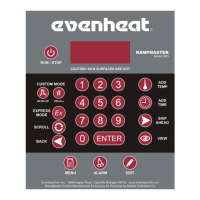
Rampmaster Key Layout ....................................................... 4
Rampmaster Key Descriptions .............................................. 5
Detailed Custom Mode Programming ................................... 6
Programming & Use Features ............................................... 8
Beginning of Process Hold Alarm .......................................... 8
End of Process Hold Alarm .................................................... 8
Set Point Temperature Alarm ............................................... 8
The BACK Key ........................................................................ 8
The MENU Key ...................................................................... 8
Storing a Custom Mode Program .......................................... 8
Recalling a Custom Mode Program ....................................... 9
Writing Over Data ................................................................. 9
Degrees per Hour .................................................................. 9
Initialization .......................................................................... 9
Programming a Time Value ................................................... 9
Reviewing Your Program Before Running ............................. 9
Standby (STbY) ...................................................................... 9
Two Key Run ......................................................................... 9
12 User Programs in Custom Mode ...................................... 9
32 Segments per Custom Mode Program ............................. 9
Delay Start Feature ............................................................. 10
Maximum Programmable Temperature .............................. 10
Brief Power Failures ............................................................ 10
Extended Power Failures ..................................................... 10
Disabling Some Error Codes ................................................ 10
Useless Rampmaster Features ............................................ 10
On-the-Fly Features ............................................................ 11
Add Temperature to Hold ................................................... 11
Add Time to Hold ................................................................ 11
Skip to Next Segment .......................................................... 11
Suspend .............................................................................. 12
Viewing the Current Segment Data .................................... 12
Rampmaster Display Conditions ......................................... 13
Rampmaster Display Messages........................................... 13
Rampmaster Key Function Tables ....................................... 14
Menu—Configuration Tools................................................ 17
Options Menu ..................................................................... 17
Delay Start .......................................................................... 17
Process Alarm Settings........................................................ 17
Add Temperature Value ...................................................... 17
Add Time Value ................................................................... 17
System Menu ...................................................................... 18
Change Temperature Scale (°F or °C) .................................. 18
Viewing Options .................................................................. 18
Error Code Disable .............................................................. 18
PC Identification ................................................................. 18
Two Key Start ...................................................................... 18
Diagnostic Menu ................................................................. 19
Error Temperature & Time ................................................. 19
OUTS Test ........................................................................... 19
Software Version ................................................................ 19
Electronics Temperature..................................................... 19
LED Test .............................................................................. 19
Voltage Test ........................................................................ 19
Factory Menu...................................................................... 20
Thermocouple Offset .......................................................... 20
Maximum Programmable Temperature ............................. 20
Thermocouple Type ............................................................ 20
Error Display Messages ....................................................... 21
Trouble Shooting ................................................................ 22
Heat Treat Data .................................................................. 23


 To Next Page