Rampmaster Operating Manual
Heat Treat ver. RM3 – Feb 2017
Page 6 of 25
Use your Smart-phone to scan this QR code to watch Rampmaster how-to Programming Videos!
Custom Mode Programming
The Custom Mode is a method of programming that allows you to precisely define every aspect of the heat treating process. You’re creating a custom
program designed for the work at hand.
During programming you will be asked to enter in data for rate of temperature increase (or decrease), the set point temperature you would like to reach
and hold time at the set point temperature. Most heat treat programs are simple, 1 segment affairs that ramp up to temperature and hold that
temperature for a period of time, then shut off. The Rampmaster does allow for heat treating applications that involve multiple firing steps. We have
included some basic heat treat data at the end of this manual to assist you developing your heat treat programs.
First Things First: What’s a Segment?
You will create your heat treat program using a segment(s). A segment consists of 3 things: How fast do you want to get to temperature? What
temperature do you want to go to? And, once you’re there, how long should you stay there? These 3 questions make up 1 segment. It’s quite likely that
most of your heat treating programs will contain only 1 segment.
You may also have programs that require multiple changes in rate and temperature (this is rare for heat treating). For these programs it will be necessary
to use two or three or even more segments to accomplish the work. Not a problem, the Rampmaster allows you to use up to 32 segments for a program.
The Rampmaster simply runs the through each segment, one after the other, performing all ramping and holding procedures in each segment until the end
of the program.
Programming Your Heat Treat Program
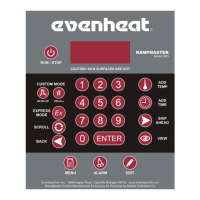
Beginning the Custom Mode programming process is easy: with the display reading STbY (Standby) simply press the Develop key one time.
PROG is displayed. The Rampmaster is asking which of the 12 available locations you would like to store your program. In other words: a program number.
You’re choices are 1 thru 12. Use the numerical keys to choose and press the Enter key.
SEGS is displayed along with some number. The Rampmaster wants to know the total number of segments you would like to use for the program. Most
heat treat programs use 1 segment, so the simple answer is 1. If your heat treat program requires more than 1 segment (which is rare) you can use up to
32 segments for your program. Your choices are 1 thru 32. Use the numerical keys to choose and press the Enter key.
RA 1 is displayed. RA stands for Rate and the 1 means you’re programming the rate of temperature increase for segment 1. Rate means speed and you
need to tell the Rampmaster how fast you want the temperature to increase. Rate is programmed in degrees per hour (°/hr). Most heat treat programs ask
for a rate of temperature increase of As Fast As Possible. To program a rate of As Fast As Possible in the Rampmaster simply key in 9999. Use the
numerical keys to put in your rate and press the Enter key.
°F 1 is displayed. °F stands for the temperature set point (°C is displayed if you’re using Celsius) and the 1 means you’re programming the temperature you
would like to reach in segment 1. This is temperature at which your metal is hardened or tempered. The choice is yours. Use the numerical keys to put in
your temperature and press the Enter key.
Hd 1 is displayed. Hd stands for Hold (a.k.a. soak or dwell) and the 1 means you’re programming the amount of time you want the temperature to stay at
the segment 1 temperature once you reach it. Hold time is programmed in hours and minutes. Use the numerical keys to put in your hold time and press
the Enter key.
If you are using 1 segment for your heat treat program the display will now read ALRM, which stands for Alarm. If you are using more than 1 segment for
your program the display will read RA 2 in which case RA 2 is asking for the rate for segment 2. Simply continue to program all remaining segment data as
you did previously. When you have completed all remaining segment data the display will read ALRM, which stands for Alarm.
The Alarm feature allows you to set a temperature at which the alarm sounds (set point alarm). It could be any temperature you want. To disable the
alarm, key in 9999 and press the Enter key.
CPL is displayed briefly followed by STbY. CPL stands for Complete and means programming is now complete.
Programming is complete! Your heat treating data is now stored in the User program number you’ve selected and is ready to go.


 To Next Page