Rampmaster Operating Manual
Heat Treat ver. RM3 – Feb 2017
Page 7 of 25
Use your Smart-phone to scan this QR code to watch Rampmaster how-to Programming Videos!
Custom Mode Programming Continued from Previous Page
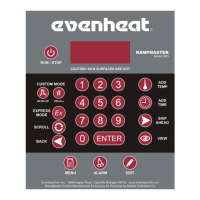
To run the program, press the Run/Stop key one time. Four horizontal dashes will appear.
Press the Enter key.
- ON- will appear briefly and then chamber temperature. The Rampmaster is now running your Custom Mode program.
When the heat treat process is complete the display alternates between CPLT, current chamber temperature and total process time. Pressing the
Run/Stop key at this point will return the display to the STbY (Standby) position.
You may always stop the heat treating process at any time by pressing the Run/Stop key. STOP is displayed briefly and then STbY.
To run a program previously stored in one of the 12 user programs simply press the Recall key (with the display reading STbY), choose the program number
that contains the desired program and press the Enter key. Start the heat treating process as you would with any other by pressing the Run/Stop key one
time and then pressing the Enter key.


 To Next Page