Rampmaster Operating Manual
Heat Treat ver. RM3 – Feb 2017
Page 5 of 25
Use your Smart-phone to scan this QR code to watch Rampmaster how-to Programming Videos!
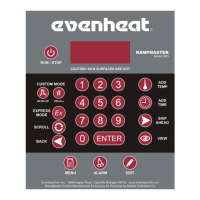
Rampmaster Key Descriptions
RUN/STOP
The Run/Stop key starts and stops the heat treating process. If a running program is stopped and then restarted, the Rampmaster picks up at the first
segment containing the current chamber temperature.
DEVELOP
The Develop key is used to begin the Custom Mode Programming Process.
RECALL
The Recall key allows the user to recall or bring up a previously programmed Custom Mode Program for use. The Rampmaster contains 12 programs in the
Custom Mode. The Recall feature allows you to easily grab these stored programs for immediate use.
EX
Express Mode key is of no use in heat treating, see page 10.
SCROLL
The Scroll key is used to display programming choices during Menu Features selection.
BACK
The Back key is used to view previously viewed data. This gives you the opportunity to go back and inspect and change previously entered data if you wish.
ADD TEMP
Pressing the Add Temp key while holding at a temperature increases the programmed hold temperature for that segment. The factory default is set to
5°for every press of the ADD TEMP key. You do have the option of changing the amount of temperature added per press (see page 17 for detailed
information on customizing this feature). The Add Temp feature does not change your stored program, it simply adds temperature for that particular
moment.
ADD TIME
Pressing the Add Time key while holding at temperature increases the programmed hold time for that segment. The factory default is set to 5 minutes for
every press of the ADD TIME key. You do have the option of changing the amount of hold time added per press (see page 17 for detailed information on
customizing this feature). The Add Time feature does not change your stored program, it simply adds time for that particular moment.
SKIP AHEAD
Pressing the Skip Ahead key running a program moves the program to the next segment. The Skip Ahead feature is available for use on all segments in
Custom Mode.
VIEW
The View key will display the entire heat treat program when at the Standby position and the current segment data while running. We suggest using the
View key before running any heat treat program. It gives you the opportunity to inspect your programmed data before you actually commit.
MENU
The Menu key allows access to the four Configuration Menus: Options, System, Diagnostic and Factory.
ALARM
The Alarm key gives direct access to the Set Point Alarm temperature setting.
EDIT
Edit key is of no use in heat treating, see page 10.
NUMERICAL KEYS
The Numerical keys are used to key-in specific data. The Numerical keys also allow for various “On-the-Fly” features (see page 11).
ENTER
The Enter key is used to store displayed data. During programming, the Enter key stores the displayed data and moves the programming to the next step.


 To Next Page