11
ENGLISH
9.2.2 Clock setting: set date and present time
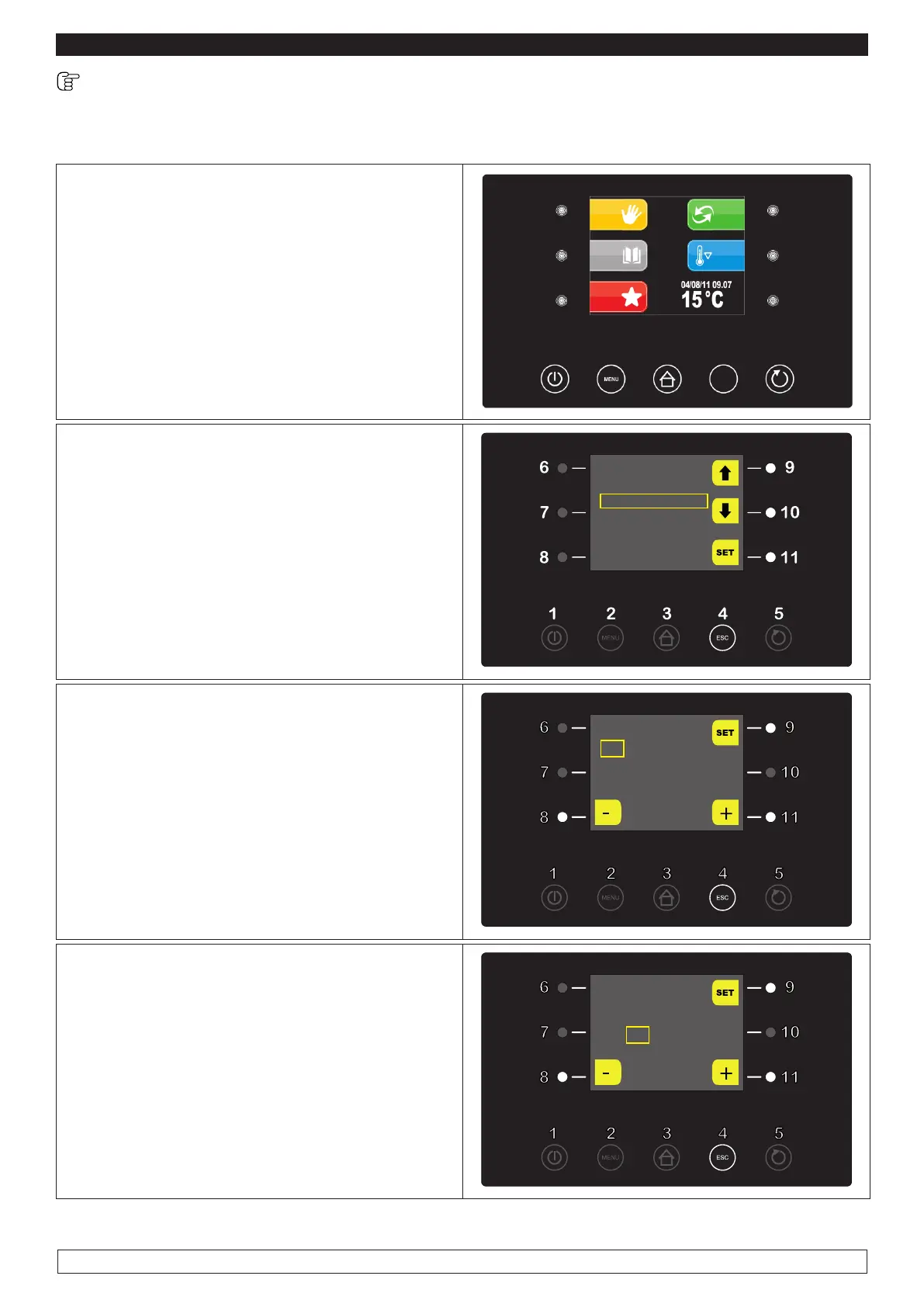
The first operation to be carried out is setting the clock to the present time as follows:
► Press the MENU key (2) ,
2
ESC
► Select with the UP-DOWN keys (9-10) the
menu date and time options then confirm by
pressing the SET key (11)
OPTIONS
LIGHT
22/12/14 18:15
MANUAL DEFROST
ALARM LIST
INTERNAL VALUES
SERVICE
► Press the - and + keys (8-11) to adjust the date
then confirm by pressing the SET key (9)
22 / 12 / 14
18:15
► The adjustment of Month, Year , Hours and
Minutes will be automatically carried out in se-
quence.
► Press the - and + keys (8-11) to change the
inserted data.
► Press the SET key (9) to confirm the inserted
data.
22 / 12 / 14
18:15
►
When the operation is completed either press the ESC key (4) or do not work for 60 seconds.








 To Next Page