20
ENGLISH
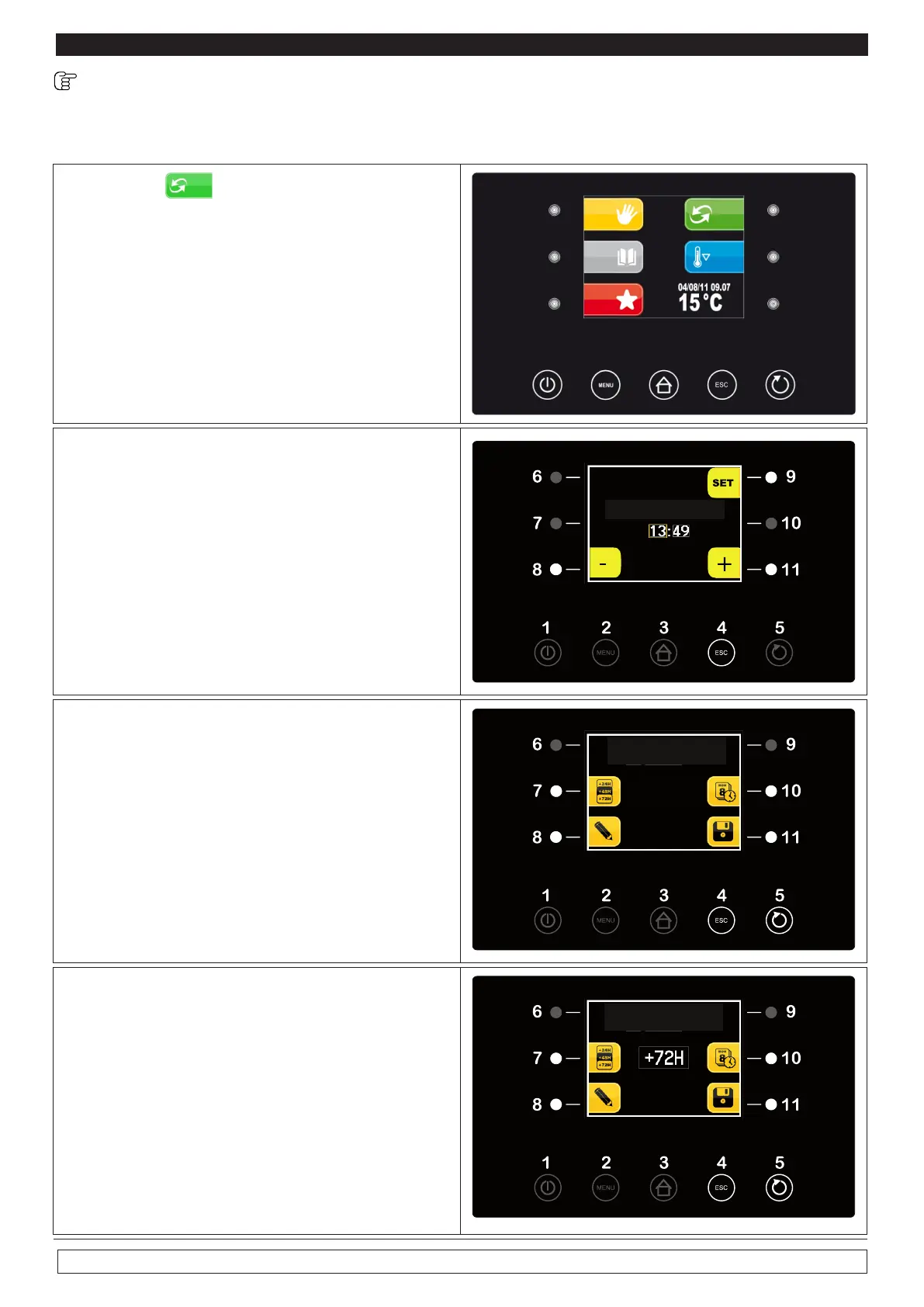
10.4 Setting-up and implementation of an AUTOMATIC cycle :
The selection of the AUTOMATIC menu allows you to set up a complete retarded proofing process.
► Press key AUTOMATIC (9)
9
► Press the + button or the minus button to set
the end of cycle time
► Press SET (9) to confirm the hour and move
to change minutes after modification
► push the key SET (9) again to confirm the
time of the end of the cycle and move to the
next screen
The screen shows the day and time for end of
stroke and four selection options
-Hourly (7) time slot +24 +48 +72
-Clock (10)
-Pencil (8)
-Save data (11)
Hourly -time slot (7) +24 +48 +72 by pushing
it delays the end time 24h 48h 72h cycle or
leaving unchanged the end time cycle and the
fermolievitazione program:
-Watch (10) Pushing it back to set the time for
the end of cycle
END CYCLE TIME CHANGE
END CYCLE
MON 30/12/13 12:00
END CYCLE
MON 30/12/13 12:00








 To Next Page