RS700
012
Remote Control
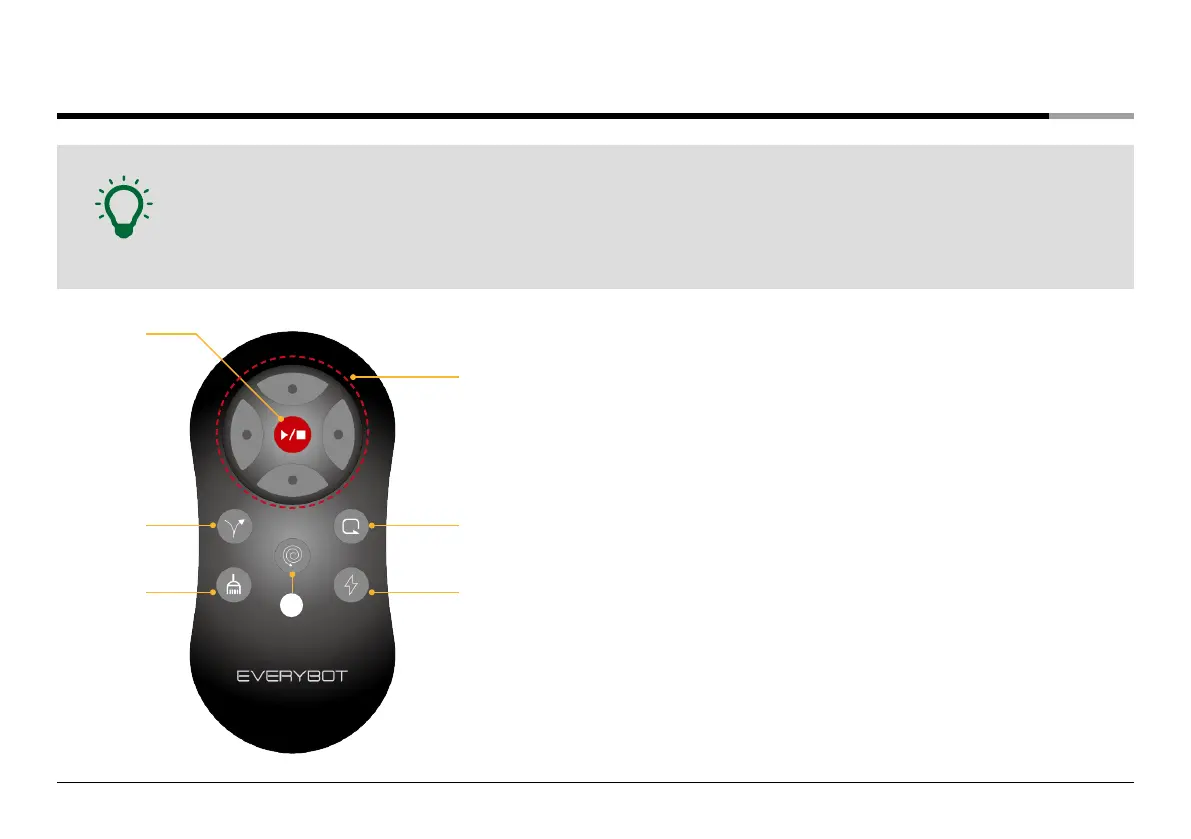
• You can conveniently access various functions of the robot cleaner with your remote control.
• Available functions of the remote control: Auto Cleaning, Y Cleaning, Focus Cleaning, Corner Cleaning, Manual Cleaning,
Dry Mop Cleaning, Turbo Mode.
• The range of the remote control is 5m.
Note
❹
❺
❻
❶
❷
❸
❼
❶
Start/Stop button
Start the auto cleaning or stop the cleaning mode.
❷
Y cleaning button
Thoroughly clean with Y curve pattern as if wiping floor by hands.
❸
Dry cleaning button
Clean fine dust, and hairs neatly with the electrostatic absorption of
microfiber mops.
❹
Direction buttons
When the main unit stops, the unit can be controlled with direction buttons.
❺
Corner cleaning button
Cleans the corner by repeating 180° turns along the walls.
*After the 20minutes of corner cleaning, the cleaning mode is switched over to Auto Cleaning Mode.
❻
Turbo mode button
Clean the whole space faster with the increased motor speed.
*Pressing the turbo mode button again turns off the turbo mode.
❼
Focus cleaning button
Intensively cleans the surrounding area relative to the main unit's current
location.


 To Next Page