RS700
019
Dry Mop Cleaning Mode
• When attaching the water supply mop kit to the main unit, refer to the right pictures.
If the mop does not attach correctly, the mop can cover cliff detection sensors and the
robot cleaner can be stopped.
• Attach the water supply mop kit in the main unit correctly.
When operating the dry mop cleaning mode, do not wet the mop or put the water in the water supply mop kit.
Caution
Caution
• This mode is optimized for dry mop cleaning.
• Microfiber mops can clean fine dust, hairs and so on neatly by dry mop cleaning pattern.
Note
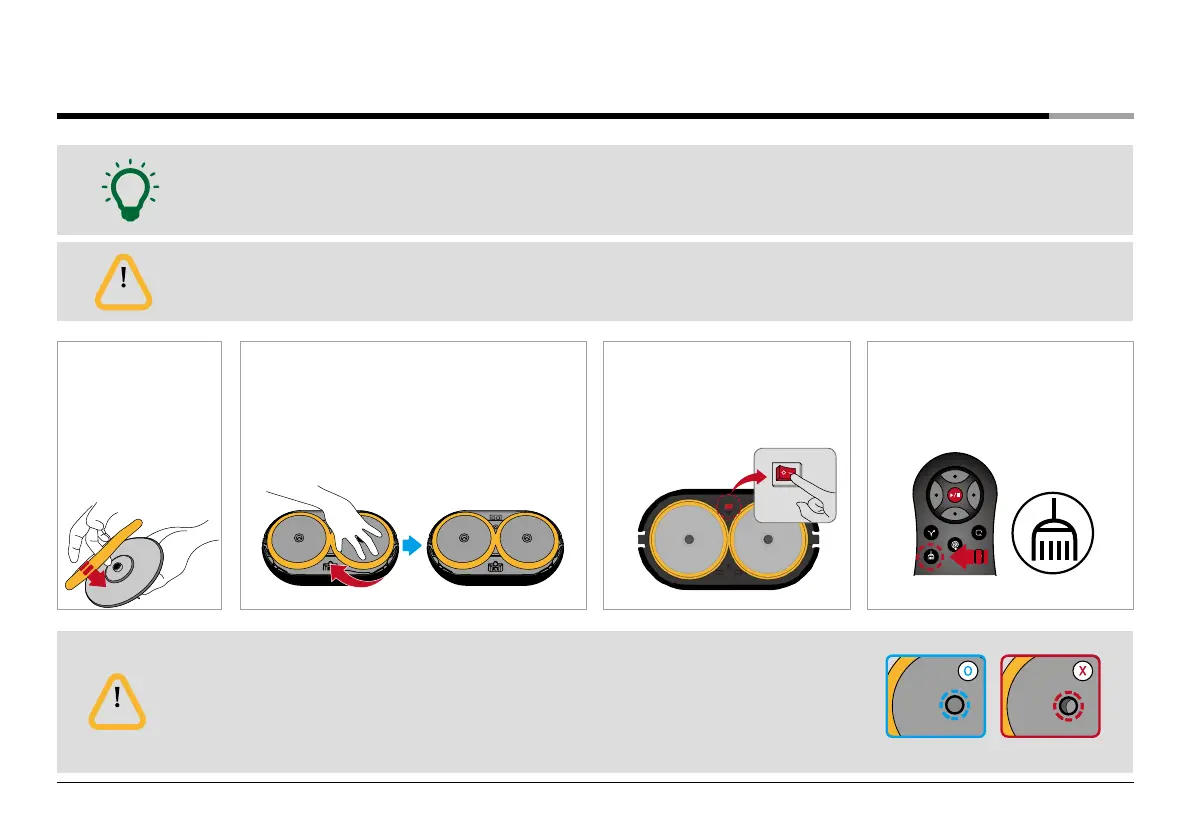
❶
Attach the microfiber
mop to fit the joint
parts well to the holes
of the water supply
mop kit.
* Do not wet the mop.
❸
Turn on the System Power Switch.
❷
Close the rubber stopper of the Mop Kit and attach it to
the bottom part of the main unit. (If you press it turning
from side to side, it is installed with a click sound.)
❹
Start ‘Dry Cleaning Mode’ by pushing the
button of the remote control.
Correct installation of the mop Incorrect installation of the mop


 To Next Page