RS700
015
Installing the Water Supply Mop Kit
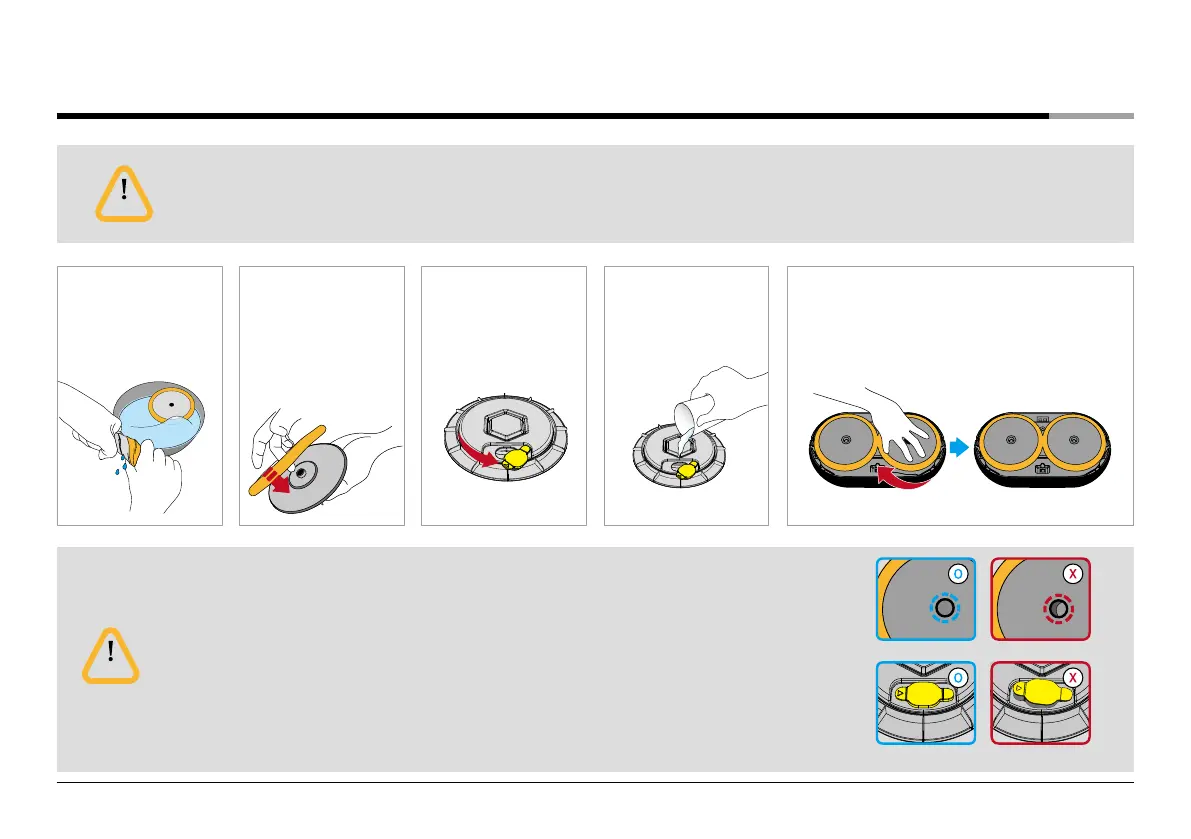
Before attaching wet mops in the water supply mop kit, wring out mops slightly. If mops are too moist,
the robot cleaner may slow down or stop.
Caution
❶
Wet mops thoroughly
in water and apply
them in the main unit
after wringing them
out.
❸
Open the rubber
stopper of the water
supply mop kit.
❷
Attach the mop pads
to fit the joint parts to
the holes of water
supply mop kit.
(see the Figure below)
❹
Fill water into the
water tank.
❺
Close the rubber stopper of the water supply mop kit
and attach the water supply mop kit in the bottom of
the main unit (Pressing it while turning side to side
will install it with a click sound)
• When attaching the water supply mop kit to the main unit, refer to the right pictures. If the mop
does not attach correctly, the mop can cover cliff detection sensors and the robot cleaner
can be stopped.
• After filling water in the water supply mop kit, fully close the rubber stopper (see the right pictures.)
If rubber stopper does not close, there will be failure or malfunction in the robot cleaner.
• Attach the water supply mop kit in the main unit correctly.
• If too much force is applied, the connecting part of the water supply mop kit can be damaged.
Caution
Correct installation of the mop Incorrect installation of the mop
Correct installation of the
rubber stopper
Incorrect installation of the
rubber stopper


 To Next Page