37
Heat Meter
Check the values read by the meter (see room module instructions). Above all verify the
input and output temperature, the instantaneous flow rate and the total measured energy.
Note the total measured energy at the moment it starts. Check that the meter does not
present errors.
Pump Release
Before powering the ModuSat TP, check that the pump rotor is not jammed (this can occur
after a period of inactivity).
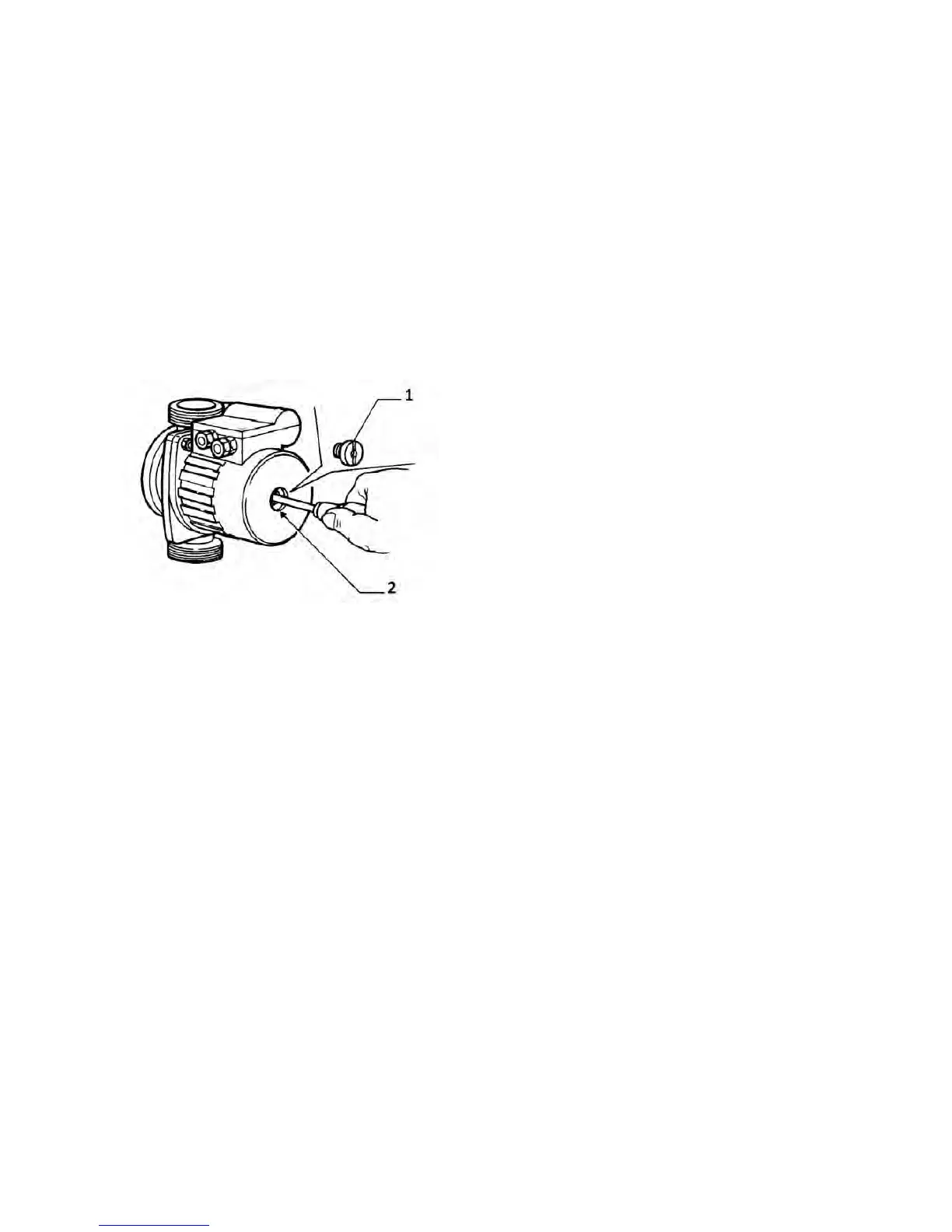
Act as follows to release it:
Isolate the electricity to the pump before draining it.
1. Remove the cap, making sure that the water
coming out does not cause any damage.
2. Introduce a screwdriver in the shaft trace and
turn it both ways to unblock it. Screw the cap back
on and check the correct position of the gasket.
Whenever the heating is turned on or after a long
period of inactivity ensure that the pump starts
freely.
It is normal that a small amount of water may leak
out during this operation.
Volumetric Meters
Note the measured values at the moment it starts. Check that actual reading increase on
the board and/or ModuSat TP room controller display.
Expansion Vessel
Check the water heater expansion vessel charge.
Temperature Setting
Set the DHW delivery temperature (from the board or ModuSat TP room controller). Set
the heating delivery temperature (from the board or ModuSat TP room controller). If there
is climatic operation, set the curve and temperature limit i.e. UFH.
DHW Production
Check the actual hot water output at the set temperature (if this is possible depending on
the requested flow rate and the primary temperature).
Heating Delivery
Activate heating with the relevant room unit (thermostat or ModuSat TP room controller)
and ensure that the pump starts. Delivery temperature must remain at the set value (as
long as the primary is up to temperature).


 To Next Page