41
7.2 Room Unit
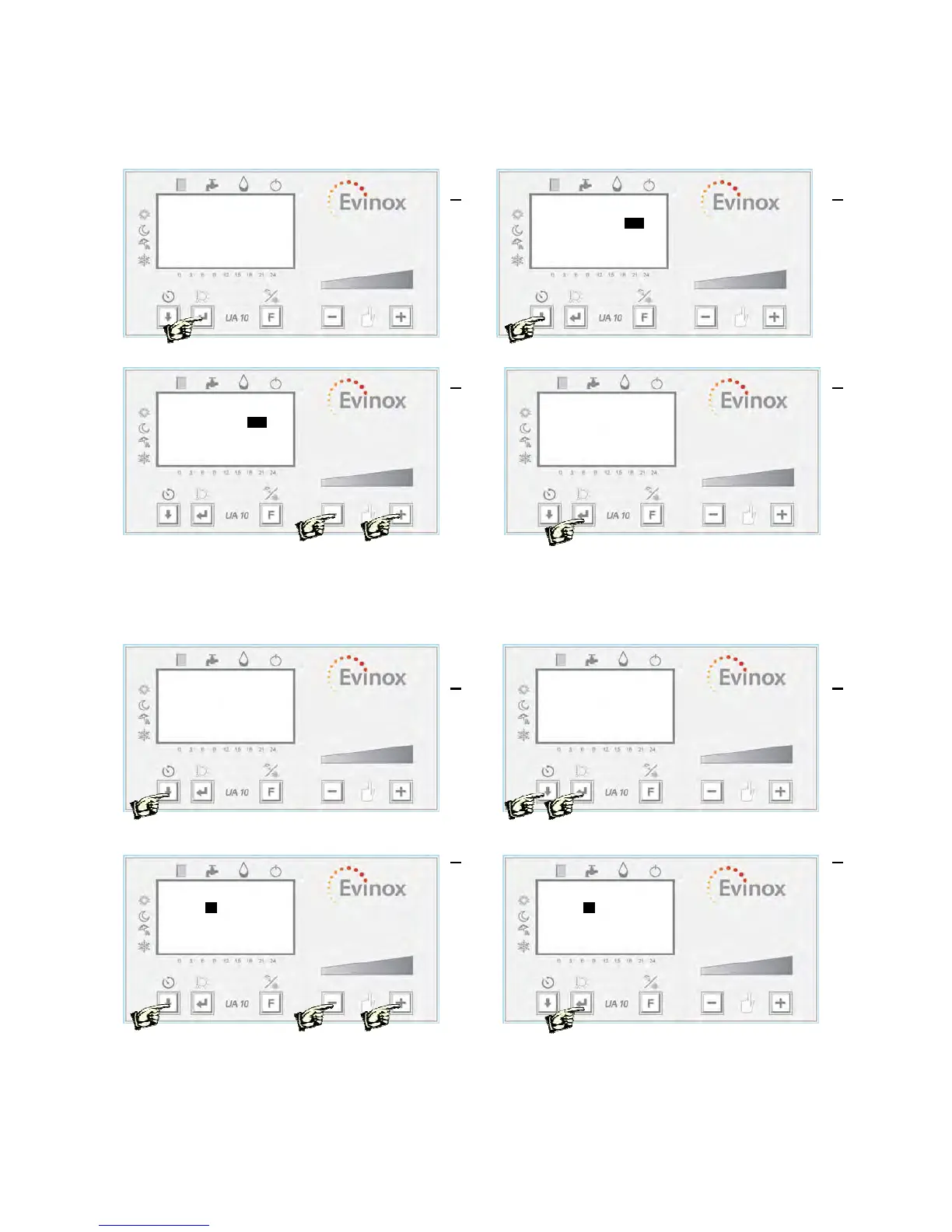
Parameter Setting This operation allows the user to set the temperature set point for comfort, reduced,
anti-freeze and HW, that will follow the daily or weekly set time schedule.
Press ‘ENTER’ for more than 3 sec Use the ‘Down Arrow’ to select a parameter
Use the ‘-‘ or ‘+’ buttons to change the value Select ‘end’ and press ‘ENTER’ to exit
The temperature set point can be changed using the ‘+’ or ‘-‘ buttons. The set temperature can be changed
within +/- 3 °C.
Time Schedule Programming The time schedule can be set to control the comfort, reduced or anti-
freeze operation of the system.
Press ‘ENTER’ for more than 3 sec Use the ‘Down Arrow’ button to select a parameter
and press ‘ENTER’
Use the ‘-‘ or ‘+’ buttons to change the value Select ‘end’ and press ‘ENTER’ to exit
1
20,5 °C
20.0 °C
09:40
2
Temperature end
- Comfort 20.0 °C
- Reduced 18.0 °C
- DHW 50.0 °C
- Anti-freeze 10.0 °C
3
Temperature end
- Comfort 21.5 °C
- Reduced 18.0 °C
- DHW 50.0 °C
- Anti-freeze 10.0 °C
4
Temperature end
- Comfort 21.5 °C
- Reduced 18.0 °C
- DHW 50.0 °C
- Anti-freeze 10.0 °C
1
Time schedule end
Monday Friday
Tuesday Saturday
Wednsday Sunday
Thursday 7 daysdays
2
3
7 days end
1- Start 06:00 Comfort
2- Start 22:00 Reduced
3- Start --:-- Comfort
4- Start --:-- Comfort
4
7 days end
1- Start 06:00 Comfort
2- Start 22:00 Reduced
3- Start --:-- Comfort
4- Start --:-- Comfort
20,5 °C
21.5 °C
09:40


 To Next Page