42
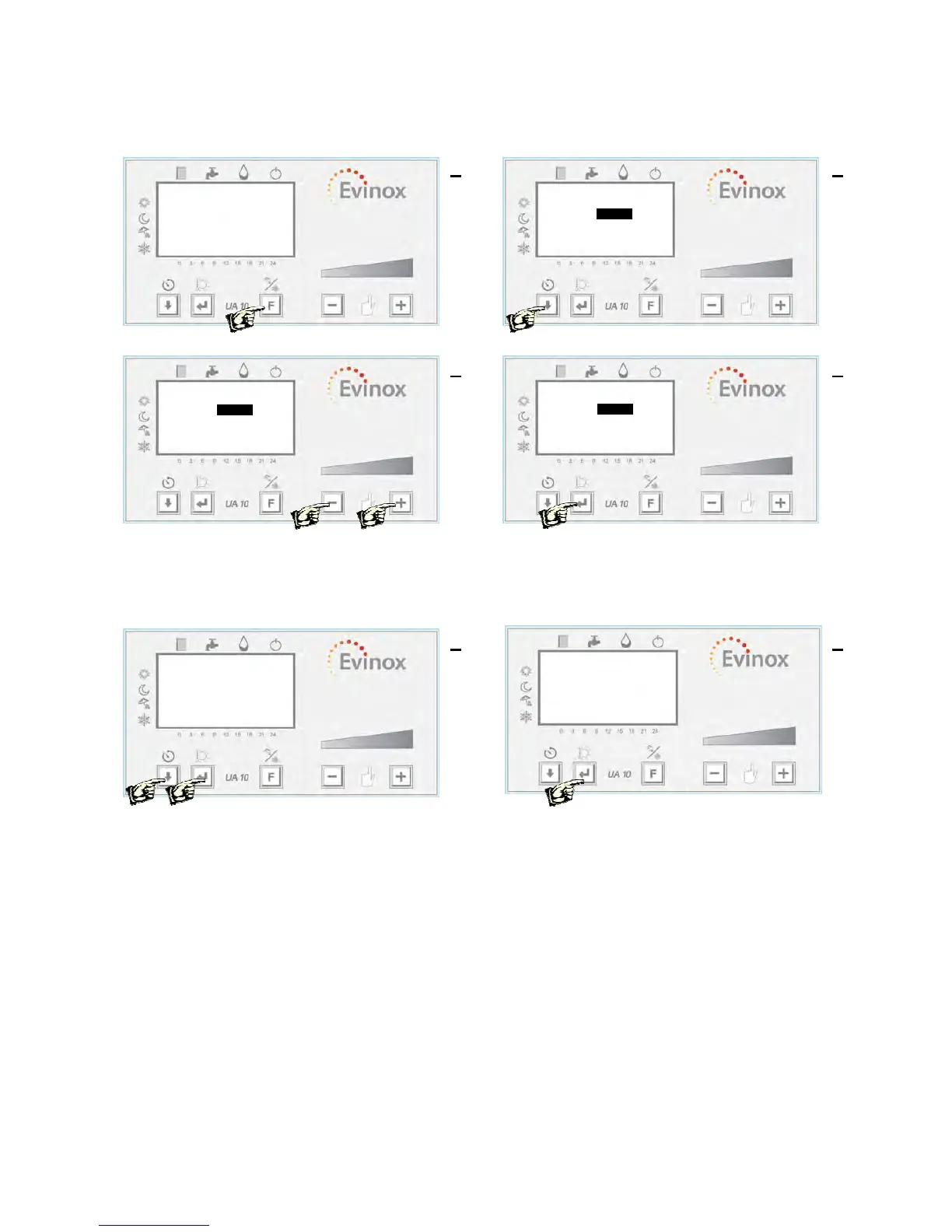
Operating Mode Selection This operation allows the user to set the operating mode: comfort,
reduced, daily, 7 days, anti-freeze, clock date and time.
Press ‘F”’ to enter the menu Use the ‘Down Arrow’ to select a parameter
Use the ‘-‘ or ‘+’ buttons to change the value Use the ‘Down Arrow’ button to select a parameter
and press ‘ENTER’
Consumption Values Reading
The user can read the consumption values of his unit, like : C for heating, C1 cooling (when present) and C2
HW. The display shows also the temperature and flow rate related to the three counters.
Press ‘ENTER’ for more than 3 sec Select ‘end’ and press ‘ENTER’ to exit
Set Mode end
-Mode: Comfort
-Time: 09:40
-Day: Monday
2 1
3
Set Mode end
-Mode: Comfort
-Time: 09:40
-Day: Monday
4
Set Mode end
-Mode: Comfort
-Time: 09:40
-Day: Monday
1
Counters
-C 0 kWh end
-C1 0 kWh
-C2 0 m3
-C 0.0 °k 0 l/h
-C1 0.0 °k 0 l/h
-C2 0.0 °k 0 l/h
2
20,5 °C
21.5 °C
09:40
20,5 °C
21.5 °C
09:40


 To Next Page