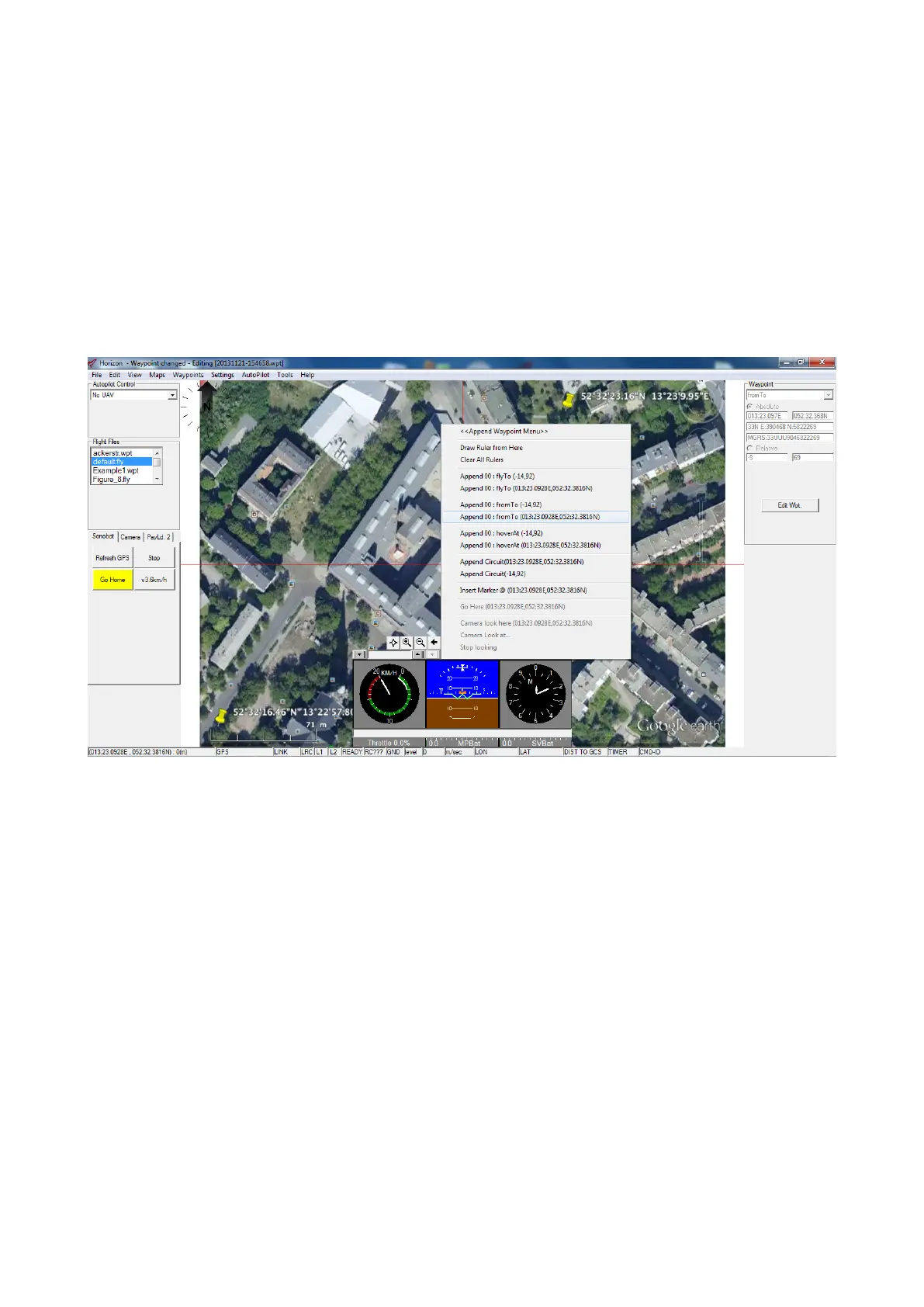
• To place a waypoint on the map, click on the place on the map where you want it to appear and right-click. In the
Append Waypoint menu, select Append XX: fromto(Longitude,Latitude).
Here
– XX stands for waypoint number.
– fromto is Horizon’s command for the autopilot to travel to the waypoint along a straight line. This command
continually corrects for wind or current drift.
Do not use other commands from the Append Waypoint menu as they do not constantly correct for the drift
and the vehicle in this case will not travel along a straight path, compromising the measurements.
– Longitude and Latitude are absolute coordinates - do not use the relative coordinates (the command above
in the Append Waypoint menu), as the vehicle will then travel the programmed path regardless of the launch
location. This is unsuitable for most Sonobot applications.
Figure 37: Horizon: adding a new waypoint
To move a waypoint, click-and-drag it to the new position.
To edit a waypoint:
– Select it and open the Edit Waypoint Options with a right-click.
– Edit the waypoint coordinates and press Ok.
Refer to Horizon manufacturer’s guide for detailed information on editing waypoints!
32



 To Next Page