OWNER MANUA L
EVOLUTION
Read carefully all the safety statements before attempting any procedure.
EVOLUTION
PAG E 42
OWNER MANUA L
Read carefully all the safety statements before attempting any procedure.
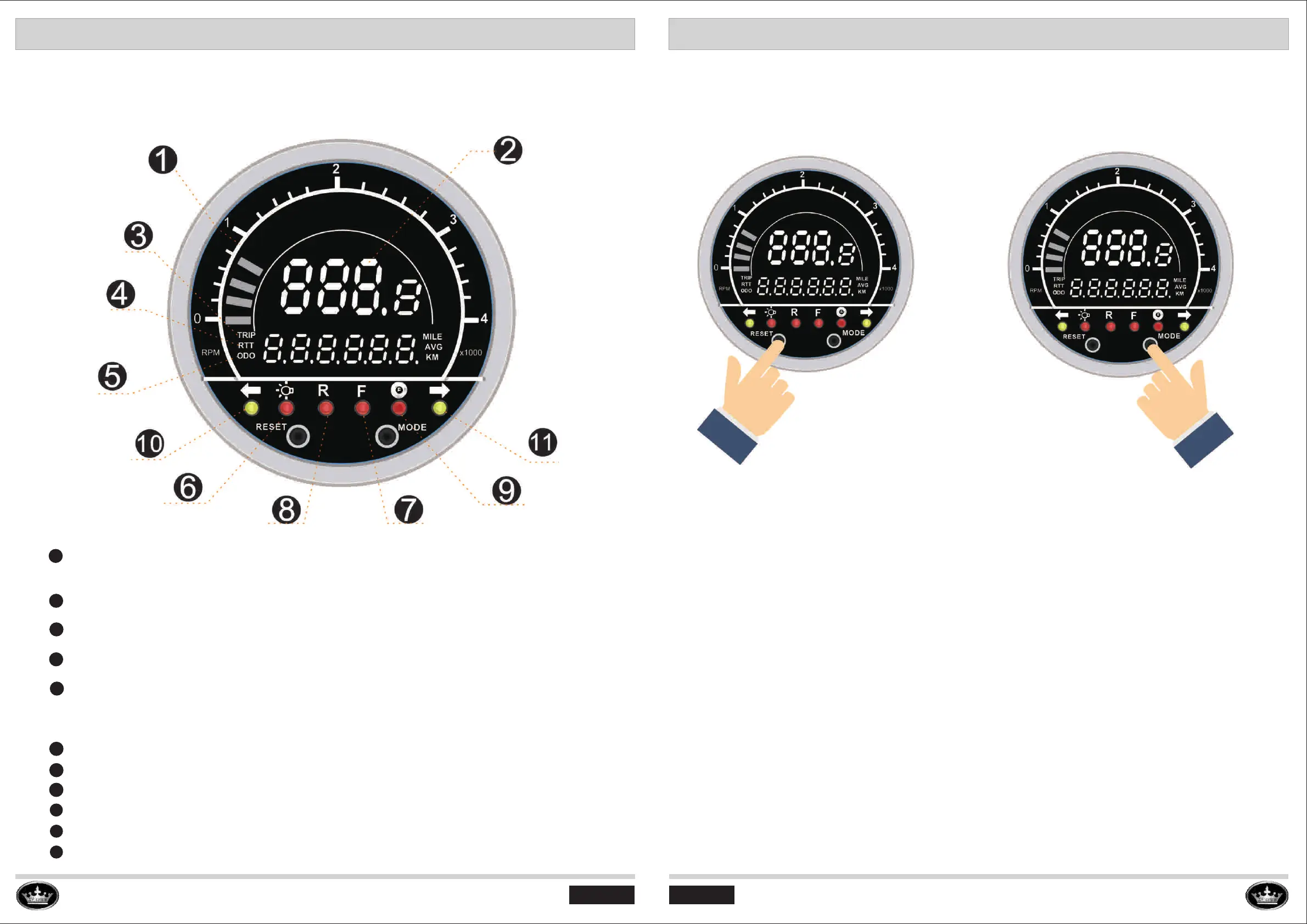
SPEEDOMETER
SPEEDOMETER OVERVIEW
SPEEDOMETER
SPEEDOMETER OPERATION
I. To change the display of “TRIP” or “ODO” mode,
>Press “Mode” button twice to change to “TRIP” mode;
>Press “Mode” button three time to change to “ODO” mode.
II. To change the speed unit from km/h to mph, or from mph to km/h:
1) First press the “Mode” button three times to change to “ODO” mode.
2) Secondly press the “RESET” button for 5 seconds, then the unit will be changed from mph
to km/h or from km/h to mph.
III. To change the display to RTT, total driving time:
Press “Mode” button one time to change to “RTT” then it will display total driving time.
PAG E 41
6
7
8
9
10
11
Headlight Indicator
Forward Indicator---F
Reverse Indicator---R
Braking Indicator
Left Turning Indicator
Right Turning Indicator
Motor Rotation Speed: shown on the top of speedometer (for example: when the
speedometer shows 3 then the motor rotation speed is 3000rpm)
Vehicle running speed: Shows current running speed of vehicle, with unit km/h or Mph.
TRIP (Single trip of distance): Records the mileage for a single trip.
ODO: Odometer, Records the mileage for total trips.
RTT: Total driving time of cart operation.
Speedometer LED Indicators:
1
2
3
4
5


 To Next Page