EasyManua.ls Logo

EWM Pico 162 - Optional Dirt Filter Installation and Care

EWM Pico 162
37 pages
Print Icon
To Next Page IconTo Next Page
To Previous Page IconTo Previous Page
Loading...
Design and function
Dirt filter
28
099-002040-EW501
28.04.2014
5.7 Dirt filter
NOTE
These accessory components can be retrofitted as an option, see Accessories chapter.
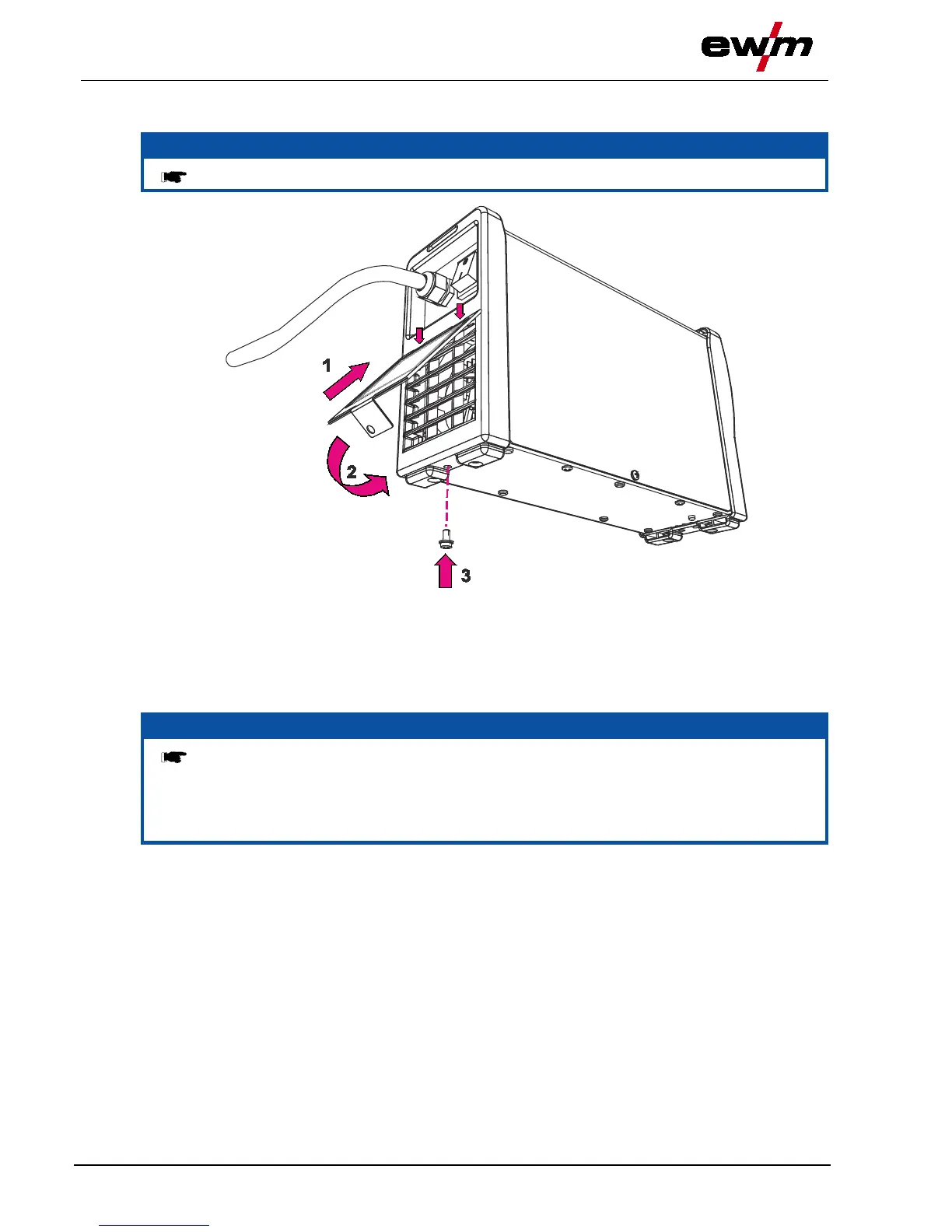
Figure 5-7
As shown in the diagram, insert the dirt filter into the rear of the machine, above the air inlet, using
both clips (1).
Fold down the dirt filter (2).
Fasten the dirt filter to the underside of the machine (3) using fixing screws.
NOTE
The dirt filter can be used in places with unusually high levels of dirt and dust in the
ambient air.
The filter reduces the duty cycle of the welding machine via the reduced flow of cooling
air.
The filter must be disassembled and cleaned regularly depending on the level of dirt
(blow out with compressed air).

Table of Contents

Related product manuals