AG-Series
14
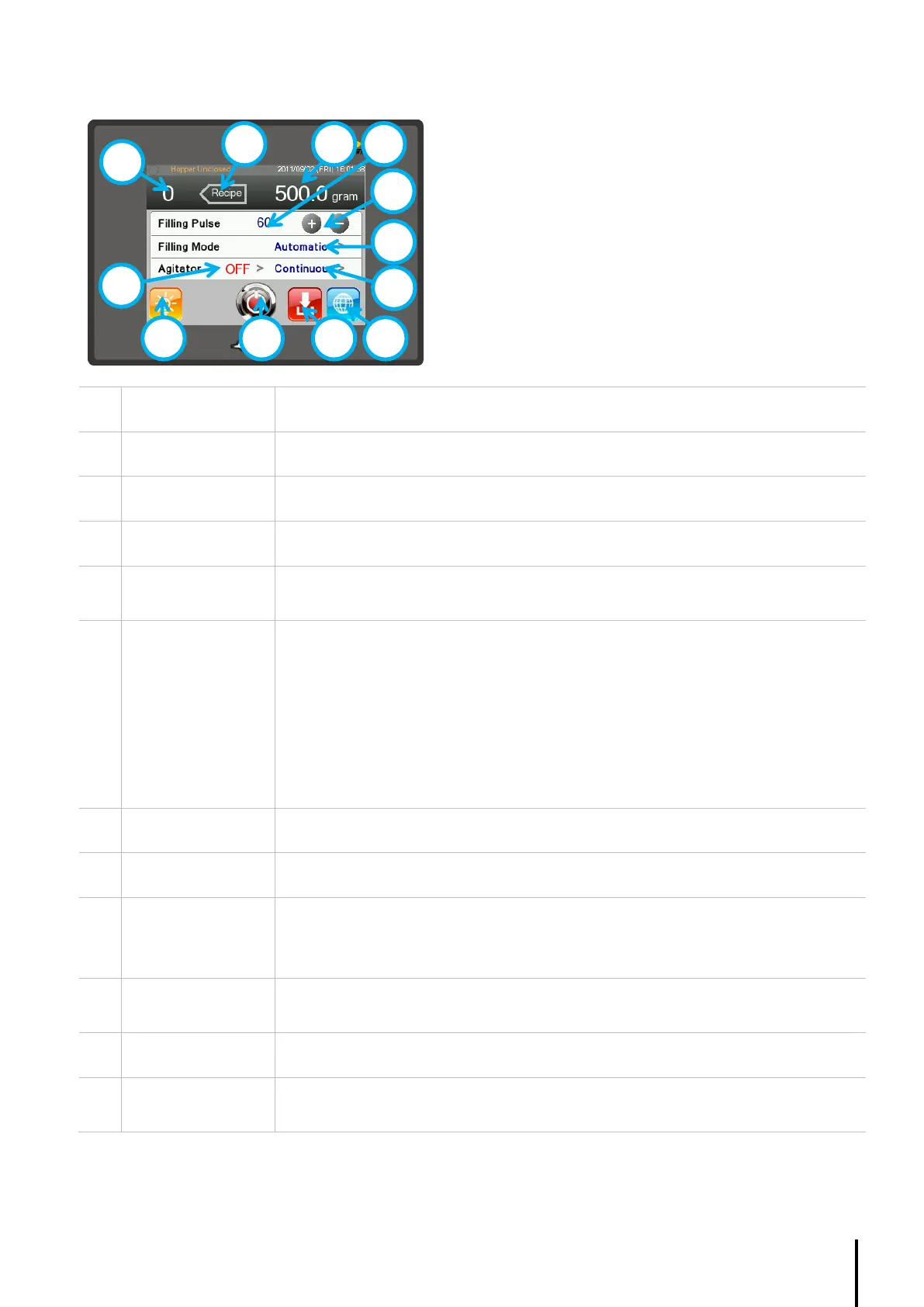
4.4.1. Home Page
Displays the Recipe selected.
Displays the Filling target for the according Recipe.
Displays the Filling pulse for the according Recipe.
Pre-requisite: Increment / decrement value set in Recipe.
Increase or decrease the filling pulse in order to increase or decrease filling weight.
Select Automatic, Manual or Link filling mode.
Automatic: Fills after each Automatic interval until the Fill button (9), foot paddle, RS
Switch, RS button is pressed.
Manual: Fills only when the Fill button (9), foot paddle, or RS Switch is pressed.
Link: To use when link with an upstream system. The auger filler will active by a fill
signal from the upstream device connected to PLC X5, and issue a filling complete
signal to the upstream device connected to PLC Y9.
Select Continuous agitation or Agitation Upon filling.
Displays the Supplier page.
Pre-requisite: RS button (10) or RS switch must be ON
Triggers the filling mode. When in Automatic, the machine fills after each Automatic
interval until the button is pressed again. When in Manual, the machine fills once.
The Run / Stop button is used to set the machine ready for operation. It is linked with
the RS switch.
Displays the current agitator status.
Press ‘>’ to change.



 To Next Page