EasyManua.ls Logo

Excel AG Series - Additional Recipe Parameters

Excel AG Series
16 pages
Print Icon
To Next Page IconTo Next Page
To Previous Page IconTo Previous Page
Loading...
AG-Series
17
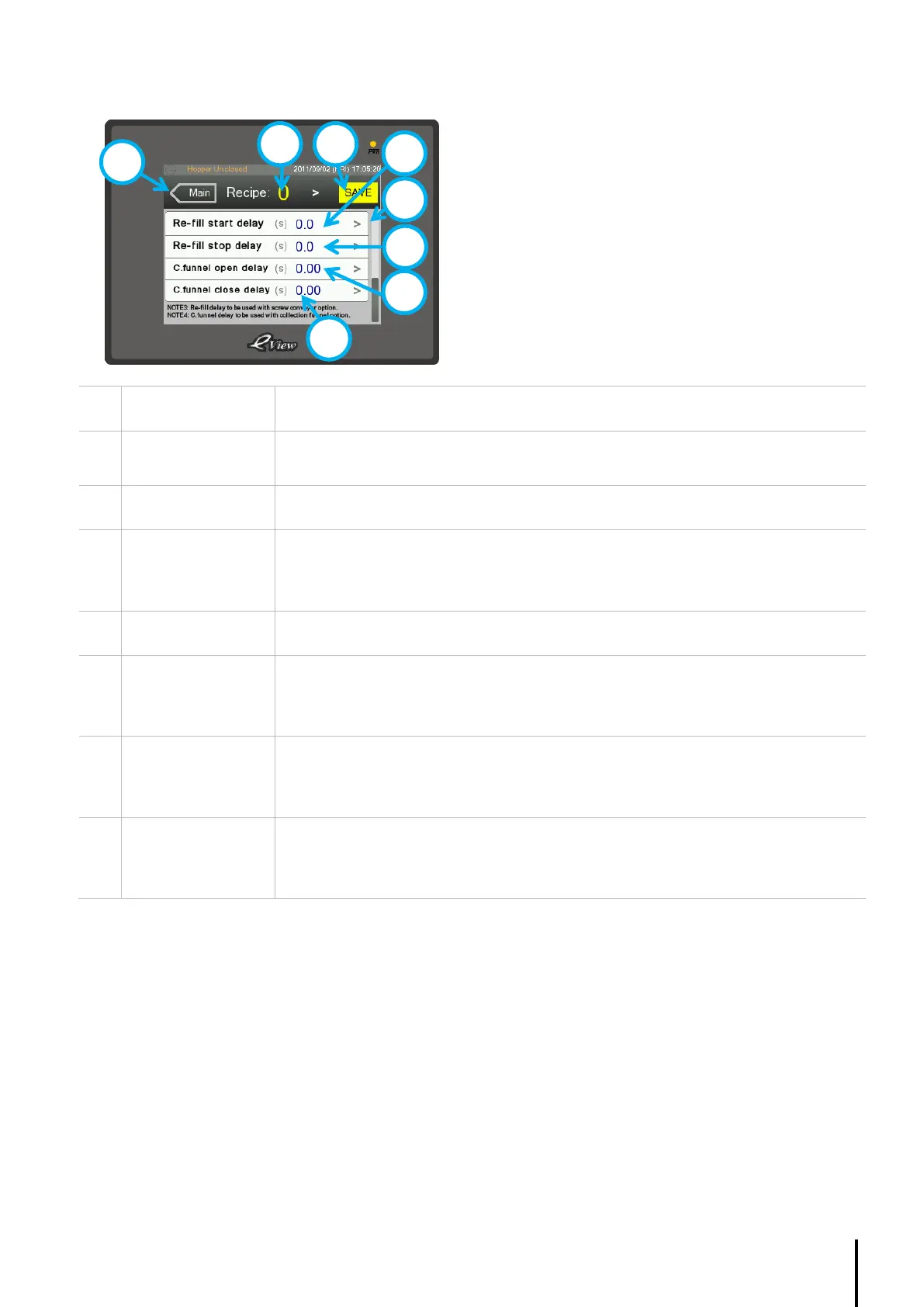
4.4.4. Recipe Page (3 of 3)
1
Main button
Return to Home page
2
Recipe number
Displays the Recipe selected.
Press > to change.
3
Save button
Press to save setting into the PLCs memory.
4
Re-fill start delay
Displays the Start delay of the screw conveyor when it is available and activated for
the according Recipe.
Press > to change.
5
Scroll up button
Shows page 2 of the Recipe page
6
Re-fill stop delay
Displays the Stop delay of the screw conveyor when it is available and activated for
the according Recipe.
Press > to change.
7
C.funnel open delay
Displays the Open delay of the collection funnel when it is available and activated for
the according Recipe.
Press > to change.
8
C.funnel close
delay
Displays the Close delay of the collection funnel when it is available and activated for
the according Recipe.
Press > to change.
1
3
4
5
6
7
2
8

Related product manuals