19
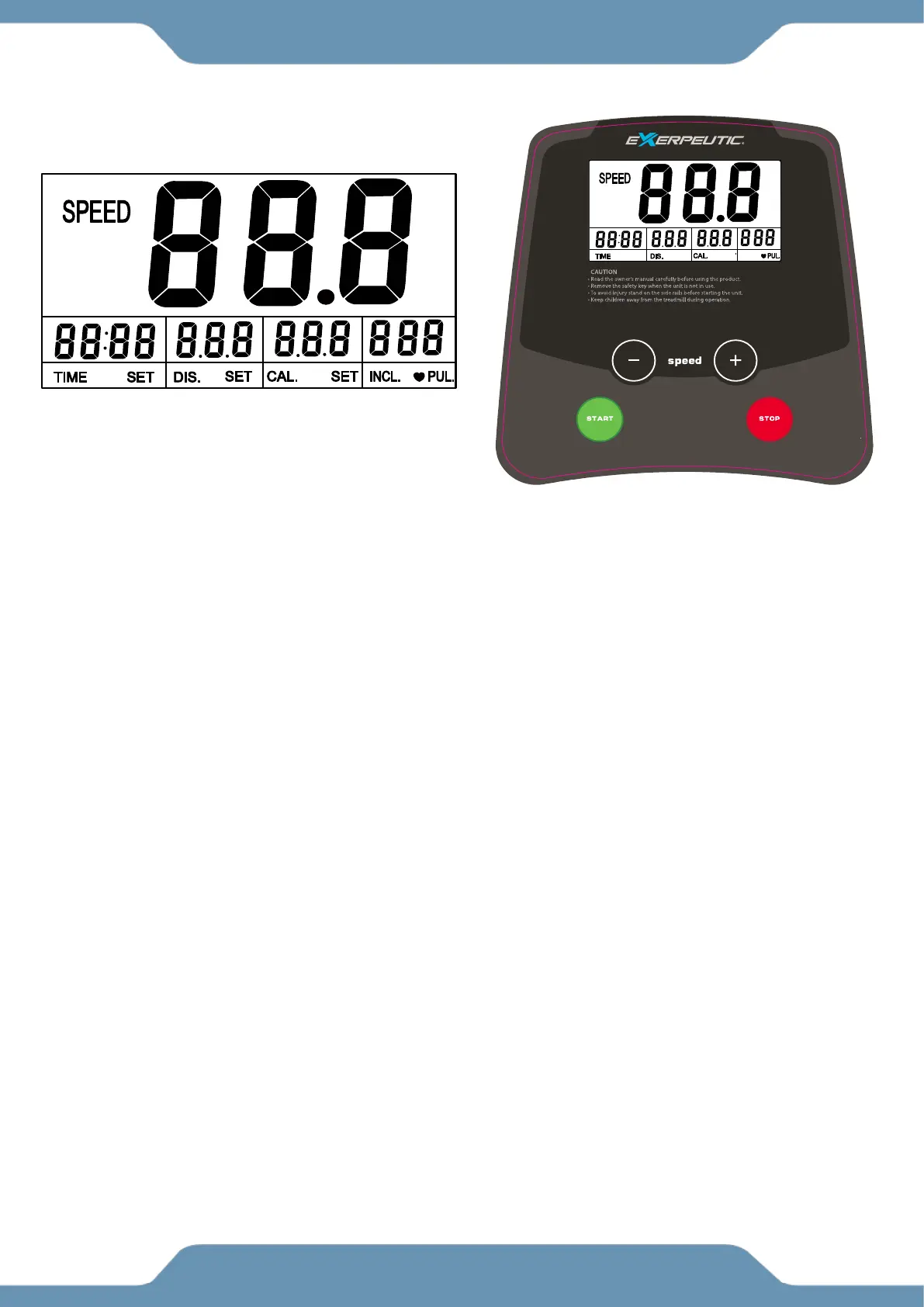
WINDOW DISPLAYS:
1. SPEED display will show speed
i. Speed range is 0.2-5.0 MPH.
2. TIME display will show the walking time from 0:00-99:59 MINS.
i. When the count reaches the maximum of 99:59 MINS, the machine will stop smoothly and
show “END” then enter standby mode after 5 seconds.
3. DISTANCE display will show the distance from 0.0-99.9 miles (kilometers).
i. When the count reaches 99.9, it will reset and begin counting again from 0.0.
4. CALORIES display will show the amount of calories burned from 0 to 999 KCAL.
i. When the count reaches 999, it will reset and start back to 0.
5. PULSE display will show the pulse when holding the pulse sensors.
i. The system will calculate the walker’s heart beat and display it on this window.
ii. Pulse range is 50-200 beats/min.
iii. This data is just for reference, and cannot be used as the medical data.
FUNCTION KEYS
1. START: To start the machine, insert the magnet end of the Safety Tether Key into the console
and press the START button. (This machine requires a safety key in order to operate). 0.2MPH is
the default walking speed.
2. STOP: This button has the functions of PAUSE and STOP. While in use, press this button to
pause the walking belt and the current workout data display will show “PAU” for pause. To
terminate the current session and all data, press the “STOP” button again and the machine will
stop and all data will reset to zero.
3. SPEED +/– BUTTONS: While in use, press the +/– buttons to increase or decrease the speed in
increments of 0.1MPH; holding either of these keys for a duration of over ½ a second will increase
or decrease the speed quickly.


 To Next Page