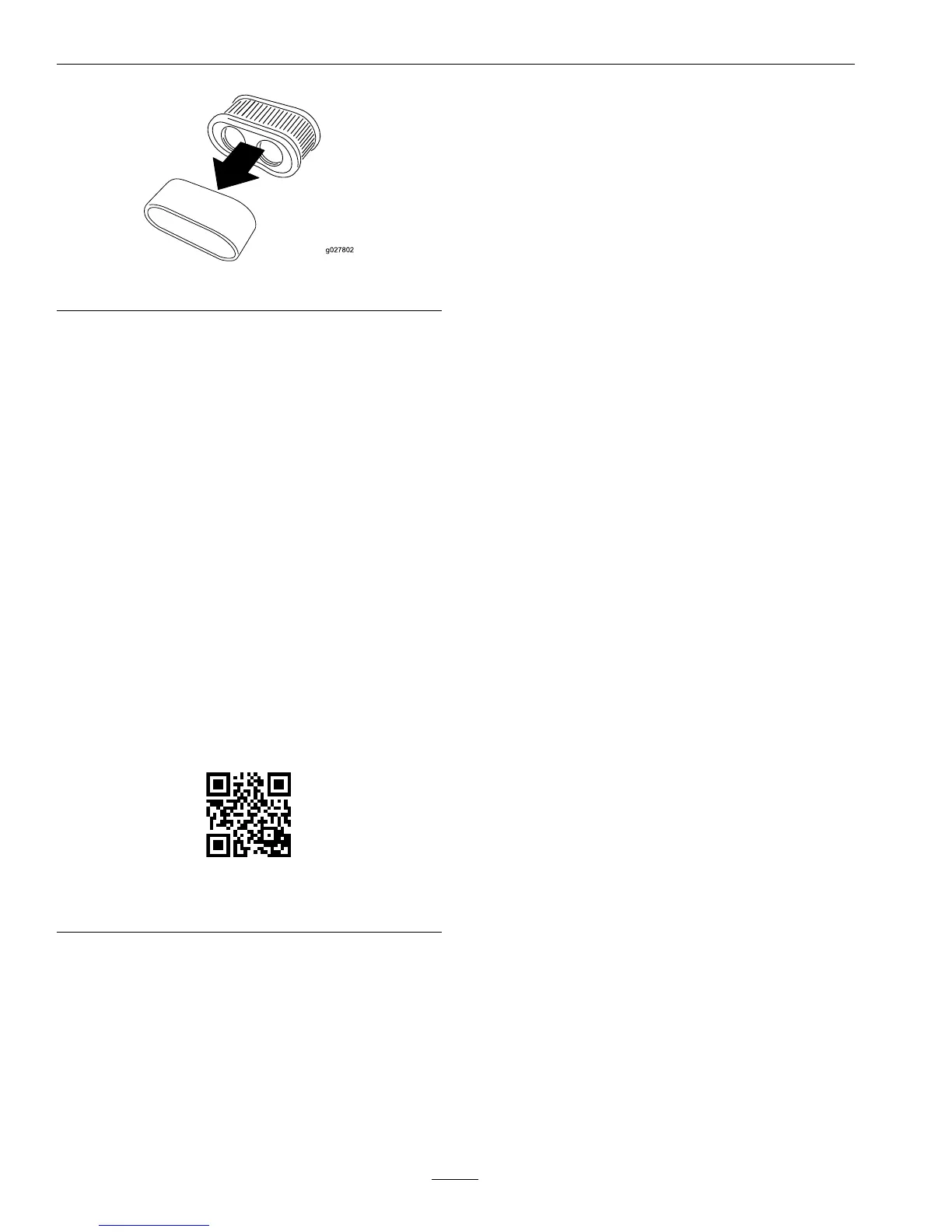
Figure27
CleaningtheFoamandPaperElements:
FoamElement:
Washthefoamelementwithwater.
Important:Replacethefoamelementifitis
tornorworn.
PaperElement:
1.Lightlytaptheelementonaatsurfacetoremove
dustanddirt.
2.Inspecttheelementfortears,anoilylm,and
damagetotheseal.
Important:Donotcleanthepaperelement
withpressurizedairorliquids,suchas
solvent,gas,orkerosene.Replacethepaper
elementifitisdamagedorcannotbecleaned
thoroughly.
TolearnmoreabouttheExmarktwin-cylinderengine
gotohttp://exmark.com/enginesorscantheQR
code.
Figure28
708ccEngine
ServicingtheAirCleaner–Kohler
Engine
ServiceInterval:Beforeeachuseor
daily—Checktheair
cleanerfordirty,looseor
damagedparts.
Every25hours—Service
orreplacetheaircleaner
precleaner(moreoften
underextremelydusty,
dirtyconditions)(Kohler
engine).
Every50hours—Service
theaircleanerpaper
element(moreoften
underextremelydusty,
dirtyconditions)(Kohler
engine).
Every100hours—Replace
theaircleanerpaper
element(moreoften
underextremelydusty,
dirtyconditions)(Kohler
engine).
Thisengineisequippedwithareplaceable,high
densitypaperaircleanerelement.Checktheair
cleanerdailyorbeforestartingtheengine.Checkfor
abuildupofdirtanddebrisaroundtheaircleaner
system.Keepthisareaclean.Also,checkforlooseor
damagedcomponents.Replaceallbentordamaged
aircleanercomponents.
Note:Operatingtheenginewithlooseordamaged
aircleanercomponentscouldallowunlteredairinto
theengine,causingprematurewearandfailure.
Note:Servicetheaircleanermoreoftenunder
extremelydusty,dirtyconditions.
1.Parkthemachineonalevelsurface,disengagethe
bladecontrolswitch,movethemotioncontrol
leverstothebrakeposition,stoptheengine,
removethekey,andwaituntilallmovingparts
stopbeforeleavingtheoperatingposition.
2.Removethecovertoaccesstheaircleaner
element(seeFigure29).
38






 To Next Page