Maintenance
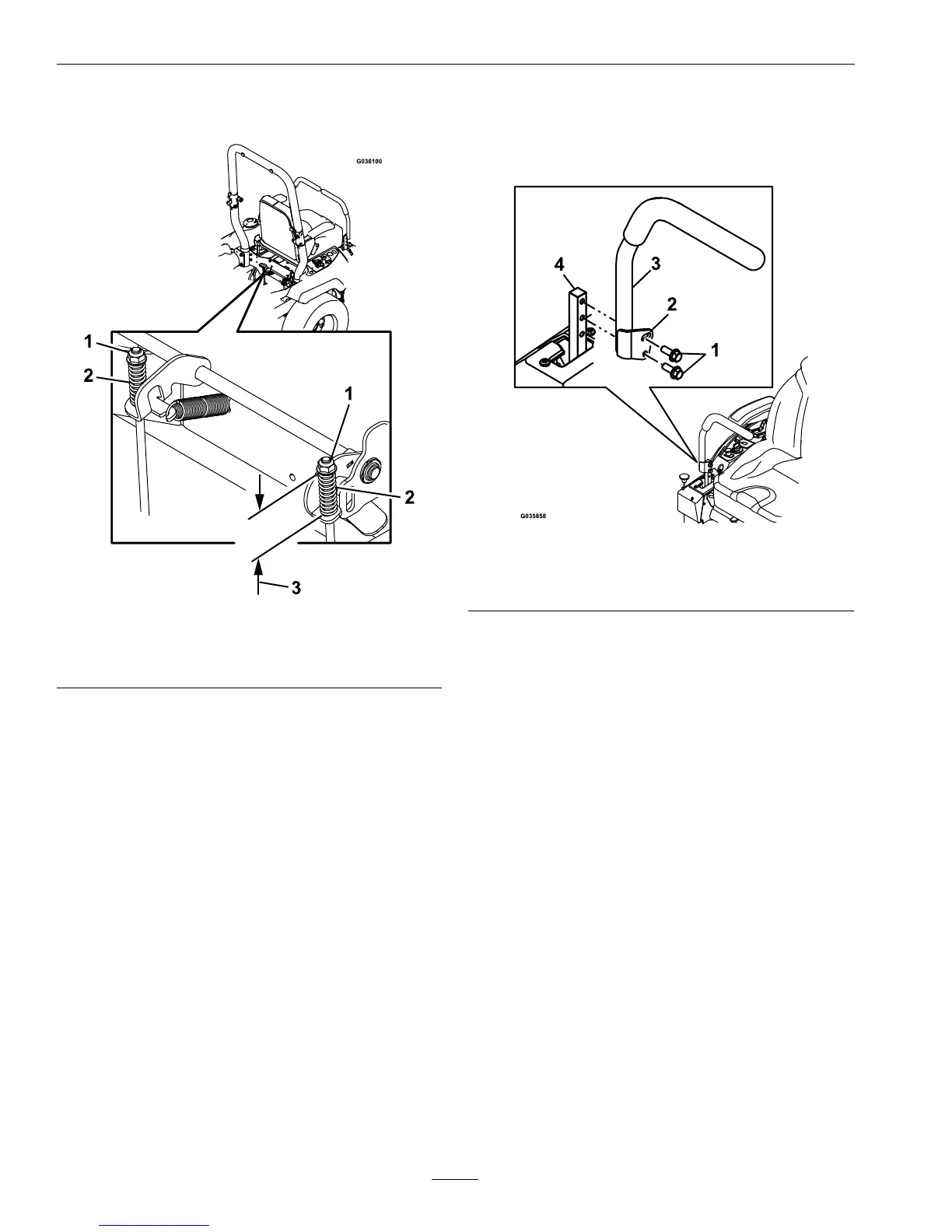
nutclockwisetoshortenandcounterclockwise
tolengthen.
Figure70
1.Topnut
3.1.75inches(44mm)
2.Spring
9.Pushtheparkingbrakeleverallthewayforward
anddown.Rotatethebrakelinkageshaftuntilthe
endalignswithholeinlever.
•Shortenthelinkagebyturningitclockwise.
•Lengthenthelinkagebyturningit
counterclockwise.
Insertthebrakelinkageshaftintoparkingbrake
holeandsecurewiththecotterpin.Repeatstep6
andreadjustifnecessary.
10.Whenadjustmentiscomplete,removethejack
standsorequivalentsupportandlowerthe
machine.
11.Placethemachineintothe“operating”position.
RefertotheDriveWheelReleaseValvessection
inOperation.
MotionControlHandle
Adjustment
Adjustingtheheight:
Themotioncontrolleverscanbeadjustedhigheror
lowerformaximumoperatorcomfort.
1.Removethehardwareholdingthecontrolleverto
thecontrolarmshaft.
Figure71
1.Bolts
3.Controllever
2.Slottedhole4.Controlarmshaft
2.Movethecontrollevertothenextsetofholes.
Securetheleverwiththehardware.
3.Repeattheadjustmentfortheoppositecontrol
lever.
AdjustingtheTilt
Themotioncontrolleverscanbetiltedforeoraftfor
maximumoperatorcomfort.
1.Loosentheupperboltholdingthecontrollever
tothecontrolarmshaft.
2.Loosenthelowerboltjustenoughtopivotthe
controlleverforeoraft.Tightenbothboltsto
securethecontrolinthenewposition.
3.Repeattheadjustmentfortheoppositecontrol
lever.
FullForwardTracking
Adjustment
Ifthemachinetravelsorpullstooneside,whenthe
motioncontrolleversareinthefullforwardposition,
adjustthetrackingscrew .
1.Inserta3/16inchhexwrenchthroughtheaccess
holeonthefrontcoverpanel,rotatethetracking
66






 To Next Page