950N 12 732708 - Rev. C
950 MPS
ENGLISH
6 PROGRAMMING THE 950 MPS BOARD
DS1 950 MPS SETTING
N° FUNCTION OFF ON NOTE
1
Final closing stroke Disabled Enabled
When the door is in “closed”
position, allows enabling of a
further
electric locks)
2
Set-up procedure
Articulated arm and/
or openings up
to 90°
Sliding arm and/
or openings
greater than 90°
3 External selector switch in
position 2
Position 2
set on
Manual
Position 2
set on
Night
Allows to decide which mode is to
be associated to position 2 of the
external selector switch
4
Push and go Disabled Enabled
By setting the external selector
switch to 0 (automatic), if the door
is pushed or pulled in opening
direction, it will open.
5 Leaf delay at opening
(master/slave application)
Disabled Enabled
6 Not used
7
STOP safety detection
space
(Terminal 14
950 I/O board)
Active during the
entire stroke
Active up to 70°
opening of the
door
If set to ON, the STOP safety is
monitored by a sensor installed on
the door and avoids the detection
of any obstacles beyond 70°
opening (e.g. side wall).
8
SCP
(Selectable Close Powe-
ring)
Additional force before
closing
Disabled Enabled
When this function is enabled, it
reduces the sensitivity of the
electronic anti-crushing device.
The activation of this function is
useful whenever high friction,
particularly hard door gaskets or
are present.
9 Not used
10 Board updating using the
RS232 port Disabled Enabled
Allows enabling of the RS232
port for connection with the PC to
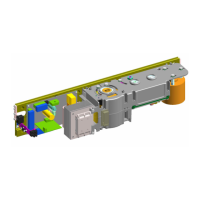
Fig.4


 To Next Page