23
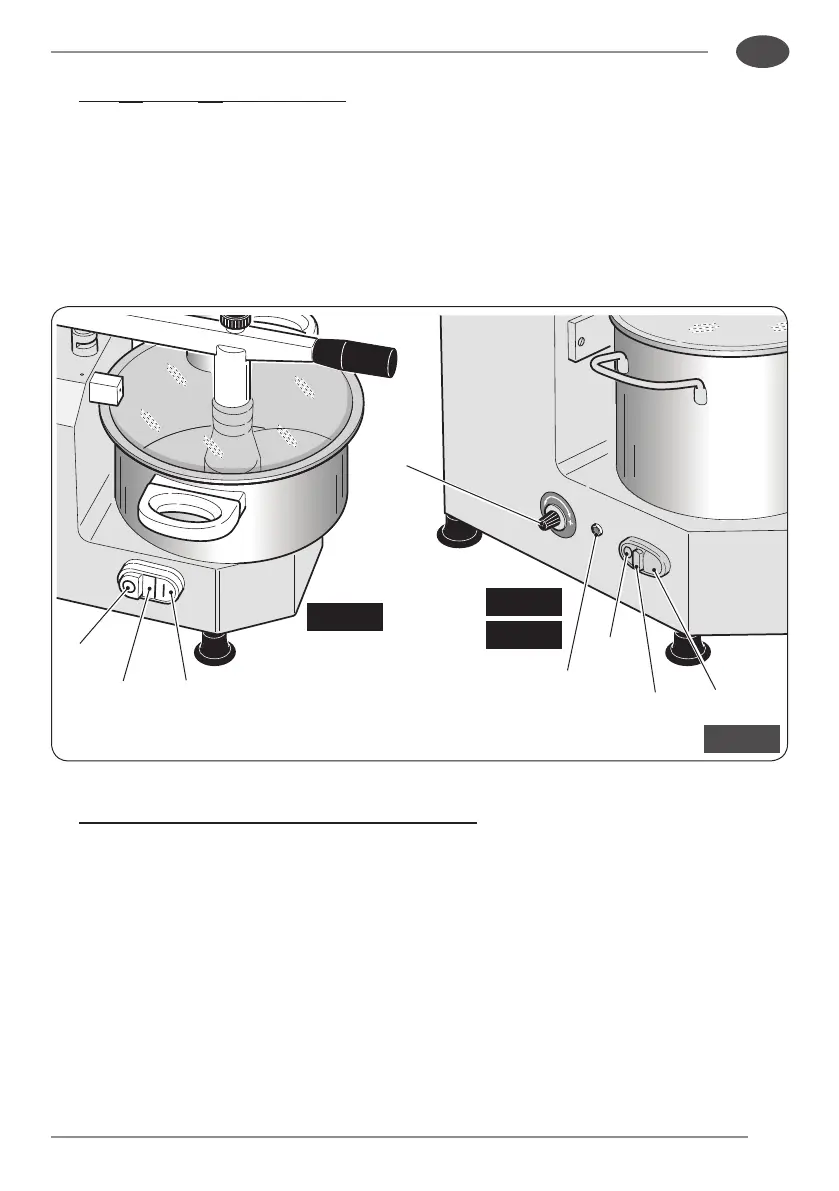
“C5”
“C8”
“C3”
14
15
13
19
15
17
18
16
Fig. 9
EN
• For“C5”and“C8”modelsonly:
pressthe“T”button(17)tostartthebladewithpulses;thebladestopsonreleasing
thebutton.
• Ifnecessary,addotherfoodstuffsthroughtheinletduct(7)
☞
If the motor struggles to operate, reduce the amount of foodstu
being processed.
• For“C5”and“C8”modelsonlyasan“Option”:
adjustthebladerotationspeedusingthespeedchanger(19).
• Prolongedapplianceoperationwillreducethefoodstuffsbeingprocessedintopulp.
• Whenprocessingiscompleted,whenthefoodstuffbeingprocessedhasreachedthe
desiredconsistency,stopthebladebypressingtherelevantbutton(“0”for“C3”model;
“STOP”for“C5”and“C8”)models.Thepoweronindicatorlight(15)switchesoff.


 To Next Page