- 10 - FC-RIDERS-V2-OP-EN v22.235
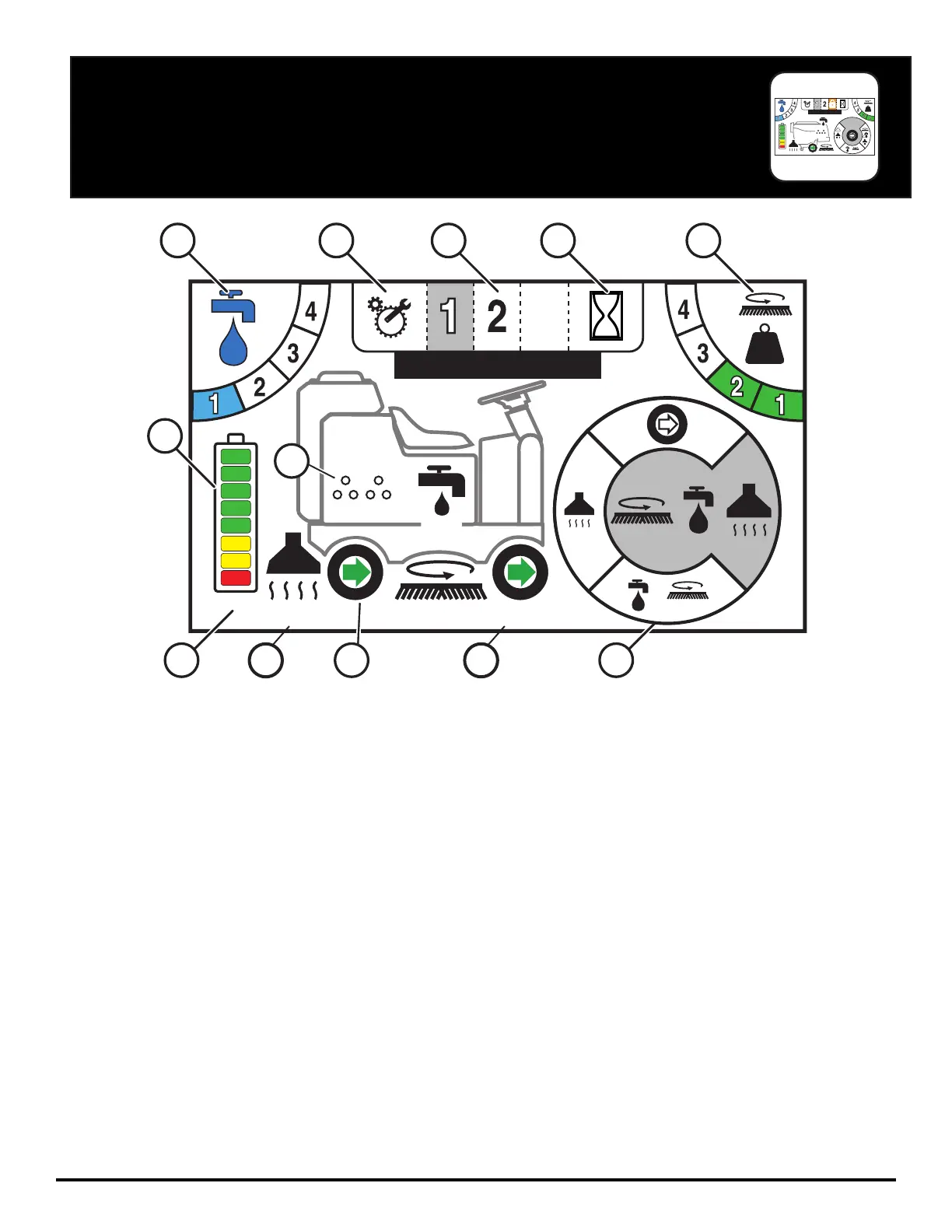
1. SOLUTION OUTPUT - Indicates the level of solution that is being dispensed when in operation, (0 = off, 1 = Low, 4 = High).
2. TECHNICAL / MANAGER SETUP - Access ‘Error Code History’ and Manager Programming
3. PROGRAMMED ZONES - Switch between preset solution and downpressure settings for varying applications
4. HOUR METERS - Displays all of the hour meters of the machine: Key Switch, Transport, Scrub Motors, and Vacuum Motor
5. DOWN PRESSURE OUTPUT - Indicates the level of downpressure that is being applied to the floor surface (1 = low, 4 = high).
6. BATTERY GAUGE - Indicates the level of battery charge available and volt meter
7. SUDS - (Onboard Chemical Dilution) indicator
8. ACTIVE VOLT & AMP DRAW - Indicates the live DC Volts (under battery gauge) and Amp draw (under systems) when machine
is running
9. AMP VAC CURRENT - Indicates Vac power consumption
10. TRANSPORT INDICATION - Green Forward & Red Rev
11. BRUSH DISK CURRENT - Indicates Brush power consumption
12. OPERATION MODE SELECTOR - Cycle through and select which operation mode you would like to work in
TOUCH SCREEN (OPTIONAL)
3
#1 NAME
SUDSSUDS
SUDSSUDS
3
#1
24.9
22.5 34.2
1
6
8 9 10
7
11 12
2 3 4 5


 To Next Page