19
1 2 3 4
5 6 7 8
9 10 11 12
13
14 15 16
English
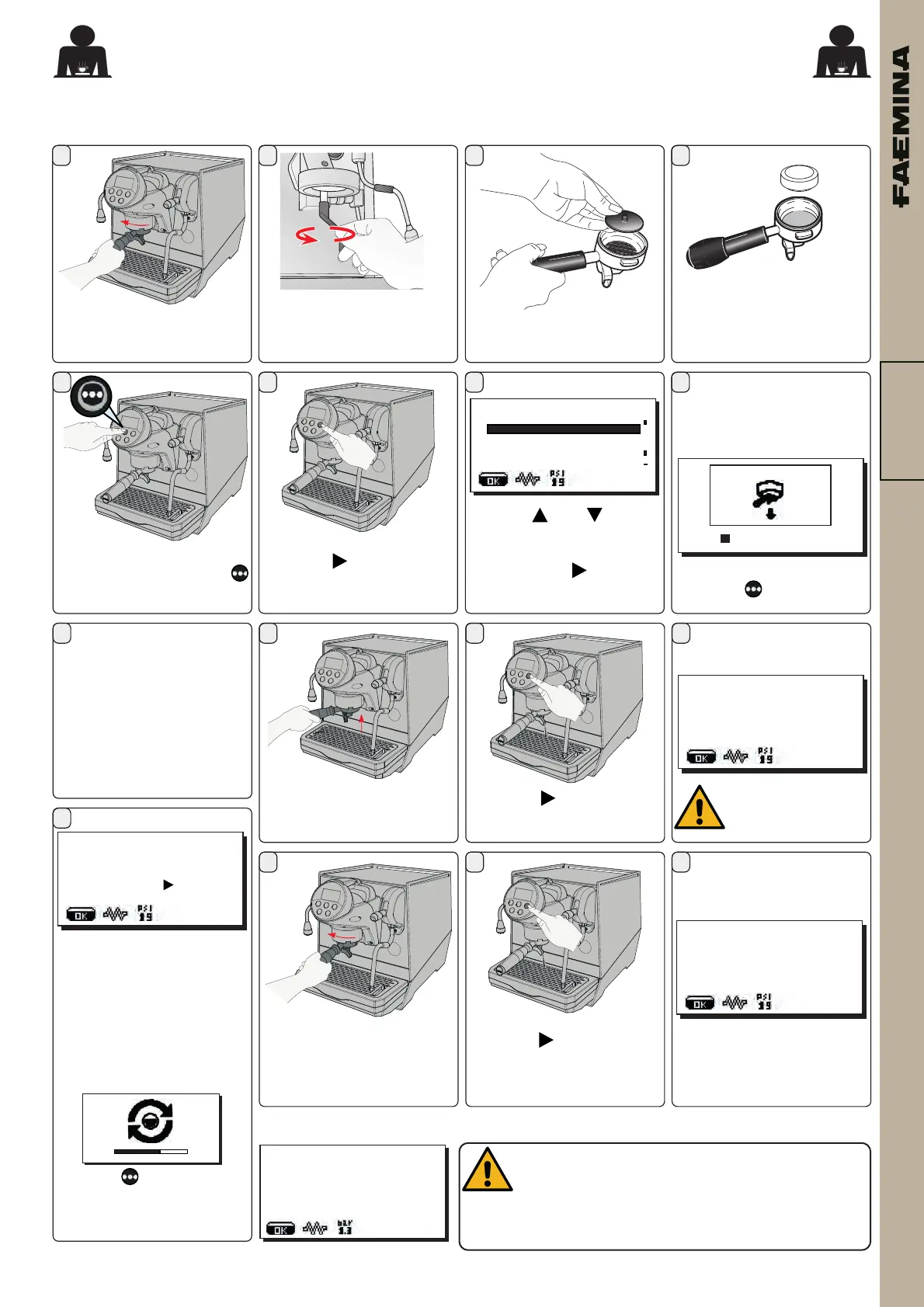
Remove the lter holder
fromthecoeegroup.
Using a brush, clean the
covergasket.
Inserttherubberdiskinto
thelterholder.
Positionadetergenttablet
Hookthelterholdertothe
group.
The washing is interrupted and blocks the
machine if, after starting it, the machine is
switchedoorifthemachinedetectstankempty
or discharge basin full.
+
CUSTOMERPROG.
CUPWARMER
WASHES
WATERCHANGE
LIGHTS
SELFLEARNING
Accessisgainedtocustomer
programmingpressingthe
keyfor5seconds.
Pressthe key.
Pressthe key.
Washes
conrm
Use the and keys to
position the cursor (white
line)onthedesiredlineand
thenpressthe key.
!!!!!!!!!!
GROUP1LOCKED
EXECUTEWASHING
!!!!!!!!!!
EnteringtherelatedMenu,the
machinewashingoperations
begin.
Thenthewashingbegins:
07MAY21
Friday15:59:03
GR1WASH
005 %
Do not remove the
lter holder during
dispensing.
Pressthe key.
07MAY21
Friday16:03:01
REMOVEFILTERHOLDER
push
toconrm
Removethelterholder.
Pressthe key.
07MAY21
Friday16:03:14
GR1RINSE
072 %
Themessage"GR1 RINSE"
willappear.
The washing cycle is
complete after the rinsing
phase.
CLEANING THE UNIT - This operation must be carried out at the end of each working day
For the operations described below, use the one-way lter holder
N.B.rstyouareasked:
-toemptythebasin
-toinsertthelterholder
Alsocheckthatthetankis
lledtothemaximumlevel
withwater.
At the end of wash cycle,
the message "REMOVE
GROUP FILTER HOLDER"
willappear.
NOTE.Wheninimagemode
thefollowingscreenwillbe
onthedisplay:
Pressthe keyandholditto
returntotextmessagemode.
02_FAEMINA_USA.indd 1902_FAEMINA_USA.indd 19 26/09/2022 15:09:3026/09/2022 15:09:30



 To Next Page