Service Manual CHAPTER 6 - THE SX-48 CONFIGURATOR July 24, 2008
SX-48 Page 22
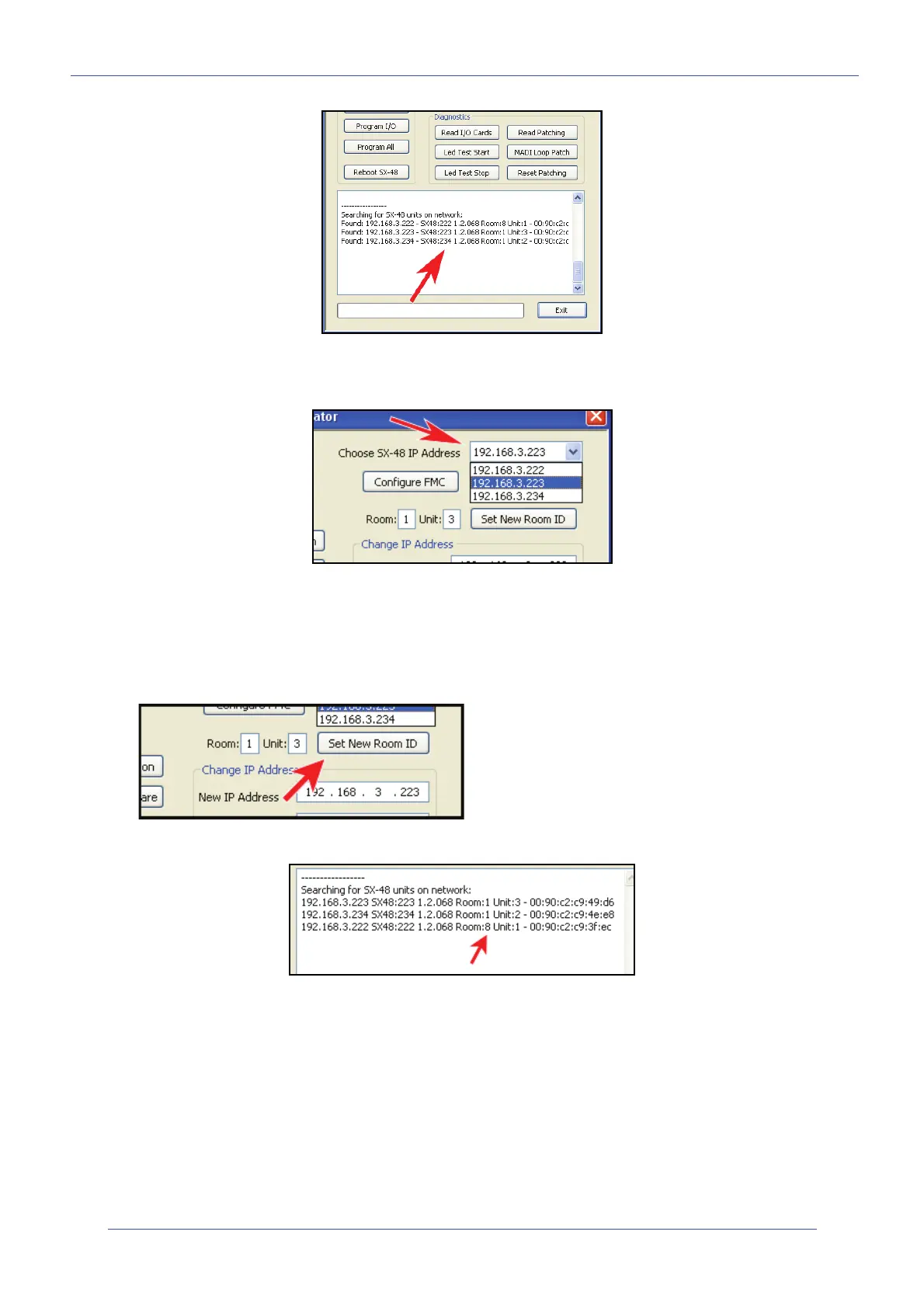
Please note that once these SX-48 units are scanned and recognized, all of these units will now also
be available for individual selection in the following drop-down window:
Room and Unit ID
You can set a fixed “Room” number and “Unit” identifier to each SX-48 unit by choosing a particular
unit from the drop-down window. Setting the Room number and Unit number, then simply click on the
<Set New Room ID> button. The "Room" ID accepts any single alphanumeric character, number or
letter.
This information will also appear in the information window along with the IP and MAC address.
Setting a new IP address
To set a new IP address for a particular unit, simply choose a unit (once again), from the drop down
window. Setup your new IP address and Subnet mask. Then click on the <Set New IP address>
Button.


 To Next Page